How to Make AI Voice Sound Less Robotic: 12 Fixes (2026)
Why AI voices sound robotic, and 12 fixes that work: write for the ear, use punctuation for pauses, spell out numbers, fix pronunciation, tune speed and more.
You paste in a script, press generate, and the voice sounds… fine. Clear, but flat. It rushes through lists, stresses the wrong words, and reads "$1.2M" like a spreadsheet.
Here's the surprising part: the technology is rarely the problem anymore. In a 2025 study published in PLOS One, listeners judged AI voice clones to be human 58–70% of the time, close to the 62–81% scored by real human recordings.
So when AI voice sounds robotic today, the cause is usually the script and the settings, not the engine. Both are things you can fix in minutes.
This guide shows you exactly how.
What you'll learn:
- The five things that make AI speech sound robotic
- A quick way to diagnose what's wrong with your audio
- 12 fixes, from rewriting your script to tuning voice settings
- How to control pauses, numbers and pronunciation without any code
- What speed AI narration should be, with real numbers
- A full before-and-after rewrite you can copy
Quick answer: To make AI voice sound less robotic, write short sentences the way people talk, use commas, periods and paragraph breaks to create pauses, spell out numbers and abbreviations, respell words the voice mispronounces, and pick a voice that suits the content. Then slow the speed slightly and lower stability a little for more expression. In an AI text to speech tool, most of these take seconds.
Why Does AI Voice Sound Robotic?
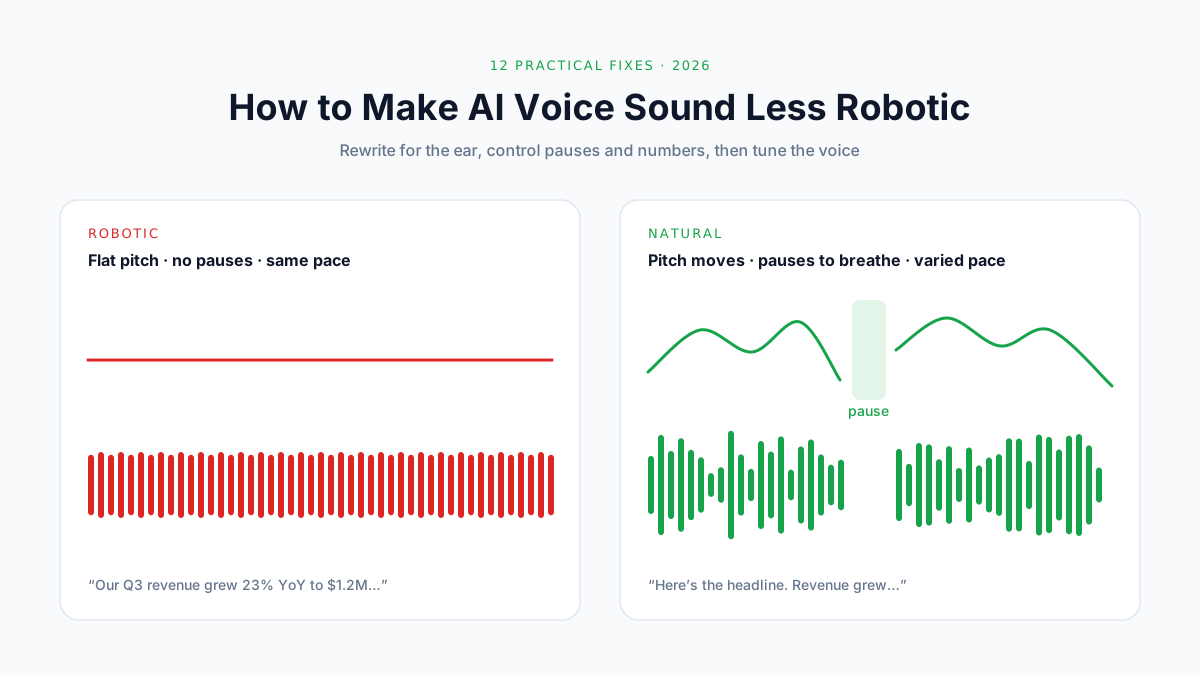
AI voice sounds robotic when its rhythm, pitch and pauses don't match how people actually speak. Humans vary their pace, raise and lower their pitch, pause to breathe, and stress the words that matter. Synthetic speech sounds robotic when it doesn't.
The 5 Causes
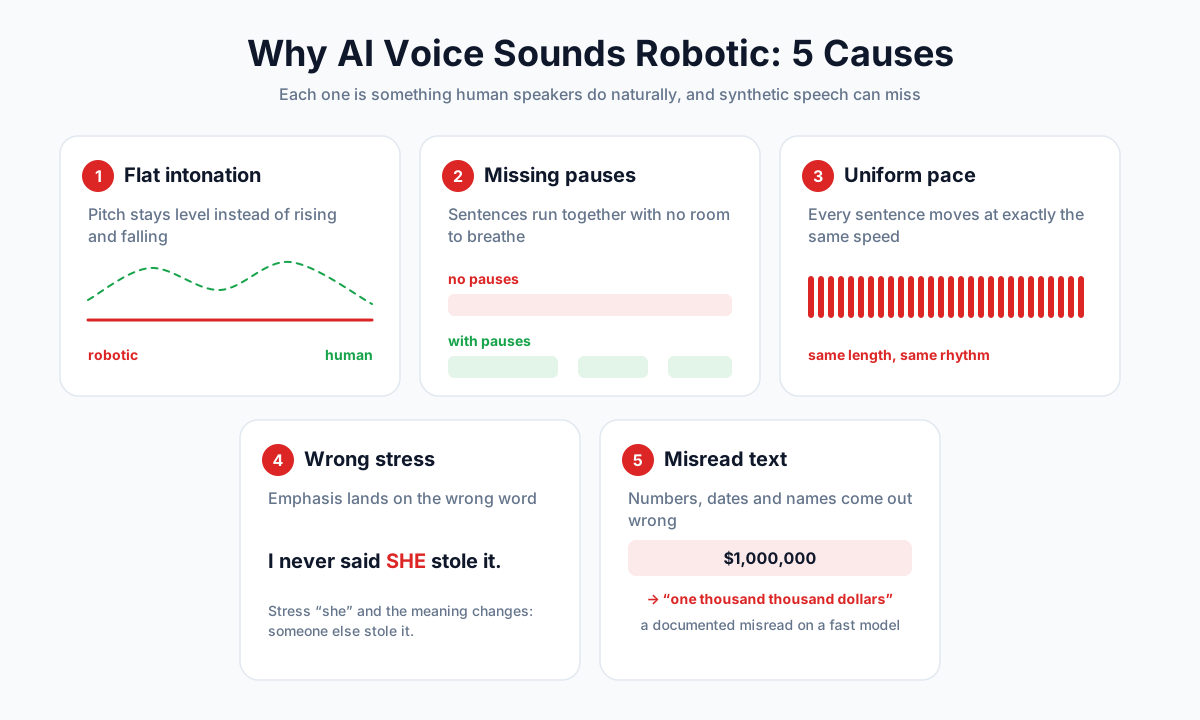
- Flat intonation. Pitch stays level instead of rising and falling with meaning.
- Missing pauses. Sentences run into each other with no room to breathe.
- Uniform pace. Every sentence moves at exactly the same speed.
- Wrong stress. The emphasis lands on the wrong word, so the meaning shifts.
- Misread text. Numbers, dates, abbreviations and names come out wrong.
Researchers have a name for the last one: text normalization, turning written text into words a voice can say. It's hard even for modern systems, because "1/2" can mean "one half", "January second" or "February first", depending on context.
How Far AI Voices Have Come
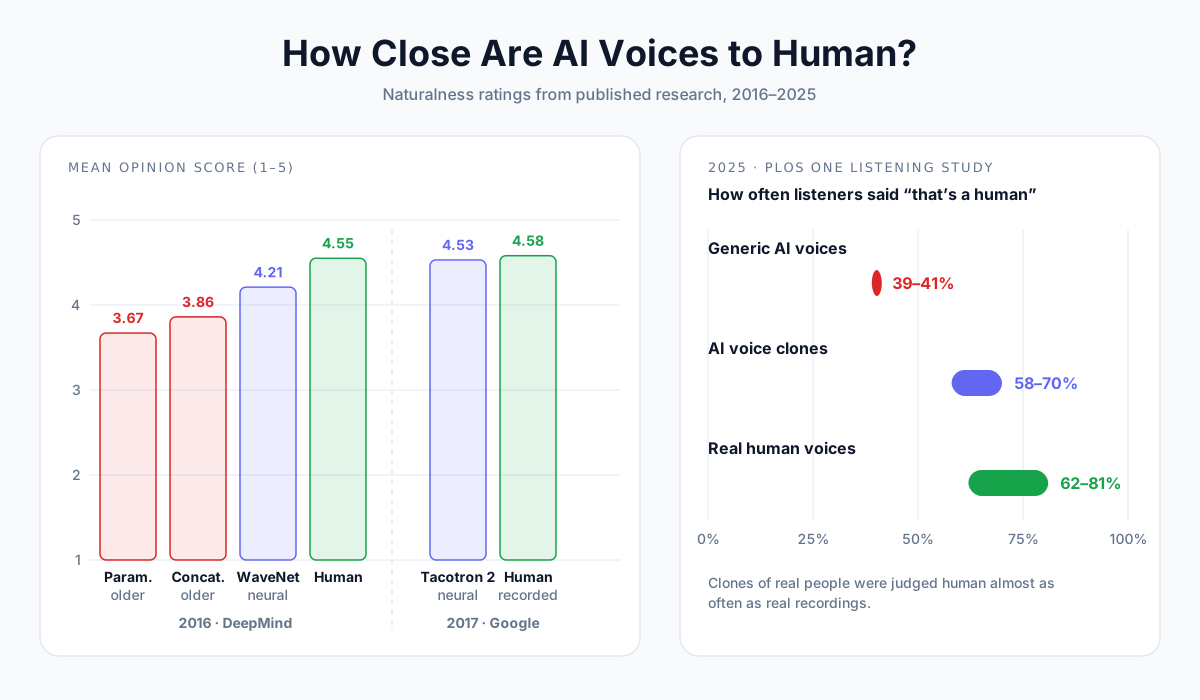
Speech scientists measure naturalness with a Mean Opinion Score (MOS): listeners rate clips from 1 (bad) to 5 (excellent).
| Year | Milestone | Score |
|---|---|---|
| 2016 | Older "parametric" and "concatenative" voices (the robotic GPS era) | 3.67 and 3.86 MOS; humans scored 4.55 |
| 2016 | DeepMind's WaveNet, the first big neural voice | 4.21 MOS |
| 2017 | Google's Tacotron 2 | 4.53 MOS vs 4.58 for recorded speech |
| 2022 | Microsoft's NaturalSpeech | No statistically significant difference from recordings |
| 2025 | PLOS One listening study | Voice clones judged human 58–70% of the time; real humans 62–81% |
The same study found that generic AI voices (not cloned from a real person) were judged human only about 40% of the time. That gap matters, and we'll come back to it in fix #11.
Most "Robotic" Audio Today Is a Script Problem
Modern voices can sound human. But they read exactly what you give them.
A 45-word sentence with three abbreviations and a dollar figure will sound robotic in almost any voice. The same idea, rewritten for the ear, will sound natural in most of them. That's why most of the fixes below are about the text.
Quick Diagnosis
Before you change anything, listen once and name the problem. Then jump to the fix.
| What you hear | Likely cause | Fix |
|---|---|---|
| Flat, monotone delivery | Voice doesn't suit the content, or stability set too high | #1, #2, #9 |
| No breathing room between ideas | Long sentences, few commas or paragraph breaks | #3, #4 |
| Rushed, breathless reading | Speed too fast, lists crammed into one sentence | #3, #8 |
| Emphasis on the wrong word | Key word buried mid-sentence | #7 |
| "$1,000,000" read strangely | Numbers and symbols left as digits | #5 |
| Names or brands mispronounced | Unusual words with no obvious spelling-to-sound rule | #6 |
| Sounds different from paragraph to paragraph | Long script split with different settings | #10 |
| Sounds "too clean", like a lab recording | Dry audio, no room tone or music bed | #12 |
The 12 Fixes
Fix #1: Start with the Right Voice Tier
Not all AI voices are built the same. Faster, cheaper models are great for drafts. Premium models handle rhythm and emotion better.
On AnySpeech, the same text can be generated on five tiers:
| Tier | Best for | Worth knowing |
|---|---|---|
| Basic | Drafts, long reads, accessibility | Free, available on free text to speech |
| Standard | Wide language and accent coverage | 300+ voices, 40+ languages |
| Flash | Short, lively, conversational pieces | Fast and expressive; up to 5,000 characters per generation |
| Advanced | Natural narration in 70+ languages | Our default for most voiceovers |
| Pro | The most nuanced, natural delivery | Uses 2 credits per character; paid plans |
💡 Pro tip: If a line sounds flat, don't rewrite it straight away. First, generate the same line on a higher tier. If it now sounds right, the voice was the problem. If it still sounds off, it's the script.
Fix #2: Match the Voice to the Content
A voice that sounds great in an ad can sound odd reading a bedtime story. Choose by what the audio is for, not by which sample sounds nicest.
| Content | Look for | Avoid |
|---|---|---|
| Audiobooks, documentaries | Warm, steady narrator | Hyped, "announcer" voices |
| Explainers, e-learning | Clear, friendly, mid-paced | Very breathy or dramatic voices |
| Ads and promos | Energetic, bright | Slow, soft voices |
| YouTube and social | Conversational, natural | Overly formal voices |
| Meditation, sleep | Calm, low, slow | Anything upbeat |
Browse the voice library and filter by style. For YouTube scripts, the YouTube voiceover generator lists voices that suit narration.
Fix #3: Write for the Ear, Not the Eye
Written text and spoken text are different. Reading, we can re-read a long sentence. Listening, we can't.
- Keep sentences short. Aim for under 20 words. Split anything longer.
- Use contractions. "It's", "you'll" and "don't" sound human; "it is" and "you will" sound stiff.
- Put one idea in each sentence. Two ideas joined by "which" or "and" is where the rhythm breaks.
- Use active verbs. "We tested ten tools" beats "Ten tools were tested by our team".
- Read it aloud yourself. If you run out of breath, so will the voice.
| Written for the eye | Written for the ear |
|---|---|
| Upon completion of the registration process, users will receive a confirmation email. | Once you've signed up, we'll send you a confirmation email. |
| The product, which was launched in 2024, has been adopted by over 10,000 teams. | We launched in 2024. Since then, more than ten thousand teams have signed up. |
Fix #4: Use Punctuation to Create Pauses
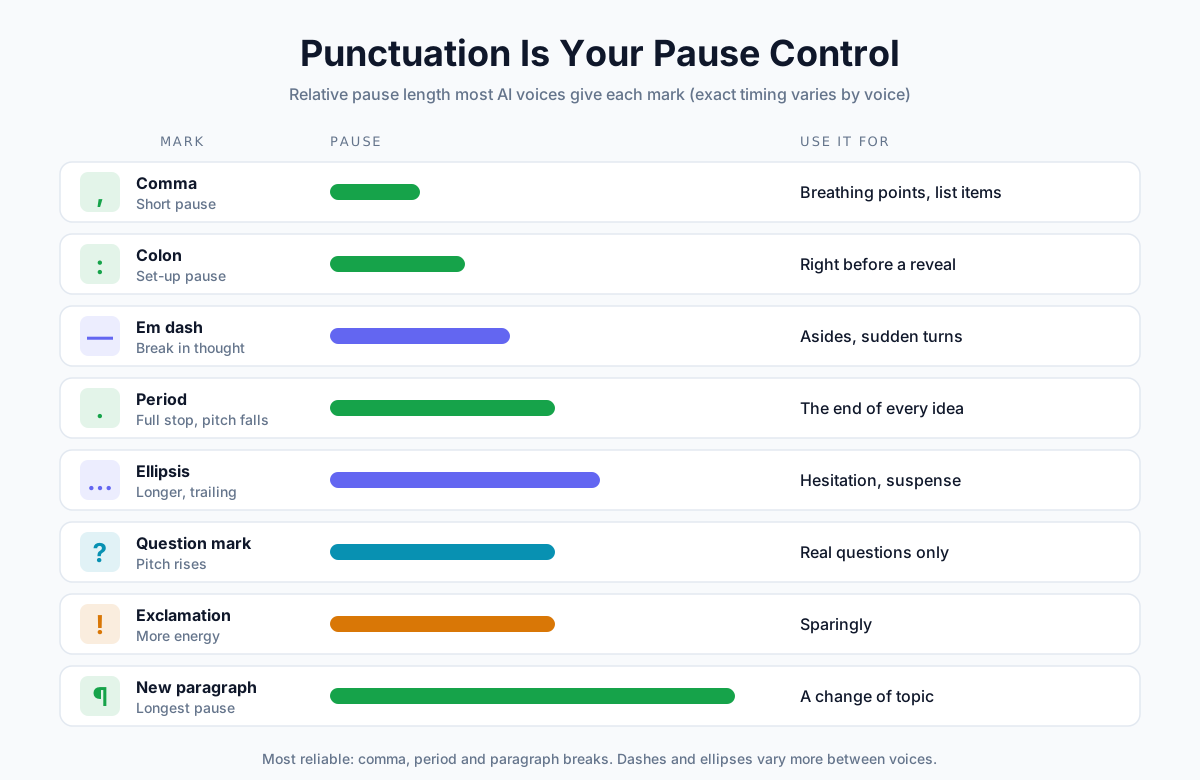
Modern AI voices treat punctuation as stage directions. A comma gives a short breath. A period lets the pitch fall. A new paragraph gives the longest pause of all.
| Punctuation | What it usually does | Use it for |
|---|---|---|
| Comma , | Short pause | Breathing points, list items |
| Period . | Full stop, pitch falls | The end of every idea |
| Colon : | Brief set-up pause | Right before a reveal or a list |
| Em dash — | A break in the thought | Asides and sudden turns |
| Ellipsis … | Longer, trailing pause | Hesitation, suspense |
| Question mark ? | Pitch rises | Real questions only |
| Exclamation mark ! | More energy | Sparingly, or it sounds shouty |
| New paragraph | The longest pause | A change of topic |
📝 Note: Exact pause lengths vary by voice and engine. ElevenLabs' own documentation notes that dashes and ellipses create pauses less consistently than other methods. Commas, periods and paragraph breaks are the most reliable.
Fix #5: Spell Out Numbers, Dates and Symbols
Digits and symbols are where AI voices trip up most, because the same characters can be read several ways.
ElevenLabs' documentation gives a clear example: one of its fast models can read "$1,000,000" as "one thousand thousand dollars". Writing the number out removes the guesswork on every voice.
| Instead of | Write | Why |
|---|---|---|
| $1,000,000 | one million dollars | Avoids strange number grouping |
| $42.50 | forty-two dollars and fifty cents | Reads the cents correctly |
| 3:30 pm | three thirty p.m. | Time, not a ratio |
| 2026-01-15 | January fifteenth, twenty twenty-six | Dates vary by country |
| 25% | twenty-five percent | Some voices skip the symbol |
| Dr. Smith | Doctor Smith | "Dr." could be "Drive" |
| Q3 | third quarter | Abbreviations get spelled out |
| anyspeech.io/pricing | anyspeech dot io slash pricing | URLs read unpredictably |
| 1/2 | one half | Could be a date |
You don't have to do this for every number. Small, simple numbers like "3" or "10" are usually fine. Focus on money, dates, times, percentages and anything with symbols.
Fix #6: Fix Pronunciation by Respelling
When a voice mispronounces a name or brand, spell it the way it sounds. It feels like a hack, but it's the one method that works on every engine.
| Word | Respell as | Problem it solves |
|---|---|---|
| Nguyen | Win | Common surname, often misread |
| Worcestershire | Wuss-ter-sher | Silent letters |
| AnySpeech | Any Speech | Brand made of joined words |
| SQL | sequel (or S Q L) | Acronym vs word |
| read (past tense) | red | Same spelling, different sound |
| live (adjective) | lyve | "a lyve show" vs "I live here" |
| GIF | jif (or gif) | Pick one and be consistent |
On AnySpeech, you don't have to edit every script. On the text-to-speech page, open Pronunciation dictionary, fill in Written text and Say it like, and the rule applies automatically to every voice. You can save up to 50 rules once you're signed in.
💡 Pro tip: For acronyms you want spelled out letter by letter, add spaces or periods: "F B I" or "F.B.I." For acronyms read as a word, like "NASA", leave them as they are.
Fix #7: Create Emphasis with Word Order
In a plain-text tool, you can't mark a word as "stress this". But you can control emphasis with how you build the sentence.
- Put the key word at the end. English naturally stresses the end of a sentence. "The results surprised everyone" vs "Everyone was surprised by the results".
- Give it its own sentence. "It's free. Completely free." Short sentences land hard.
- Use a colon or dash for a reveal. "There's one thing that matters here: timing."
- Avoid ALL CAPS. Many voices read capitals as an acronym and spell the word out.
Fix #8: Set the Right Speed
A voice that's a little too fast is the most common reason narration sounds machine-like. Here's what real narrators do:
| Content | Typical pace | Speed setting to start with |
|---|---|---|
| Audiobook narration | About 155 words per minute (ACX) | 0.9×–1.0× |
| Everyday conversation | About 150 words per minute | 1.0× |
| Tutorials, technical content | Slightly slower than conversation | 0.9× |
| Ads and promos | Faster, energetic | 1.05×–1.1× |
| Meditation, sleep | Slow and spacious | 0.8× |
The 155 figure comes from ACX, Audible's audiobook platform, which says most narrators read about 9,300 words per hour.
On AnySpeech, the Speed slider on the Standard, Advanced and Pro tiers runs from 0.7× to 1.2×. Change it in small steps of 0.1×. Bigger jumps can make a voice sound stretched or squeezed.
Fix #9: Tune Stability and Similarity
On the Advanced and Pro tiers, two sliders change how expressive the voice is.
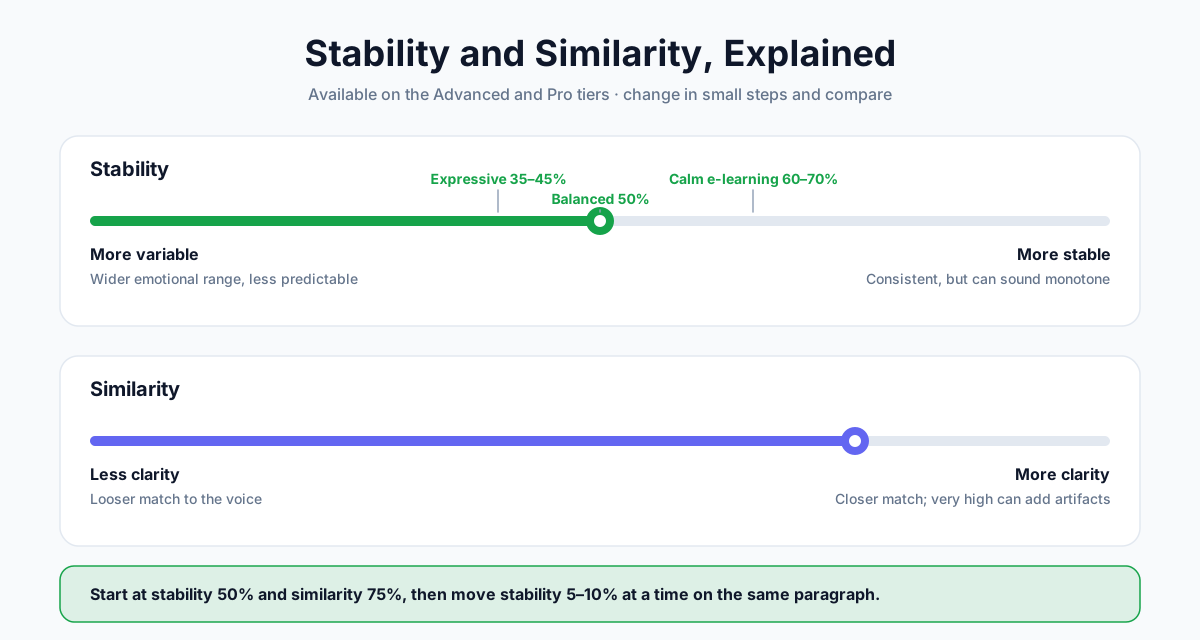
| Slider | Lower | Higher |
|---|---|---|
| Stability | More variable: wider emotional range, but less predictable | More stable: consistent, but can sound monotone |
| Similarity | Less clarity, looser match to the voice | More clarity, closer match; very high values can add artifacts |
A practical starting point:
| Goal | Stability | Similarity |
|---|---|---|
| Expressive storytelling | 35–45% | 75% |
| Balanced narration (default) | 50% | 75% |
| Consistent, calm e-learning | 60–70% | 75–80% |
Adjust stability in steps of about 5–10%, and regenerate the same paragraph each time so you can compare.
Fix #10: Generate Long Scripts in Sections
Long scripts cause two problems. If one sentence goes wrong, you have to regenerate everything. And if you split the script carelessly, each part can sound slightly different.
- Split at natural breaks: chapters, scenes or topic changes, never mid-paragraph.
- Keep the settings identical for every part: same voice, tier, speed and stability.
- Name your files in order (01-intro, 02-setup…) so they're easy to join.
On AnySpeech, paid plans can generate up to 50,000 characters at once (5,000 on the free plan and on the Flash tier). Even so, generating chapter by chapter makes fixing a single line far easier.
Fix #11: Use a Cloned Human Voice
Remember the PLOS One study? Voice clones of real people were judged human far more often than generic AI voices: roughly 58–70% of the time versus about 40%.
A clone carries a real person's rhythm, quirks and breathing habits. If you narrate regularly, you can clone your own voice from a short recording and use it for every script.
- Record in a quiet room, with no music or echo.
- Speak the way you want the clone to sound: relaxed and natural, not "announcer" mode.
- Only clone your own voice, or a voice you have clear permission to use.
Our voice cloning guide walks through the recording process step by step.
Fix #12: Finish It in Post-Production
Raw AI audio can sound unnaturally "clean", like a voice floating in empty space. A few light touches make it sit in the real world.
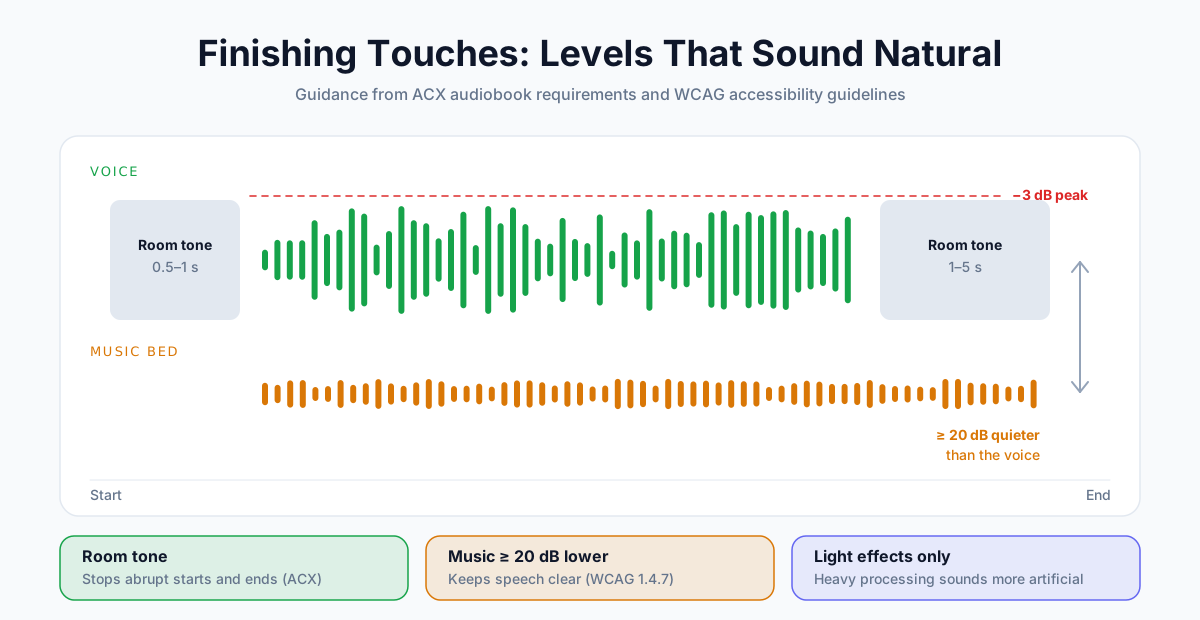
- Add room tone. ACX asks for 0.5–1 second of room tone at the start of each file and 1–5 seconds at the end. It stops the audio from starting or ending abruptly.
- Keep music well below the voice. Accessibility guidelines (WCAG) recommend background audio at least 20 decibels quieter than speech.
- Go easy on effects. Heavy compression, reverb or EQ can make a synthetic voice sound more artificial, not less.
- Keep peaks below −3 dB so the audio doesn't clip on loud playback (also an ACX requirement).
Before and After: A Full Rewrite
Here's one paragraph, written the way business reports usually are, then rewritten for a voice.
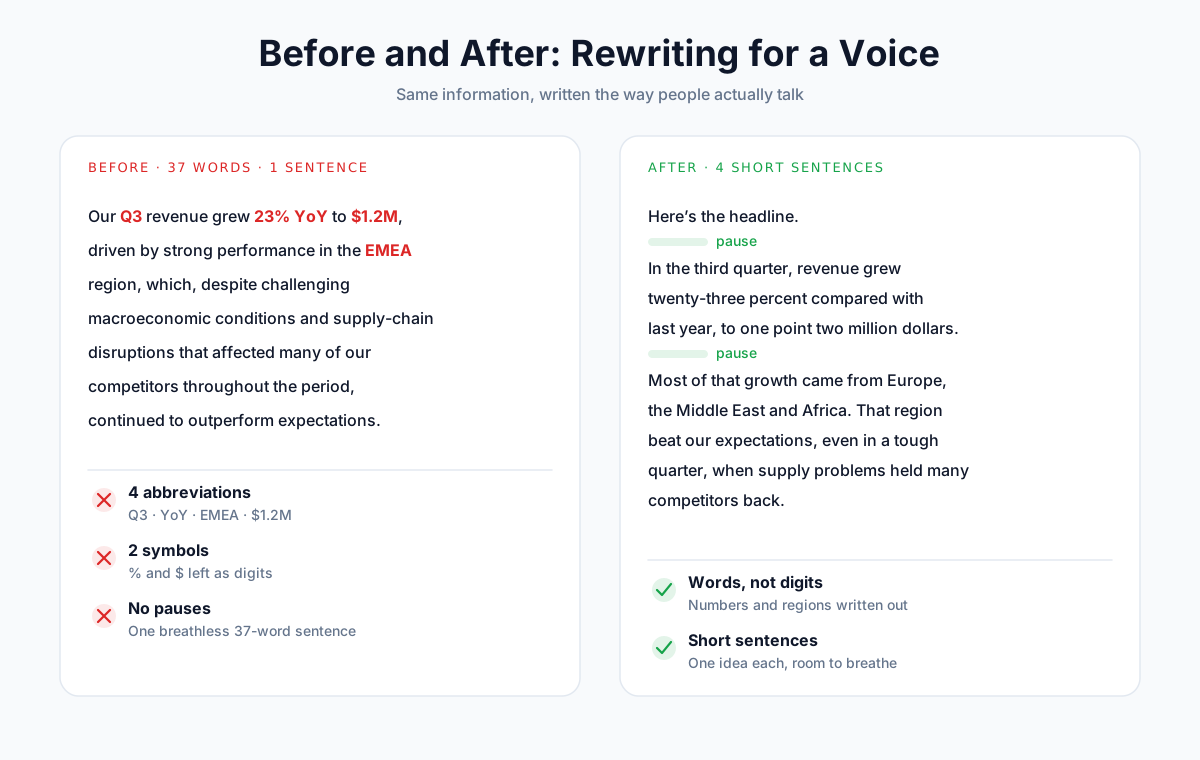
Before (37 words, one sentence):
Our Q3 revenue grew 23% YoY to $1.2M, driven by strong performance in the EMEA region, which, despite challenging macroeconomic conditions and supply-chain disruptions that affected many of our competitors throughout the period, continued to outperform expectations.
After (four short sentences):
Here's the headline. In the third quarter, revenue grew twenty-three percent compared with last year, to one point two million dollars.
Most of that growth came from Europe, the Middle East and Africa. That region beat our expectations, even in a tough quarter, when supply problems held many competitors back.
What changed:
| Change | Fix used |
|---|---|
| "Q3", "YoY", "EMEA" expanded into words | #5 |
| "23%" and "$1.2M" written out | #5 |
| One 37-word sentence split into four | #3 |
| A short opener ("Here's the headline.") to set up the news | #7 |
| A paragraph break between results and context | #4 |
Same information. Nothing clever. But in almost any voice, the second version sounds like a person talking.
What About SSML?
SSML (Speech Synthesis Markup Language) is a set of tags some text-to-speech engines accept, for example to insert a pause of an exact length or say a word with a specific pronunciation.
<speak>
  Welcome back. <break time="700ms"/> Let's get started.
</speak>
SSML still works on many classic cloud voices. But newer, more expressive models increasingly ignore it or support only part of it. ElevenLabs, for example, says its newest v3 and v4 models don't support SSML break tags. Google's Chirp 3 HD voices support only a subset.
AnySpeech works with plain text, which is why every fix in this guide uses writing, punctuation and settings instead of tags. Those methods work on every voice and every tier.
Language-Specific Tips
Most of the fixes above apply in any language. A few issues come up specifically with non-English text:
- Use a native voice. A Spanish script sounds far more natural in a voice built for Spanish. Browse by language on the text to speech languages page, or pick an accent, such as British English.
- Write numbers out in the target language. In mixed-language text, a voice may read digits in the wrong language.
- Use the language's own punctuation. Chinese and Japanese use full-width marks (。,?), which voices treat as pauses.
- Test mixed-language text before you commit. Brand names and English terms inside another language are a common trip-up. Respell them if needed (fix #6).
The Natural AI Voice Checklist
Run through this list before you publish. If a line fails, the quick diagnosis table tells you which fix to use.
- The voice suits the content (narrator, conversational or energetic)
- Sentences are short, with one idea each
- Contractions are used where a person would use them
- Paragraph breaks mark each change of topic
- Money, dates, times and percentages are written out
- Tricky names and brands are respelled or in your pronunciation dictionary
- The key word in each important sentence sits near the end
- Speed matches the content (start at 0.9×–1.0× for narration)
- Stability is set for the tone you want
- Long scripts are split at natural breaks, with identical settings
- Music sits at least 20 dB below the voice
- You've listened to the whole thing once, start to finish
Frequently Asked Questions
Why does my AI voice sound robotic?
Usually because of the text, not the voice. Long sentences, missing punctuation, abbreviations and digits all push AI voices toward a flat, rushed delivery. A voice that doesn't suit the content, a speed that's too fast, or stability set too high can also make it sound monotone.
What is the most natural-sounding AI voice?
It depends on the content and language, so test the same script on a few voices. In our lineup, the Advanced and Pro tiers give the most natural delivery. A clone of a real human voice often sounds even more natural: in a 2025 PLOS One study, clones were judged human 58–70% of the time.
How do I add pauses in text to speech?
Use punctuation. Commas add short pauses, periods add full stops, and a new paragraph adds the longest pause. Colons and em dashes add a break before a reveal. Some engines also accept SSML break tags, but many newer models ignore them.
How do I make text to speech pronounce a word correctly?
Respell the word the way it sounds, such as "Win" for "Nguyen" or "red" for the past tense of "read". On AnySpeech, save the respelling in the Pronunciation dictionary so it applies to every voice automatically.
What speed should AI narration be?
About 150–155 words per minute suits most narration. ACX says audiobook narrators average about 9,300 words per hour, which is roughly 155 words per minute. Start at 0.9× to 1.0× speed, and slow down slightly for technical content.
Can AI voices express emotion?
Yes. Premium voices pick up emotion from the words themselves, so write the feeling into the script ("I couldn't believe it."). Lowering stability gives a wider emotional range. Pro voice clones also come with emotion controls.
Do I still need SSML?
Not for most projects. SSML is useful for exact pauses and pronunciations on classic cloud voices, but newer expressive models often ignore some tags. Plain-text methods (punctuation, respelling and writing numbers out) work on every engine.
Can people tell AI voices from real ones?
Often not. In a 2025 PLOS One study, listeners judged voice clones to be human 58–70% of the time, compared with 62–81% for real human recordings. Generic AI voices scored lower, at about 40%.
Make Your Next Voiceover Sound Human
You don't need a new tool or a sound engineer to fix a robotic voice. Start with the script: shorter sentences, real punctuation, and numbers written out. Then fine-tune the voice, speed and stability.
Try it now: paste a paragraph into AnySpeech text to speech, generate it once as-is, then again after applying fixes #3 to #5. The difference is easy to hear.
Author

Categories
More Posts
Text to Speech for Accessibility: A Guide for Dyslexia, ADHD & Low Vision (2026)
How text to speech helps with dyslexia, ADHD, and low vision — who it helps, what the research says, what to look for in a tool, and how to start reading by ear for free.
How to Start a Faceless YouTube Channel with AI Voice (2026)
Start a faceless YouTube channel with AI voice: niches, scripts, voices and costs, plus YouTube's 2026 rules on AI content, disclosure and monetization.

Convert Text to Audio: The Complete Guide to Converting Text Into Speech (2026)
Learn how to convert text to audio in minutes using AI voices. Free tools, step-by-step guide, voice quality tips, and best use cases for content creators, educators, and marketers.