
How to Turn On Voice Isolation: Step-by-Step Guide for Every Device (2026)
Learn how to turn on voice isolation on iPhone, iPad, Mac, and Android. Step-by-step instructions for FaceTime, phone calls, and tips for AI audio isolation tools.
You're on a FaceTime call with your boss. The neighbor starts mowing the lawn. Your dog decides this is the perfect moment to bark at absolutely nothing. And your boss says, "Sorry, I can't hear you."
Sound familiar? That's exactly why Apple built voice isolation into iPhones, iPads, and Macs. It's a built-in feature that filters out background noise during calls so only your voice comes through clearly.
The problem? Most people don't even know it exists. And even if they do, finding the setting isn't exactly obvious.
In this guide, I'll walk you through how to turn on voice isolation on every Apple device, cover the Android alternatives, and show you what to do when you need audio isolation for recorded files — not just live calls.
Quick Navigation: Jump to your device — iPhone | iPad | Mac | Android/Samsung | Recorded Audio
What Is Voice Isolation?
Voice isolation is a microphone mode built into Apple devices. It uses on-device machine learning to identify your voice and suppress everything else — traffic, wind, people talking nearby, construction noise, you name it.
Think of it as a smart filter for your mic. Instead of picking up everything around you, your device focuses on your voice and pushes background sounds way down.
It's different from regular noise cancellation in your headphones. Noise cancellation helps you hear better. Voice isolation helps the other person hear you better. Big difference.
A Brief History of Voice Isolation
| Year | iOS Version | What Changed |
|---|---|---|
| 2021 | iOS 15 | Voice isolation introduced for FaceTime only |
| 2023 | iOS 16.4 | Expanded to regular phone calls |
| 2024 | iOS 18 | Added Automatic Mic Mode (AI-powered switching) |
Each update has made the feature more useful. And yet, it's still buried in a place most people never look.
Voice Isolation vs Wide Spectrum vs Standard Mode
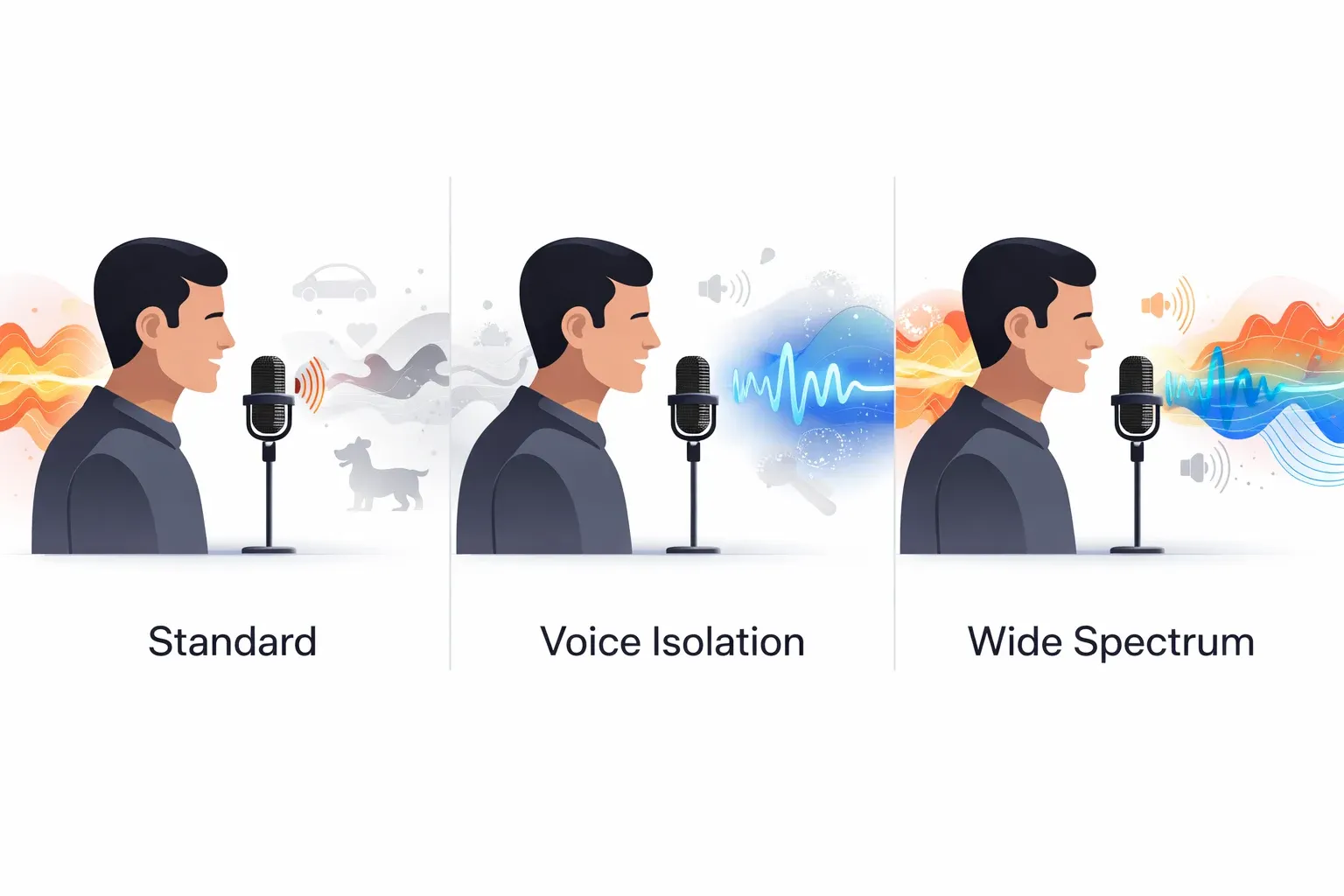
Before you turn on voice isolation, it helps to know your options. Apple gives you three microphone modes (four if you're on iOS 18):
| Mic Mode | What It Does | Best For | Noise Level |
|---|---|---|---|
| Standard | Default mode, no special processing | Quiet rooms, normal calls | 🟡 Some noise passes through |
| Voice Isolation | Blocks background noise, focuses on your voice | Noisy environments, outdoor calls | 🟢 Minimal background noise |
| Wide Spectrum | Picks up ALL sounds around you equally | Music, group conversations | 🔴 All ambient sound included |
| Automatic (iOS 18+) | AI switches modes based on your environment | Set-and-forget convenience | 🟢 Adapts in real time |
Here's a simple way to decide:
Are you in a noisy environment?
├── YES → Use Voice Isolation
└── NO
    ├── Do you want others to hear ambient sound?
    │   ├── YES → Use Wide Spectrum
    │   └── NO → Use Standard
    └── Not sure? → Use Automatic (iOS 18+)
When to use voice isolation: You're in a coffee shop, walking down a busy street, working from home with kids running around, or anywhere with unpredictable noise.
When NOT to use it: You're playing music for someone over the call, or you want the other person to hear your surroundings.
How to Turn On Voice Isolation on iPhone
Here's the thing most people miss: you can't turn on voice isolation from Settings. You have to be on a call first. The option only shows up during an active call.
For FaceTime Calls
Step 1 → Start or join a FaceTime call
Step 2 → Open Control Center
         • iPhone X or later: swipe down from top-right corner
         • iPhone SE / older: swipe up from bottom
Step 3 → Tap "Mic Mode" at the top
Step 4 → Select "Voice Isolation" ✓
That's it. You'll see a checkmark next to Voice Isolation, and the other person should immediately notice clearer audio.
💡 Pro Tip: Your iPhone remembers your mic mode choice. Once you pick Voice Isolation, it stays selected for future FaceTime calls until you change it.
For Regular Phone Calls
This works on iOS 16.4 and later:
- Make or answer a phone call
- Open Control Center while on the call
- Tap Mic Mode
- Choose Voice Isolation
Same steps as FaceTime. The key is remembering to open Control Center during the call.
⚠️ Common Mistake: Trying to find voice isolation in Settings before making a call. It won't be there. You must be on an active call first.
For Third-Party Apps
Voice isolation also works with many popular apps. Here's the compatibility status:
| App | Voice Isolation Support | Notes |
|---|---|---|
| FaceTime | ✅ Full support | Works since iOS 15 |
| Phone (cellular) | ✅ Full support | Requires iOS 16.4+ |
| ✅ Works | Voice and video calls | |
| Zoom | ✅ Works | Meetings and calls |
| Microsoft Teams | ✅ Works | Has its own noise suppression too |
| Messenger | ✅ Works | Meta voice/video calls |
| LINE | ✅ Works | Voice and video calls |
| Telegram | ✅ Works | Voice calls |
| Discord | ⚠️ Partial | May not show Mic Mode in all versions |
| Skype | ⚠️ Partial | Test during a call |
The steps are identical — start a call in the app, open Control Center, tap Mic Mode, pick Voice Isolation.
Not every app supports it, though. If you don't see the Mic Mode option during a call, that app hasn't integrated Apple's audio isolation API.
How to Turn On Voice Isolation on iPad
The process on iPad is nearly identical to iPhone. iPads with supported chips use the same voice isolation technology.
Step 1 → Start a FaceTime call or supported video call
Step 2 → Swipe down from the top-right corner to open Control Center
Step 3 → Tap "Mic Mode"
Step 4 → Select "Voice Isolation" ✓
Supported iPad Models
| iPad Series | Supported Models | Chip |
|---|---|---|
| iPad | 8th generation (2020) and later | A12+ |
| iPad Air | 3rd generation (2019) and later | A12+ |
| iPad mini | 5th generation (2019) and later | A12+ |
| iPad Pro | All models with Face ID | A12X+ |
If your iPad isn't on this list, you won't see the Mic Mode option. Time for an upgrade — or keep reading for AI-powered audio isolator alternatives that work on any device.
How to Turn On Voice Isolation on Mac
Macs got voice isolation starting with macOS Monterey (macOS 12). The feature works on any Mac with Apple Silicon (M1 chip or later) or an Intel Mac with a T2 security chip.
Step-by-Step for macOS
Step 1 → Start a FaceTime call, Zoom meeting, or any supported video call
Step 2 → Click the Control Center icon in the menu bar
         (looks like two toggle switches, top-right of screen)
Step 3 → Click "Mic Mode"
Step 4 → Select "Voice Isolation" ✓
Which Macs Support Voice Isolation?
| Mac Type | Minimum Year | Chip Required |
|---|---|---|
| MacBook Air | 2018 | T2 or Apple Silicon |
| MacBook Pro | 2018 | T2 or Apple Silicon |
| Mac mini | 2018 | T2 or Apple Silicon |
| iMac | 2020 | T2 or Apple Silicon |
| Mac Studio | All models | Apple Silicon |
| Mac Pro | 2019 | T2 or Apple Silicon |
The rule of thumb: if your Mac has a T2 chip or Apple Silicon, you're good. If it's older than 2018, you're probably out of luck.
💡 Mac Users: Voice isolation works with external microphones too, not just the built-in mic. If you use a USB mic for calls, voice isolation still applies its processing.
How to Turn On Voice Isolation on Android and Samsung
Here's the honest truth: Android doesn't have a universal "voice isolation" feature like Apple. But there are solid alternatives depending on your phone.
Android Voice Isolation Alternatives at a Glance
| Brand | Feature Name | Where to Find It | Quality |
|---|---|---|---|
| Samsung | Noise Cancellation | Settings > Sounds > Call Sound | ⭐⭐⭐⭐ |
| Google Pixel | Clear Calling | Settings > Sound > Clear Calling | ⭐⭐⭐⭐ |
| OnePlus/OPPO | Clear Voice | Phone app settings | ⭐⭐⭐ |
| Vivo | Voice Isolation | Dialer settings | ⭐⭐⭐ |
| Xiaomi | AI Call Noise Cancellation | Phone app settings | ⭐⭐⭐ |
| Other Android | Third-party apps (Krisp) | App Store | ⭐⭐⭐⭐ |
Samsung Galaxy Phones
Samsung calls theirs Noise Cancellation (not "voice isolation"):
- Open Settings > Sounds and Vibration
- Tap Call Sound or Sound Quality and Effects
- Enable Noise Reduction or Soft Sound for calls
On newer Samsung phones (S24 series and later), look for Call noise reduction in the Phone app settings.
Google Pixel Phones
Google Pixel has Clear Calling:
- Open Settings > Sound & Vibration
- Scroll to Clear Calling
- Toggle it on
Clear Calling uses AI to filter background noise on phone calls. It works really well in my experience — not quite Apple's voice isolation, but close.
Other Android Phones
- OnePlus/OPPO: Look for "Noise Reduction" or "Clear Voice" in phone settings
- Vivo: Check "Voice Isolation" in the dialer settings
- Xiaomi: "AI Call Noise Cancellation" in the phone app
If your phone doesn't have a built-in option, apps like Krisp can provide AI-powered noise suppression for calls.
How to Turn Off Voice Isolation
Sometimes you want background sounds to come through. Maybe you're sharing music, or you're in a group and want everyone to be heard.
On iPhone/iPad
- Open Control Center during a call
- Tap Mic Mode
- Select Standard (or Wide Spectrum if you want extra ambient sound)
On Mac
- Click Control Center in the menu bar during a call
- Click Mic Mode
- Choose Standard
When Should You Turn It Off?
| Scenario | Recommended Mode |
|---|---|
| Playing music for someone on a call | Wide Spectrum |
| Group call with multiple speakers | Standard or Wide Spectrum |
| Voice sounds too processed/robotic | Standard |
| Recording a podcast and want room tone | Standard |
| Showing someone an ambient sound (rain, etc.) | Wide Spectrum |
Which Devices Support Voice Isolation?
Quick reference table so you don't have to guess:
iPhone Compatibility
| Model | Voice Isolation | Minimum iOS |
|---|---|---|
| iPhone 16 / 16 Pro / 16 Pro Max | ✅ | iOS 18 |
| iPhone 15 / 15 Pro / 15 Pro Max | ✅ | iOS 17 |
| iPhone 14 / 14 Pro / 14 Pro Max | ✅ | iOS 16 |
| iPhone 13 / 13 Pro / 13 mini | ✅ | iOS 15 |
| iPhone 12 / 12 Pro / 12 mini | ✅ | iOS 15 |
| iPhone 11 / 11 Pro / 11 Pro Max | ✅ | iOS 15 |
| iPhone XR / XS / XS Max | ✅ | iOS 15 |
| iPhone SE (2nd gen, 2020) | ✅ | iOS 15 |
| iPhone SE (3rd gen, 2022) | ✅ | iOS 15 |
| iPhone X | ❌ | — |
| iPhone 8 / 8 Plus or older | ❌ | — |
iPad & Mac Compatibility
| Device | Voice Isolation | Minimum OS |
|---|---|---|
| iPad (8th gen+, 2020+) | ✅ | iPadOS 15 |
| iPad Air (3rd gen+, 2019+) | ✅ | iPadOS 15 |
| iPad mini (5th gen+, 2019+) | ✅ | iPadOS 15 |
| iPad Pro (Face ID models) | ✅ | iPadOS 15 |
| MacBook Air / Pro (2018+) | ✅ | macOS Monterey |
| iMac (2020+) | ✅ | macOS Monterey |
| Mac mini (2018+) | ✅ | macOS Monterey |
| Mac Studio (all) | ✅ | macOS Monterey |
The pattern: If your Apple device has the Neural Engine (A12 Bionic chip or later for iPhones/iPads, T2 or Apple Silicon for Macs), voice isolation is available.
Troubleshooting: Voice Isolation Not Working?
If you can't find or use voice isolation, run through this checklist:
Quick Troubleshooting Flowchart
Voice Isolation not working?
│
├── Can you see "Mic Mode" in Control Center?
│   ├── NO → Are you currently on a call?
│   │       ├── NO → Start a call first, then check again
│   │       └── YES → Check device compatibility (see table above)
│   │
│   └── YES → Can you select "Voice Isolation"?
│           ├── NO → Update to iOS 15+ (FaceTime) or iOS 16.4+ (phone calls)
│           └── YES but it's not working well?
│                   → Try tips below ↓
Check Your OS Version
Voice isolation needs iOS 15+ for FaceTime, iOS 16.4+ for phone calls. Go to Settings > General > Software Update and make sure you're up to date.
For Mac, you need macOS Monterey or later.
You Must Be on a Call
This trips up almost everyone. The Mic Mode option only appears during an active call. You can't set it up ahead of time from Settings.
Start a call first, then open Control Center.
Check Device Compatibility
If you have an iPhone 8, iPhone X, or older — voice isolation isn't available on your device. The Neural Engine required for real-time audio isolation isn't present in those older chips.
Restart the App
If Mic Mode isn't showing up during a FaceTime or third-party app call:
- End the call
- Force-close the app
- Restart the app and try the call again
Reset All Settings (Last Resort)
If nothing works:
- Go to Settings > General > Transfer or Reset iPhone
- Tap Reset > Reset All Settings
This won't delete your data, but it resets system settings that might be interfering.
Audio Isolation for Recorded Files: Going Beyond Live Calls
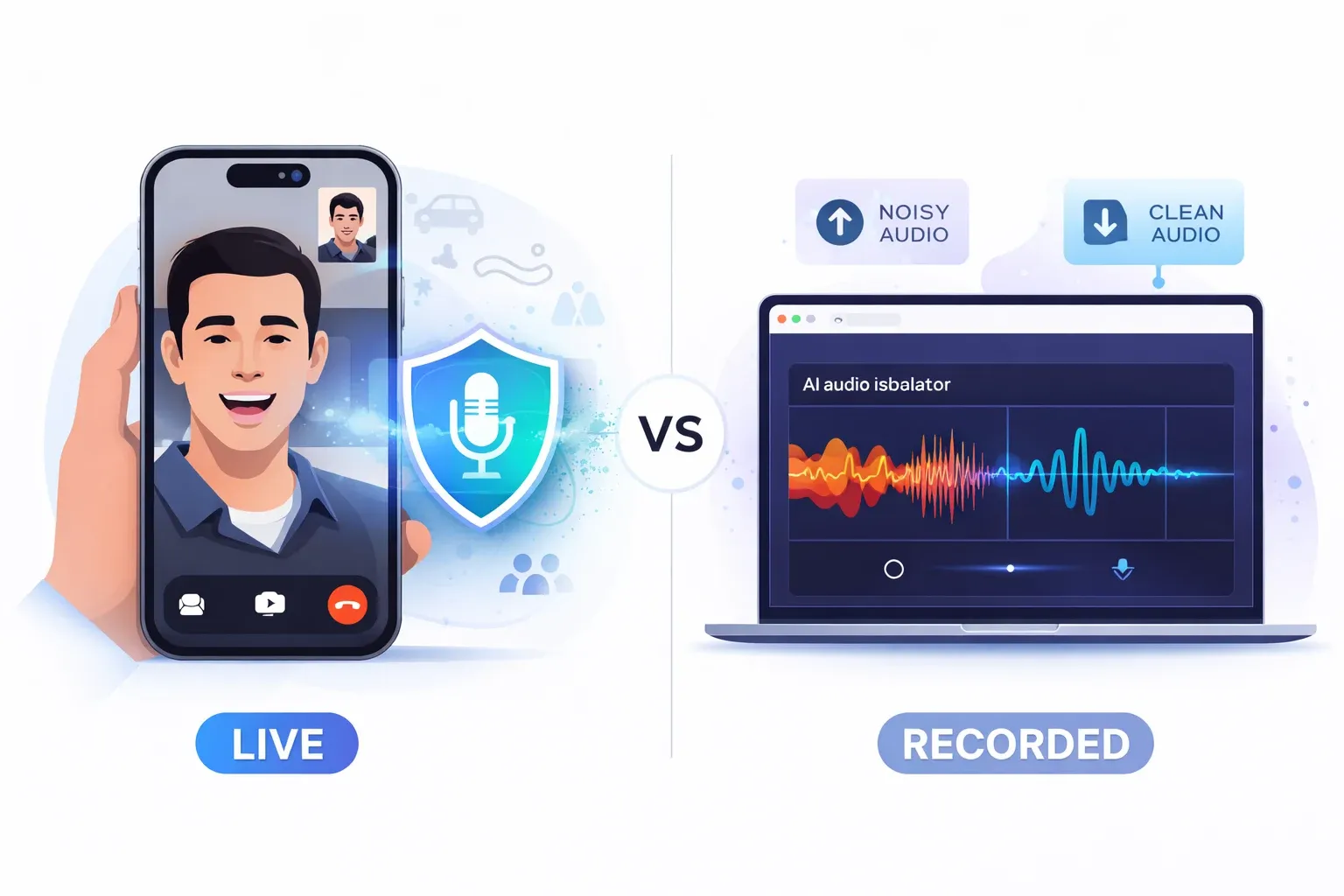
Here's something none of the other guides mention: Apple's voice isolation only works for live calls. It's real-time processing that happens during FaceTime, phone calls, and supported apps.
But what if you have a recording that's already full of background noise? A podcast interview with traffic in the background? A video where the wind was howling? A voice memo recorded in a noisy café?
That's where AI audio isolation tools come in.
What Is an Audio Isolator?
An audio isolator (or voice isolator) is a tool that separates speech from background noise in existing audio files. Unlike Apple's built-in voice isolation that works only on live calls, an audio isolator processes files you've already recorded.
Live Calls vs Recorded Audio: Which Tool Do You Need?
| Apple Voice Isolation | AI Audio Isolator | |
|---|---|---|
| Works on | Live calls only | Recorded audio files |
| Processing | Real-time | After recording |
| Devices | Apple only (iPhone, iPad, Mac) | Any device with a browser |
| File output | No file — affects call audio | Clean audio file download |
| Use case | FaceTime, phone calls, Zoom | Podcasts, videos, voice memos |
| Cost | Free (built-in) | Free tier or paid plans |
| Quality control | Automatic | You can preview and adjust |
When You Need an Audio Isolator
- Podcast editing — You recorded an interview in a coffee shop and the espresso machine ruined half your takes
- Video production — Outdoor footage with wind noise drowning out dialogue
- Voice memos — Meeting recordings where HVAC or street noise makes speech hard to hear
- Music production — Isolating vocals from a mixed track
- Content creation — Cleaning up voiceovers that had background noise during recording
How AI Audio Isolation Works
Modern AI audio isolators use deep learning models trained on thousands of hours of audio. Here's a simplified look at the process:
Your noisy audio file
        │
        ▼
┌──────────────────────┐
│   AI Deep Learning   │
│      Model           │
│                      │
│  Analyzes frequency  │
│  patterns to detect  │
│  human speech vs     │
│  background noise    │
└──────┬───────────────┘
       │
  ┌────┴────┐
  ▼         ▼
Voice    Background
Track      Track
(clean)  (separated)
  │
  ▼
Download
clean audio
The results are genuinely impressive. A recording that sounds like someone talking next to a highway can be cleaned up to sound like it was recorded in a studio.
Try AnySpeech Voice Isolator
If you need audio isolation for recorded files, AnySpeech's Voice Isolator does exactly this. Upload your noisy audio file, and our AI separates the voice from the background noise.
What it supports:
| Feature | Details |
|---|---|
| File formats | MP3, WAV, M4A, and more |
| Audio length | Up to several minutes |
| Languages | Any — AI detects speech patterns, not specific words |
| Output | Clean voice track + separated background |
| Platform | Web-based — works on any device |
| Pricing | Free tier available |
No software to install. Upload, process, download. It's that simple.
💡 When to use what: Apple Voice Isolation = live calls. AnySpeech Voice Isolator = cleaning up recorded audio. They solve different problems, and together they cover pretty much every audio isolation situation you'll run into.
Tips for Getting the Best Voice Isolation Results
Whether you're using Apple's built-in feature or an AI audio isolator, these tips help you get cleaner audio.
For Live Calls
| Tip | Why It Helps |
|---|---|
| Hold your phone close | Gives the mic a stronger voice signal to isolate |
| Use AirPods or headphones | Mic is closer to your mouth = better isolation |
| Face away from noise sources | Less noise hitting the mic directly |
| Update iOS/macOS | Apple improves voice isolation algorithms with each update |
| Close unused apps | Frees up processing power for the Neural Engine |
💡 Pro Tip: AirPods Pro and AirPods Max have their own additional noise processing, which stacks with voice isolation for even better results. It's the best combination for calls in noisy environments.
For Recorded Audio
Even the best AI audio isolator works better with decent source material. If you know you'll need to clean up audio later:
| Recording Tip | Impact on Audio Isolation |
|---|---|
| Get close to the mic | ⭐⭐⭐⭐⭐ Biggest improvement |
| Use a directional microphone | ⭐⭐⭐⭐ Reduces off-axis noise |
| Close windows, turn off fans | ⭐⭐⭐ Less noise to remove |
| Record room tone (few seconds of silence) | ⭐⭐ Helps some AI tools build a noise profile |
| Use a pop filter | ⭐⭐ Reduces plosives that can confuse AI |
Voice Isolation vs Noise Cancellation: What's the Difference?
People mix these up constantly, so let me clear it up:
                    Voice Isolation          Noise Cancellation
                    ───────────────          ──────────────────
Direction:          Outgoing (your mic) →    ← Incoming (your ears)

Who benefits:       The OTHER person         YOU
                    hears you better         hear others better

When active:        During calls only        Anytime (with headphones)

Device needed:      iPhone XR+, iPad, Mac    AirPods Pro, Max, etc.

What it filters: YOUR background noise THEIR background noise| Feature | Voice Isolation | Noise Cancellation |
|---|---|---|
| Who benefits | The person listening to you | You (the wearer) |
| How it works | Filters your mic output | Cancels incoming sound in headphones |
| When it's active | During calls only | Anytime (with compatible headphones) |
| Device required | iPhone XR+, iPad, Mac | AirPods Pro, AirPods Max, etc. |
| Result | Others hear you clearly | You hear others clearly |
Best combo: Turn on voice isolation for your mic AND use noise-cancelling headphones. Now both sides of the call sound crystal clear.
Best Audio Isolation Tools in 2026
If you need to go beyond Apple's built-in voice isolation, here are your best options for audio isolation on different platforms. We tested these and six more head-to-head in our guide to the best audio isolation tools, with scores for both speech cleanup and music separation.
| Tool | Type | Platform | Best For | Price |
|---|---|---|---|---|
| AnySpeech Voice Isolator | AI audio isolator | Web (any device) | Cleaning up recorded audio files | Free tier available |
| Apple Voice Isolation | Built-in mic mode | iPhone, iPad, Mac | Live calls | Free |
| Krisp | AI noise suppression | Windows, Mac | Meeting noise suppression | Free / $8/mo |
| NVIDIA Broadcast | AI audio/video | Windows (RTX GPU) | Streaming and gaming | Free |
| Adobe Podcast | AI audio enhancer | Web | Podcast audio cleanup | Free |
| Samsung Noise Reduction | Built-in | Samsung phones | Phone calls | Free |
| Google Clear Calling | Built-in | Pixel phones | Phone calls | Free |
| Descript | AI audio editor | Windows, Mac | Full audio/video editing | $24/mo |
How to Choose the Right Tool
What do you need?
│
├── Clean voice on LIVE CALLS?
│   ├── Apple device? → Use built-in Voice Isolation (free)
│   ├── Samsung? → Use Noise Cancellation (free)
│   ├── Pixel? → Use Clear Calling (free)
│   └── Other? → Try Krisp app
│
└── Clean voice on RECORDED AUDIO?
    ├── Quick one-off cleanup? → AnySpeech Voice Isolator (web, free)
    ├── Full podcast editing? → Descript or Adobe Podcast
    └── Streaming/gaming? → NVIDIA Broadcast
For most people, Apple's built-in voice isolation handles live calls perfectly. When you need to clean up existing recordings, a dedicated AI voice isolator like AnySpeech fills the gap.
Frequently Asked Questions
Does voice isolation work with AirPods?
Yes. Voice isolation works with AirPods, AirPods Pro, AirPods Max, and any other headphones. The feature uses your device's processing, not the headphones themselves. AirPods Pro and Max add their own audio processing on top, making it even better.
Can I use voice isolation on WhatsApp?
Yes, as long as you're on an iPhone with iOS 15 or later. Start a WhatsApp call, open Control Center, tap Mic Mode, and select Voice Isolation. It works the same as FaceTime.
Does voice isolation work on iPhone 11?
Yes! The iPhone 11, 11 Pro, and 11 Pro Max all support voice isolation. Any iPhone with an A12 Bionic chip or newer (iPhone XR and later) supports it.
What's the difference between voice isolation and noise cancellation?
Voice isolation filters your microphone so others hear you clearly. Noise cancellation blocks incoming sound so you can hear better. They work in opposite directions but pair well together.
Does voice isolation drain battery faster?
Slightly. Voice isolation uses the Neural Engine for real-time processing, which requires some extra power. In practice, the impact is minimal — you probably won't notice it during normal call lengths.
Can I use voice isolation for recording audio?
No. Apple's voice isolation only works during live calls (FaceTime, phone calls, third-party app calls). For isolating voice in recorded audio files, you need a separate audio isolator tool like AnySpeech Voice Isolator.
Is voice isolation available on Android?
Android doesn't have Apple's exact "voice isolation" feature. However, Samsung has Noise Reduction, Google Pixel has Clear Calling, and other manufacturers have similar features. For audio isolation on Android, web-based AI voice isolator tools work on any device with a browser.
Does voice isolation work on FaceTime with Mac users?
Yes. Voice isolation is a per-device setting. If you enable it on your iPhone, your voice sounds clear to everyone on the call — whether they're on a Mac, iPad, iPhone, or even a web browser.
Can I turn on voice isolation before a call?
No. The Mic Mode option only appears during an active call. You need to start or join a call first, then open Control Center to access it. The good news is your device remembers your choice for future calls.
How is AI audio isolation different from Apple's voice isolation?
Apple's voice isolation is real-time and only works during live calls on Apple devices. AI audio isolation tools (like AnySpeech Voice Isolator) process already-recorded files. They use deep learning to separate speech from background noise in uploaded audio. Different use cases, but both valuable.
Wrapping Up
Voice isolation is one of those features that feels like magic once you start using it. No more apologizing for background noise on calls. No more walking to a quiet room every time your phone rings.
Here's the quick version:
| Device | How to Turn On Voice Isolation |
|---|---|
| iPhone/iPad | Start a call → Control Center → Mic Mode → Voice Isolation |
| Mac | Start a call → Menu bar Control Center → Mic Mode → Voice Isolation |
| Samsung | Settings → Sounds → Call Sound → Noise Reduction |
| Google Pixel | Settings → Sound → Clear Calling → Toggle On |
| Recorded audio | Upload to AI audio isolator → Download clean file |
And remember — voice isolation handles live calls, but for cleaning up audio you've already recorded, an AI audio isolator like AnySpeech Voice Isolator is the way to go.
If you found this guide helpful, you might also want to check out our free text to speech tool or explore AI voice generation for creating voiceovers from scratch.
Got questions? Drop us a line at support@anyspeech.io.
Last updated: March 2026
Author

Categories
More Posts
How to Get a Transcript of a YouTube Video (6 Ways, 2026)
Get a transcript of any YouTube video: built-in Show transcript, phone, free generators with TXT/SRT export, YouTube Studio, videos with no captions, and code.
How to Remove Background Music from a Video (7 Ways, 2026)
Remove background music from a video and keep the voice. 7 methods: online AI tools, CapCut, YouTube Erase song, Resolve, Premiere, iPhone and Audacity.

How to Use Text to Speech on Mac: The Complete Guide (2026)
Learn how to use text to speech on Mac with built-in tools, shortcuts, and AI voices. Plus how to do speech to text with Dictation — step by step.