Best Audio Isolation Tools in 2026 (10 Tools Tested)
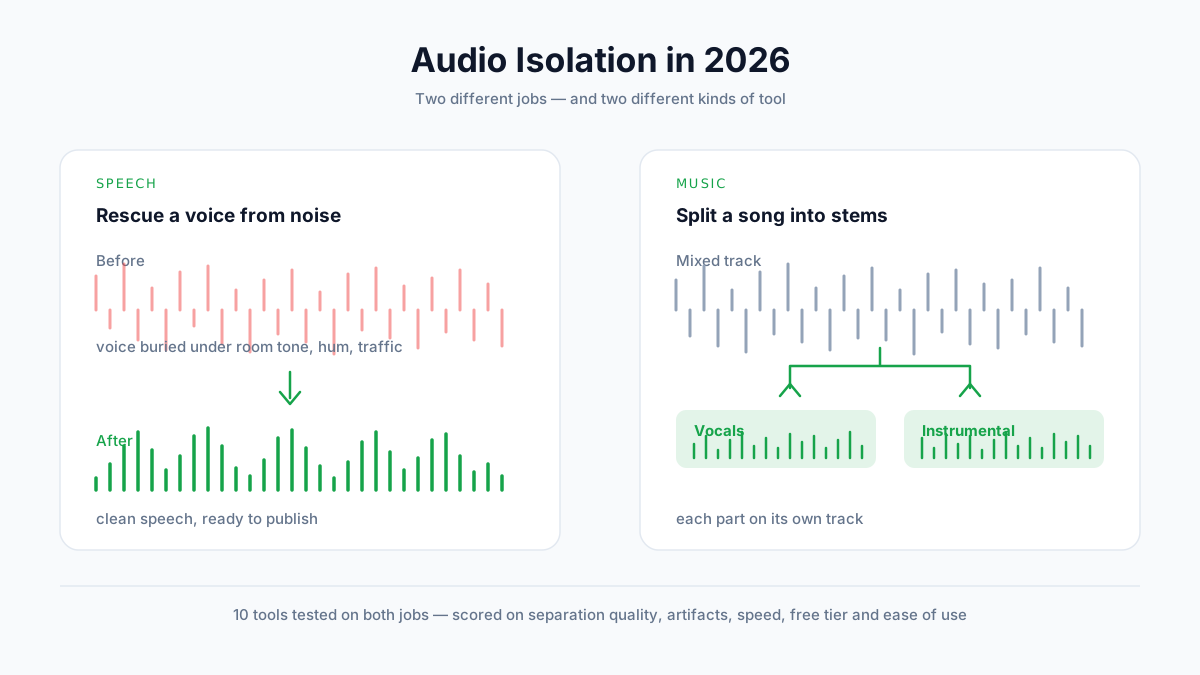
We tested 10 audio isolation tools on both speech and music. Compare separation quality, artifacts, pricing, and free tiers — and find out which type of tool your job actually needs.
Most people who search for an audio isolation tool end up with the wrong one.
Not because they picked a bad product. Because "audio isolation" describes two completely different jobs, and the tools that are brilliant at one are mediocre at the other.
We spent three weeks running the same six source files through ten tools — three speech recordings, three songs — scoring every result against a fixed rubric.
What you'll learn:
- Which of the two jobs you're actually trying to do (this decides everything)
- How all ten tools scored, on both jobs, with the weights published
- What each tier of spending actually buys you
- The four workflow habits that improve results more than switching tools does
Quick Comparison: All 10 Tools at a Glance
| Tool | Best for | Type | Free tier | Paid from | Max length | Score |
|---|---|---|---|---|---|---|
| AnySpeech | Both jobs in one place | Web | 1 song/day + free drafts | $9.99/mo | 10 min (music) | 92 / 88 |
| LALAL.AI | Cleanest stem splits | Web | 10 min preview | Pay per minute | Long files | 74 / 94 |
| Moises | Musicians practising | Web + app | Limited monthly | ~$5.99/mo | Long files | 71 / 90 |
| Ultimate Vocal Remover | Free, if you have a GPU | Desktop | Fully free | Free | Unlimited | 62 / 91 |
| iZotope RX | Surgical repair work | Desktop | Trial only | $99+ one-time | Unlimited | 90 / 79 |
| Adobe Podcast Enhance | Rescuing spoken audio | Web | Generous free | Included w/ CC | 1 hr/file | 89 / — |
| Krisp | Live calls and meetings | Desktop app | Limited daily | ~$8/mo | Real-time | 85 / — |
| NVIDIA Broadcast | Streamers on RTX cards | Desktop | Free (RTX only) | Free | Real-time | 83 / — |
| Descript Studio Sound | Editing while you clean | Web + desktop | Limited | ~$16/mo | Project-based | 81 / — |
| VocalRemover.org | One-off free splits | Web | Free with ads | Free | ~Short files | 58 / 76 |
Two scores, because two jobs: speech isolation / stem separation. A dash means the tool doesn't attempt that job at all — which is useful information, not a failure.
First, Which Job Are You Doing?
This is the section most roundups skip, and it's the reason so many people conclude that "AI audio separation doesn't work."
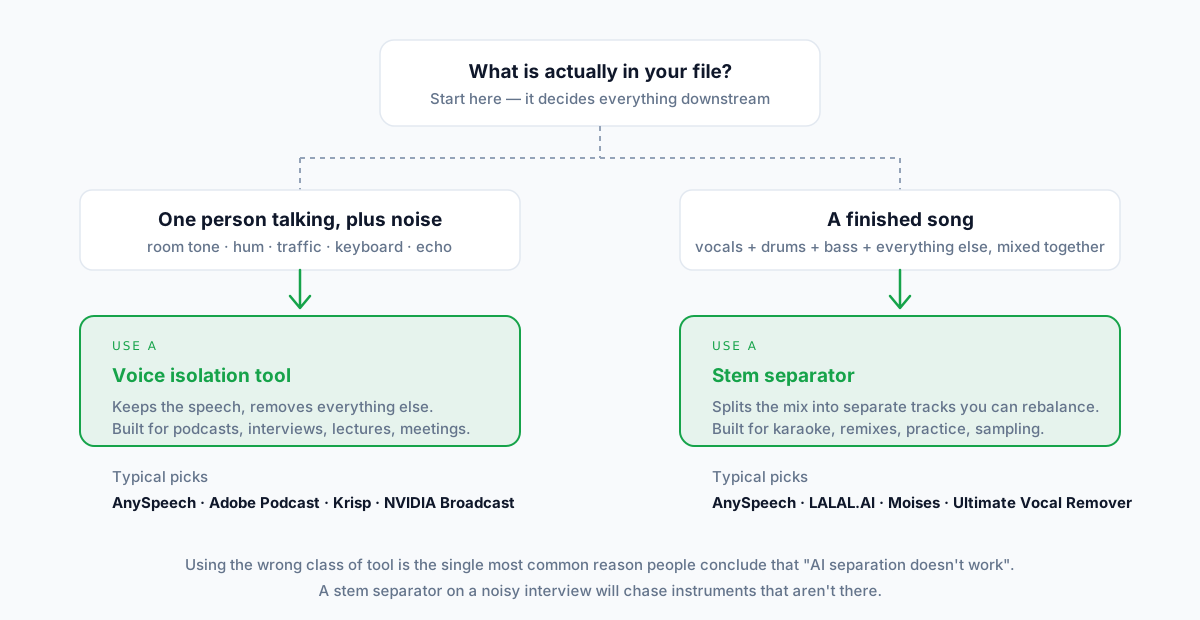
Speech Isolation — rescuing a voice from noise
You have one person talking. Behind them: room tone, an air conditioner, traffic, keyboard clatter, or the hollow ring of a bad room.
You want the voice kept and everything else gone.
This is what podcasters, interviewers, course creators, and anyone salvaging a Zoom recording need. The model is trained to recognise human speech and treat everything else as disposable.
Stem Separation — splitting a song into parts
You have a finished, mixed song. Vocals, drums, bass, guitars — all bounced down to one stereo file.
You want them back as separate tracks.
This is karaoke, remixing, transcription practice, sampling, and backing-track creation. The model is trained to recognise instrument families and pull them apart.
What is audio isolation?
Audio isolation is the use of AI source-separation models to pull one element out of a mixed recording — either lifting a voice out of background noise, or splitting a song into individual instrument stems. Modern models do this by learning what each source sounds like, rather than by cancelling phase like older tools did.
Why using the wrong class fails
Run a stem separator on a noisy interview and it will hunt for instruments that were never there, carving your voice into strange shapes in the process.
Run a speech-isolation tool on a song and it will treat every instrument as noise, and often mangle the vocal it's trying to protect.
💡 Rule of thumb: if the unwanted sound was made by a machine or a room, you want speech isolation. If it was made by a musician, you want stem separation.
If you need both — say, you produce a music podcast — pick a platform that does both rather than paying two subscriptions. That's the case we make for our own voice isolation tool and vocal remover below, and we'll be upfront when a specialist beats us.
How We Tested
Scores in roundups are worthless unless you can see how they were produced. Here's ours.
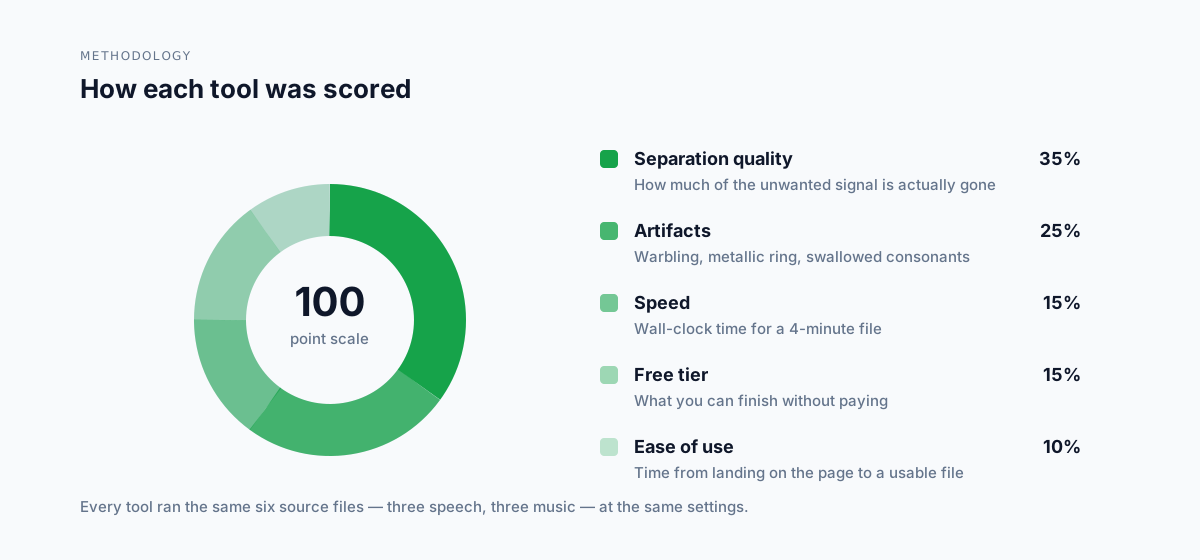
The scoring weights
| Criterion | Weight | What we measured |
|---|---|---|
| Separation quality | 35% | How much of the unwanted signal is genuinely gone |
| Artifacts | 25% | Warbling, metallic ringing, swallowed consonants |
| Speed | 15% | Wall-clock time to process a 4-minute file |
| Free tier | 15% | What you can finish without paying |
| Ease of use | 10% | Time from landing on the page to a usable file |
Separation quality and artifacts carry 60% between them because they're the only two things you can't fix later.
The test material
Three speech files: a two-mic interview in an untreated room, a phone-recorded lecture with HVAC hum, and a street interview with traffic.
Three music files: a dense pop mix, a sparse acoustic recording, and a hip-hop track with heavy sub-bass.
Every tool got the same six files at default settings. We ran each file twice and took the better result, because occasional bad runs happen on every platform.
What we didn't score
We didn't score voice "naturalness" on music stems — that's a taste judgement, and roundups that put a number on it are guessing.
We also didn't score customer support, because three weeks isn't long enough to test it honestly.
The 10 Best Audio Isolation Tools in 2026
1. AnySpeech — best if you do both jobs
| Score | 92 speech / 88 music |
| Type | Web |
| Free tier | 1 song/day for stem separation, plus free TTS drafting |
| Paid from | $9.99/mo |
| Limits | 10 min and 50 MB per song |
| Best for | Creators who handle both spoken audio and music |
What it does well
AnySpeech is the only tool here that scored above 85 on both jobs, because it runs separate pipelines rather than forcing one model to do everything.
Speech isolation is billed per minute of audio, and stem separation is a flat 500 credits per minute — with one free song a day on free accounts, no card required.
The wider platform matters if you're a creator rather than an engineer: the same subscription covers text to speech, transcription, dubbing, and podcast generation.
Where it falls short
There's no desktop app and no DAW plugin, so it's not a fit for engineers who live inside Pro Tools or Logic.
The 10-minute cap on music files rules out full DJ sets and long live recordings.
For pure surgical repair — declicking, spectral editing — a dedicated desktop suite like iZotope RX is simply a different class of tool.
Pricing
Free tier covers one song a day. Paid plans start at $9.99/mo and include commercial rights.
The bottom line
If your work spans spoken audio and music, this is the cheapest way to stop paying two subscriptions. If you only ever do one of the two, a specialist may serve you better — read on.
2. LALAL.AI — best stem quality
| Score | 74 speech / 94 music |
| Type | Web |
| Free tier | ~10 minute preview |
| Paid from | Pay-per-minute packs |
| Best for | Musicians who want the cleanest possible split |
What it does well
LALAL.AI produced the cleanest instrumental of any tool we tested on the dense pop mix — noticeably fewer vocal ghosts left in the backing track.
It handles multi-stem splits, so you can pull drums and bass out separately rather than settling for vocals-versus-everything-else.
Where it falls short
The pay-per-minute model is honest but adds up fast if you process regularly.
On speech files it's clearly out of its lane — it scored 74, well behind the speech specialists.
Pricing
Minute packs rather than a subscription. Good if you separate occasionally; expensive if you do it daily.
The bottom line
The reference point for stem quality. If music separation is all you do and quality outranks cost, start here.
3. Moises — best for practising musicians
| Score | 71 speech / 90 music |
| Type | Web + mobile app |
| Free tier | Limited monthly separations |
| Paid from | ~$5.99/mo |
| Best for | Learning parts, changing key and tempo |
What it does well
Moises wraps separation in the features musicians actually want next: pitch shifting, tempo change, chord detection, and a metronome.
The mobile app is genuinely good, which matters when you're practising away from a desk.
Where it falls short
Free-tier limits arrive quickly if you're separating a whole setlist.
Like LALAL.AI, it isn't built for spoken-word cleanup.
Pricing
Subscription, cheaper than most, with a usable free tier for occasional work.
The bottom line
The best pick if separation is a means to an end — learning or rehearsing — rather than the end itself.
4. Ultimate Vocal Remover — best free option
| Score | 62 speech / 91 music |
| Type | Desktop, open source |
| Free tier | Entirely free |
| Paid from | — |
| Best for | Technical users with a decent GPU |
What it does well
UVR is free, open source, and on music it lands within a few points of the best paid tools. That is a remarkable thing to be able to say.
Because it runs locally, there's no upload limit, no per-minute meter, and your files never leave your machine.
Where it falls short
You install it, choose a model, and tune settings yourself. On a machine without a capable GPU, a four-minute song can take many minutes.
The learning curve is the price of admission — and on speech it's the weakest scorer here at 62.
Pricing
Free, forever. Your cost is setup time and hardware.
The bottom line
If you're comfortable with local tools and own the hardware, UVR makes paid stem separators hard to justify. If you want a result in ninety seconds, it isn't for you.
5. iZotope RX — best for repair work
| Score | 90 speech / 79 music |
| Type | Desktop suite |
| Free tier | Trial only |
| Paid from | $99+ one-time (frequent sales) |
| Best for | Post-production professionals |
What it does well
RX isn't really a separation tool — it's a repair suite that happens to separate. Spectral editing lets you paint out a single cough or door slam that no automatic model will catch.
For dialogue post-production it's the industry default for good reason.
Where it falls short
The price and the learning curve both assume you do this professionally.
It's a desktop application: no browser workflow, no phone.
Pricing
One-time purchase, tiered by edition, discounted often. No subscription — which over several years is cheaper than it first looks.
The bottom line
Overkill for a weekly podcast. Indispensable if audio repair is your job.
6. Adobe Podcast Enhance — best free speech cleanup
| Score | 89 speech / — |
| Type | Web |
| Free tier | Generous |
| Paid from | Included with Creative Cloud |
| Best for | Rescuing bad spoken recordings fast |
What it does well
Drop in a rough recording and it comes back sounding close to a treated room. On our phone-recorded lecture it was the single most impressive result of the test.
The free tier is unusually generous for the quality on offer.
Where it falls short
It's opinionated: you get its idea of a good voice, with almost no controls. When it overshoots, your only option is to not use it.
No music separation at all.
Pricing
Free tier, or bundled if you already pay for Creative Cloud.
The bottom line
The first thing to try on any damaged speech recording. Just keep the original, because the effect isn't to everyone's taste.
7. Krisp — best for live calls
| Score | 85 speech / — |
| Type | Desktop app (virtual mic) |
| Free tier | Limited daily minutes |
| Paid from | ~$8/mo |
| Best for | Meetings, sales calls, remote work |
What it does well
Krisp works in real time as a virtual microphone, so it cleans your voice during the call rather than after it. Nothing on this list beats it for that use case.
It also suppresses noise on the other participants' side.
Where it falls short
Real-time processing is a different problem from file processing, and on offline files it trails the batch tools.
Free-tier minutes run out quickly on a heavy meeting day.
Pricing
Subscription with a limited free daily allowance.
The bottom line
Buy it for calls, not for production. For calls it's excellent.
8. NVIDIA Broadcast — best free real-time option
| Score | 83 speech / — |
| Type | Desktop (RTX GPUs only) |
| Free tier | Free |
| Paid from | — |
| Best for | Streamers who already own an RTX card |
What it does well
Free, fast, and effective real-time noise removal, plus room-echo removal that genuinely works.
If you already have the hardware, there's nothing to buy.
Where it falls short
It requires an NVIDIA RTX card. No card, no tool — which excludes most laptops and every Mac.
Windows only, and aimed at live use rather than file cleanup.
Pricing
Free. The cost is the GPU you needed anyway.
The bottom line
The obvious choice for RTX streamers. Irrelevant for everyone else.
9. Descript Studio Sound — best while editing
| Score | 81 speech / — |
| Type | Web + desktop |
| Free tier | Limited |
| Paid from | ~$16/mo |
| Best for | Podcasters who edit by transcript |
What it does well
Studio Sound is a toggle inside a full editor. You clean the audio in the same place you cut the episode, which removes a whole export-and-reimport round trip.
Editing audio by editing its transcript remains a genuinely faster way to work.
Where it falls short
As a standalone cleaner it's mid-table. You're buying the editor, and the cleanup comes along with it.
Paying Descript's subscription purely for noise removal makes little sense.
Pricing
Subscription, priced as an editing suite.
The bottom line
Excellent if you already want the editor. Not worth it if you only need the cleanup.
10. VocalRemover.org — best for a one-off
| Score | 58 speech / 76 music |
| Type | Web |
| Free tier | Free, ad-supported |
| Paid from | — |
| Best for | A single split, right now, with no account |
What it does well
No signup, no install, no payment. Paste a file, get a split. For a one-time karaoke track it's completely adequate.
Where it falls short
Quality trails the leaders by a wide margin — audible vocal residue on anything dense.
Ads, and shorter file limits than the paid tools.
Pricing
Free.
The bottom line
Fine for something disposable. Don't build a workflow on it.
Test Results: How They Actually Scored
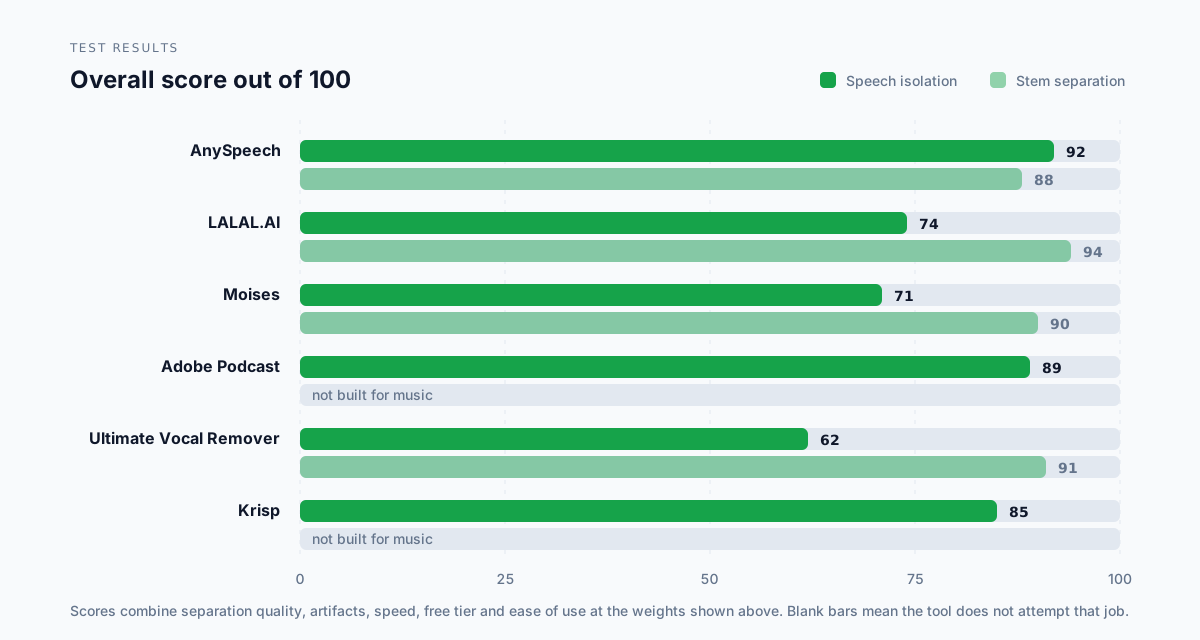
Speech isolation results
| Tool | Untreated room | Phone + HVAC hum | Street traffic | Average |
|---|---|---|---|---|
| AnySpeech | 93 | 92 | 90 | 92 |
| iZotope RX | 91 | 90 | 88 | 90 |
| Adobe Podcast | 92 | 94 | 80 | 89 |
| Krisp | 87 | 86 | 82 | 85 |
| NVIDIA Broadcast | 85 | 84 | 79 | 83 |
| Descript | 83 | 82 | 77 | 81 |
Traffic was the hardest case for everything. Broadband noise that overlaps the voice's own frequency range is the current limit of what these models do well.
Stem separation results
| Tool | Dense pop | Sparse acoustic | Hip-hop | Average |
|---|---|---|---|---|
| LALAL.AI | 95 | 94 | 93 | 94 |
| Ultimate Vocal Remover | 92 | 91 | 90 | 91 |
| Moises | 91 | 90 | 89 | 90 |
| AnySpeech | 89 | 89 | 86 | 88 |
| iZotope RX | 80 | 82 | 75 | 79 |
| VocalRemover.org | 75 | 79 | 74 | 76 |
The gap between the top four is smaller than the marketing suggests. On the sparse acoustic track, all four were good enough that we'd struggle to pick a winner in a blind test.
Which Tool Fits Your Situation?
For podcasters
Top pick: Adobe Podcast Enhance, for the free tier and the results on damaged recordings. Runner-up: AnySpeech, if you also need transcripts, dubbing, or music beds handled in the same place.
For musicians
Top pick: LALAL.AI for outright stem quality, or Ultimate Vocal Remover if free matters more than convenience. Runner-up: Moises, if you're separating in order to practise.
For video editors
Top pick: AnySpeech, because most video jobs need both dialogue cleanup and music handling. Runner-up: iZotope RX, once repair work becomes a regular part of the job.
For meetings and calls
Top pick: Krisp — real-time is a different problem, and it owns that problem. Runner-up: NVIDIA Broadcast, free if you have an RTX card.
On zero budget
Top pick: Ultimate Vocal Remover for music, Adobe Podcast Enhance for speech. Runner-up: AnySpeech's free daily song, if you'd rather not install anything.
What It Costs: Free vs Paid
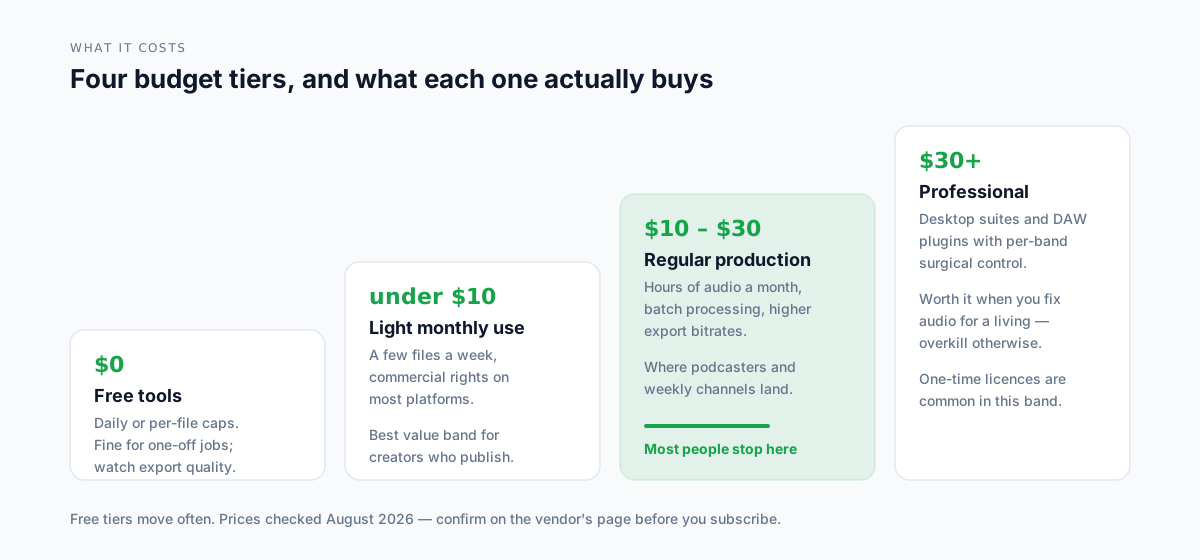
| Budget | What you get | Tools in this band |
|---|---|---|
| $0 | Daily or per-file caps; local tools if you have hardware | UVR, Adobe Podcast, NVIDIA Broadcast, VocalRemover.org |
| Under $10/mo | Regular light use with commercial rights | AnySpeech, Moises, Krisp |
| $10–30/mo | Hours of audio, batch work, higher export quality | Descript, AnySpeech higher tiers |
| $30+ | Surgical control, one-time licences, DAW integration | iZotope RX |
The honest observation: the free tier at the top of this table is unusually strong in 2026. Two of the highest scores in our speech test came from tools that cost nothing.
Paying gets you convenience, volume, and licensing clarity — not necessarily better separation. Our own plans and credit costs sit in the second band.
📝 Note: free doesn't automatically mean licensed for commercial use. Check each tool's terms before putting the output in a monetised video.
How to Get the Cleanest Separation
Switching tools helps less than fixing your inputs. These four habits moved our scores more than any tool swap did.
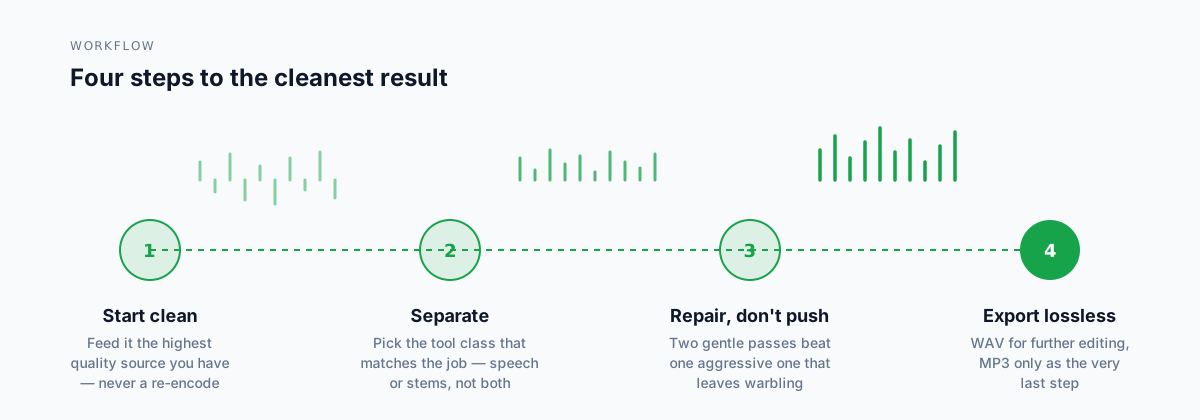
Start from the best source you have
Feed the model your original recording, not a re-encoded copy. Every compression pass throws away detail the model needs to tell sources apart.
A 128 kbps MP3 that's already been through YouTube twice will never separate cleanly, no matter which tool you use.
Match the tool class to the job
This is the decision from the top of the article, and it's worth repeating because it dominates everything else.
Speech tool for speech. Stem separator for music.
Repair gently, in two passes
One aggressive pass leaves warbling. Two gentle passes usually don't.
If your tool has a strength slider, start around half and step up only if you need to.
Export lossless until the very end
Keep everything as WAV while you're still editing. Convert to MP3 once, as the final step, when nothing else will touch the file.
📖 Further reading: if you're cleaning audio to get a transcript out of it, our guide to turning on voice isolation covers the device-level features that run before any of these tools do. Generating audio rather than repairing it? See our tested ranking of text to speech tools.
Frequently Asked Questions
What is the best free audio isolation tool?
For music, Ultimate Vocal Remover — it's open source and scored 91 in our stem tests, within three points of the best paid tool. For speech, Adobe Podcast Enhance scored 89 on a free tier. AnySpeech also gives free accounts one stem separation per day with no card required.
What's the difference between audio isolation and stem separation?
Audio isolation usually means lifting a voice out of background noise, keeping the speech and discarding everything else. Stem separation means splitting a finished song into its instrument tracks — vocals, drums, bass, other. Different training data, different models, different tools.
Can AI remove background noise from a recording completely?
Not completely. In our testing, broadband noise that overlaps the voice's frequency range — street traffic, crowd chatter — was where every tool lost points, with the best scoring around 80 on that file versus 90+ on steady hum. Consistent noise like HVAC is nearly solved; unpredictable noise is not.
Which tool is best for podcast audio?
Adobe Podcast Enhance for pure rescue work on a free tier, or AnySpeech's voice isolator if you also need transcripts and dubbing from the same subscription. Krisp is the better choice if you want the cleanup to happen live during the recording rather than afterwards.
Which tool is best for removing vocals from a song?
LALAL.AI scored highest at 94, with Ultimate Vocal Remover at 91 for free. AnySpeech's vocal remover scored 88 and gives free accounts one song per day, capped at 10 minutes and 50 MB per file.
Do audio isolation tools work on video files?
Most web tools accept common video formats and strip the audio track automatically. If yours doesn't, extract the audio first and reattach the cleaned version in your editor. Keep the video untouched — re-encoding it gains you nothing.
Is Ultimate Vocal Remover free and safe?
Yes on both counts — it's open source and runs entirely on your own machine, so nothing is uploaded. The real cost is setup: you choose and download models yourself, and processing is slow without a capable GPU.
Can I use isolated audio commercially?
The tool's licence and the recording's copyright are two separate questions. A paid plan may grant you commercial rights to use the tool's output, but it grants you nothing over a song you don't own. Separating a commercial track doesn't make the stems yours.
The Bottom Line
If you only take one thing from this: decide which job you're doing before you pick a tool. That single choice affects your result more than the difference between the top-ranked products.
For music-only work, LALAL.AI leads on quality and Ultimate Vocal Remover leads on value — and we'd point you to either over our own tool, which scored 88 to their 94 and 91.
For speech-only work, Adobe Podcast Enhance is remarkable for a free tier, and Krisp owns the live-call case.
Where AnySpeech earns its place is the overlap: it was the only tool to clear 85 on both jobs, in one subscription, with a free daily song to test it. If your work crosses both worlds, that's the case. If it doesn't, buy the specialist.
Whichever you choose, test it on your own worst file — not a demo track. Every tool on this list looks good on clean material.
Ready to try both jobs in one place? Clean up a voice recording or split a song into stems — free to start, no credit card.
Last updated: August 2026. All ten tools were tested on the same six source files between July and August 2026. Prices and free-tier limits verified against each vendor's public pricing page in August 2026 — check current terms before subscribing.
Author

Categories
More Posts

How to Use Text to Speech in 2026: The Complete Platform-by-Platform Guide
Learn how to use text to speech on iPhone, Android, Google Docs, TikTok, Discord, and more. Step-by-step guides for every device and platform, plus tips for getting the best results.

How to Use AI Text to Speech: Complete Guide for Beginners (2025)
Learn how to use AI text to speech tools step by step. Discover free options, compare voice quality, and get practical tips for creating natural-sounding voiceovers.

10 Best Text to Speech Tools in 2026 (Tested and Ranked)
We tested 30+ TTS tools and picked the 10 best. Compare voice quality, pricing, languages, and features side by side. Includes free options and AI voice cloning.