Text to Speech for Accessibility: A Guide for Dyslexia, ADHD & Low Vision (2026)
How text to speech helps with dyslexia, ADHD, and low vision — who it helps, what the research says, what to look for in a tool, and how to start reading by ear for free.
Reading isn't equally easy for everyone.
For millions of people, a page of text isn't information — it's a wall. Dyslexia makes decoding words slow and exhausting. ADHD makes staying on the line a battle. Low vision turns small print into a strain. For language learners, the words on the screen don't match the sounds in their head.
Text to speech quietly removes that wall. It turns any written text into spoken audio — so reading becomes listening, and the page finally opens.
This guide explains how text to speech helps with dyslexia, ADHD, low vision, and language learning, what the research actually shows, and how to start using it for free today.
Quick answer: Text to speech (TTS) is assistive technology that reads written text aloud, so people who find reading difficult can listen instead. It's widely used to support dyslexia, ADHD, and low vision because it removes the effort of decoding text and frees attention for understanding. You can start for free with a free text to speech tool — paste your text, choose a natural voice, and listen.
What you'll learn:
- What text to speech for accessibility actually is
- What the research says about reading comprehension
- Exactly who it helps — and the specific barrier it removes for each group
- What to look for in an accessible TTS tool
- A free, step-by-step way to start reading by ear
What is text to speech for accessibility?
Text to speech is technology that converts written text into spoken audio. As assistive technology, it lets people who struggle to read with their eyes take in the same content with their ears.
It's used everywhere reading happens: textbooks, articles, emails, PDFs, web pages, and notes. You select the text, and a natural-sounding voice reads it aloud, often with adjustable speed.
One distinction worth clearing up: text to speech is not the same as a screen reader. A screen reader narrates and navigates an entire device interface for blind and low-vision users. Text to speech reads specific content you choose. They overlap, and many people use both — but TTS is the simpler, more flexible tool for "read this to me."
💡 In short: A screen reader runs your whole device by voice. Text to speech reads the specific text you point it at. Different jobs, both valuable.
Does text to speech actually help? What the research says
This isn't just a convenience feature. The evidence for reading support is strong.
A 2018 meta-analysis published in the Journal of Learning Disabilities found that text-to-speech and read-aloud presentation positively impacts reading comprehension for individuals with reading disabilities. In other words: when struggling readers listen as well as read, they understand more.
The International Dyslexia Association puts it even more directly, describing text-to-speech technology as potentially as vital for students with dyslexia as a screen reader is for someone who is blind.
Why does it work? Reading has two parts: decoding (turning letters into sounds and words) and comprehension (understanding what those words mean). For people with dyslexia or other reading difficulties, decoding eats up most of their mental energy — leaving little left for actually understanding the content. Text to speech handles the decoding, so all that energy goes to comprehension instead.
There's a second effect, too: combining seeing and hearing the same words (a multisensory approach) reinforces learning and helps many readers track along and retain more.
📖 Further reading: For deeper background on assistive technology for reading, organizations like the International Dyslexia Association and Understood.org publish research-backed guidance.
Who text to speech helps — and how
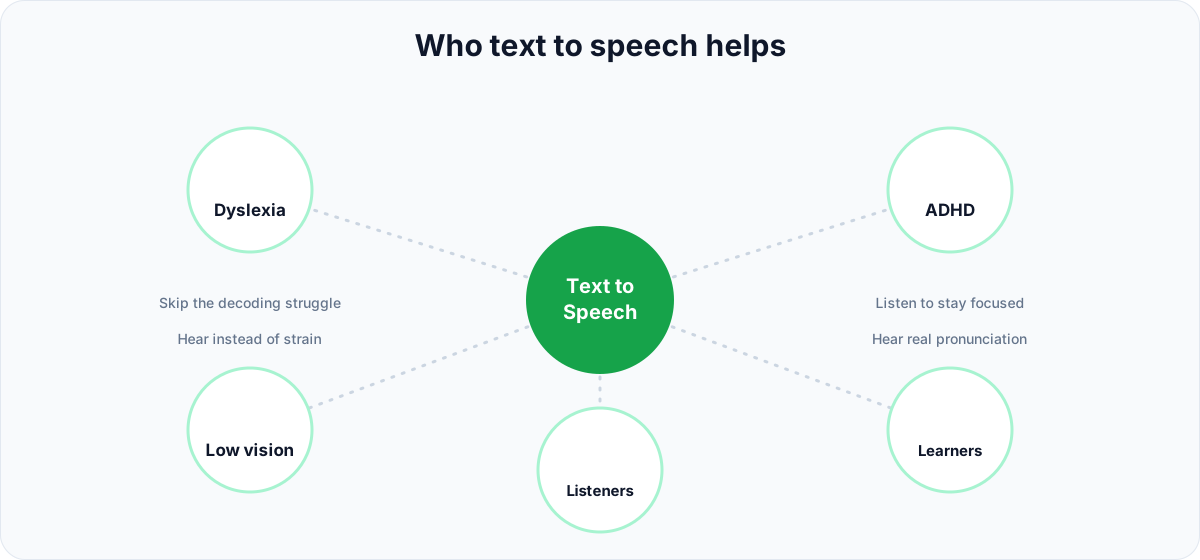
TTS isn't a single-purpose tool. It removes a different specific barrier for each group of people.
People with dyslexia
For readers with dyslexia, decoding is slow and tiring. Text to speech skips that bottleneck entirely — the words arrive as sound, so comprehension and confidence both go up. A natural voice at a slightly slower speed, followed along with the eyes, works best. It's the difference between dreading a chapter and simply getting through it.
People with ADHD
Sustained silent reading is hard when attention drifts. Listening — especially while following along with the text — gives the brain a steadier input to lock onto, which improves focus and the odds of actually finishing a long document. Headphones help block out distractions, and many people find a slightly faster pace keeps them engaged rather than bored.
People with low vision or blindness
When small print is a strain, listening removes it. Text to speech lets people with low vision take in long documents comfortably, and it pairs naturally with larger text and high-contrast display settings. (For navigating an entire device, a dedicated screen reader is the right tool — TTS shines for reading specific content.)
Language learners (ESL)
Reading a new language and hearing it are two different skills. Text to speech with multilingual voices lets learners hear correct pronunciation, rhythm, and intonation while they read along — closing the gap between the words on the page and how they're actually spoken. It's like having a patient native speaker read any text aloud, on demand.
Auditory learners and everyone else
Plenty of people without a diagnosis simply absorb information better by listening — or just have tired eyes, a long commute, or their hands full. This is the "curb-cut effect": accessibility features built for specific needs end up helping everyone. Turning an article into audio for the drive home is accessibility too.
What makes a text to speech tool good for accessibility
Not all TTS is created equal. If you're choosing a tool for reading support, these are the things that actually matter.
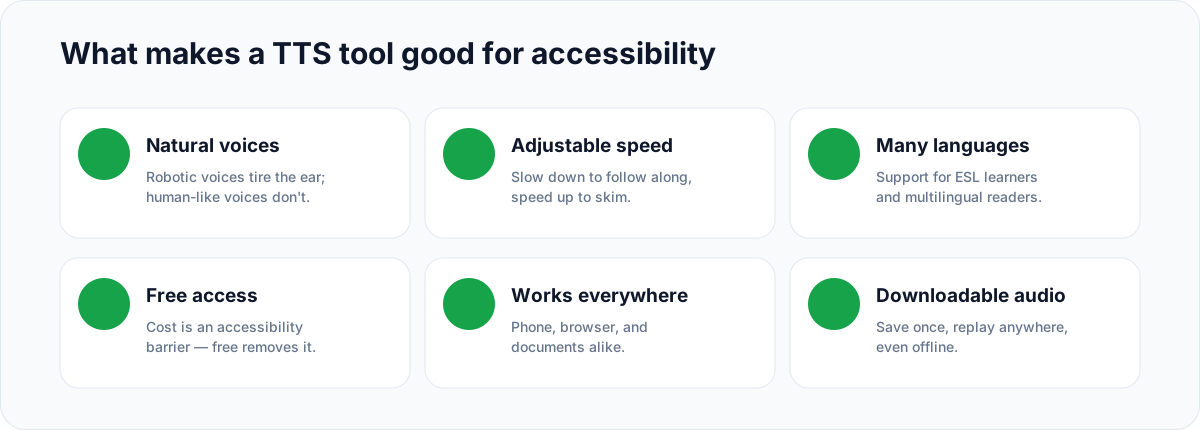
- Natural, human-like voices. Robotic, monotone voices cause listening fatigue fast — which defeats the purpose. Natural neural voices are far easier to listen to for long stretches.
- Adjustable reading speed. The ability to slow down (to follow along) or speed up (to skim) is essential. Different readers and different tasks need different paces.
- Multiple languages and accents. Crucial for ESL learners and multilingual households, and for reading content that isn't in your first language.
- Free or low-cost access. Cost is itself an accessibility barrier. A genuinely free option means students, families, and schools aren't priced out of reading support.
- Works on every device. Phone, browser, and documents — reading support should be wherever the reading happens.
- Downloadable audio. Saving the audio once and replaying it anywhere (even offline) makes review easy and reliable.
A robotic voice locked behind a paywall isn't accessibility. A natural voice, at a comfortable speed, available for free, is.
How to start using text to speech for free
You don't need special equipment or a subscription to begin. Here's the whole process.
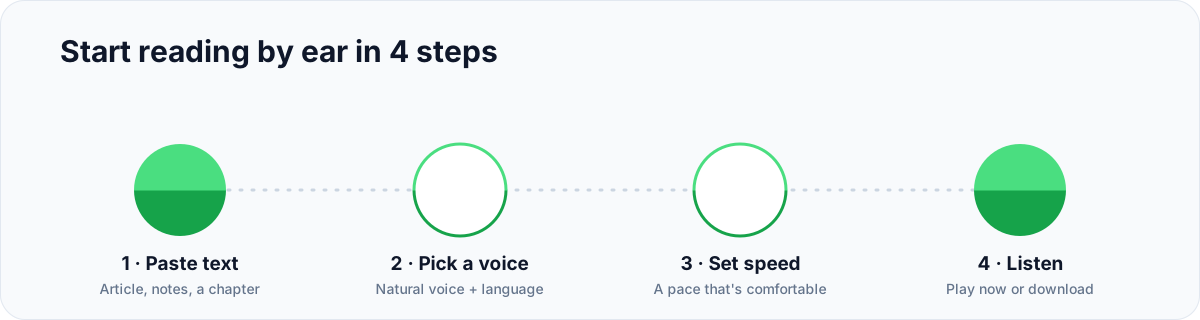
Step 1: Paste or type your text
Open a free text to speech tool and drop in whatever you need read — an article, a chapter, an email, or your own notes.
Step 2: Choose a natural voice and language
Pick a natural-sounding voice in the language of your text. If you're a language learner, choose a voice in the language you're studying to hear authentic pronunciation.
Step 3: Set a comfortable reading speed
Slow it down if you're following along word by word; speed it up if you're reviewing familiar material. There's no "right" speed — only the one that works for you.
Step 4: Listen, or download the audio
Press play and listen, or download the audio so you can replay it on the bus, at the gym, or anywhere offline. For longer texts, a full text to speech generator gives you more voices and options.
Tips for getting the most out of TTS (by need)
The setup that works best depends on why you're using it:
- Dyslexia: Use the most natural voice at a slightly slower speed, and follow along with your eyes. The combination of seeing and hearing reinforces the words.
- ADHD: Put on headphones to cut distractions, and listen and read at the same time. A slightly faster pace can keep you engaged on long, dry material.
- Studying: Convert textbook chapters and notes to audio, then review on the go. Re-listening is a powerful, low-effort way to revise. (You can also convert text to audio files to keep a personal audio library.)
- Low vision: Pair TTS with your device's large-text and high-contrast settings for the most comfortable experience.
Text to speech in the classroom — for students, educators, and parents
Reading support shouldn't depend on who can afford it. Text to speech is one of the most practical, lowest-friction tools in the accessibility toolkit — and it helps three groups at once.
For students: Turn assignments and readings into audio to keep pace with the class. In many schools, text to speech is an approved accommodation for assignments and tests — it levels the playing field without changing what's being learned.
For educators: Offer audio versions of materials so every student can access the content their own way. This aligns with Universal Design for Learning (UDL), which encourages providing information in multiple formats from the start rather than retrofitting it later.
For parents: Reading time at home doesn't have to be a nightly struggle. Letting a child listen to a book or assignment — and follow along — builds comprehension and, often, a more positive relationship with reading.
Because AnySpeech's free tier removes the cost barrier, families and classrooms can use natural-voice reading support without a budget conversation.
Text to speech vs. audiobooks: which is better for accessibility?
People often ask whether they should just use audiobooks instead. The honest answer: they solve different problems, and most people benefit from both.
Audiobooks are professionally narrated, polished, and great for books that have an audio edition. But they only cover content someone chose to record — you can't get an audiobook of your homework assignment, this morning's email, a PDF your teacher sent, or the article you're reading right now.
Text to speech covers everything else. It reads any text on demand: web pages, documents, notes, messages, and study material — in seconds, in many languages, at a speed you control. For accessibility, that flexibility is the whole point. Reading support that only works on pre-recorded books leaves out most of the reading a student or professional actually does in a day.
A good rule of thumb: use audiobooks for published books you want to enjoy, and text to speech for the everyday reading you have to get through. Together they cover almost everything.
Common myths about text to speech, cleared up
A few outdated beliefs still keep people from trying TTS. Let's clear them up:
- "It's cheating." It isn't. Text to speech changes how someone accesses content, not what they learn. A reader with dyslexia listening to a chapter is doing the same comprehension work as everyone else — just without the decoding tax. That's why schools approve it as an accommodation.
- "The voices sound robotic." That was true years ago. Modern neural voices are natural enough to listen to for hours, which is exactly what makes them practical for real reading support.
- "It's only for people with disabilities." Accessibility helps everyone. Commuters, multitaskers, and tired-eyed late-night readers all benefit — the curb-cut effect in action.
- "It's complicated to set up." It takes about a minute: paste text, pick a voice, press play. No special hardware required.
Frequently asked questions
Is text to speech good for dyslexia?
Yes. By converting text to audio, TTS removes the effortful decoding step that makes reading slow and tiring for people with dyslexia, freeing mental energy for comprehension. A 2018 meta-analysis in the Journal of Learning Disabilities found read-aloud presentation positively impacts reading comprehension for readers with disabilities.
Does text to speech help with ADHD?
For many people with ADHD, listening — especially while following along with the eyes — sustains attention better than silent reading and improves completion of long texts. Using headphones to block out distractions and a slightly faster, natural voice often helps maintain focus.
Is there a free text to speech tool for accessibility?
Yes. AnySpeech offers a free tier with natural neural voices and adjustable speed — no cost barrier. Free access matters because affordability is itself an accessibility issue for students, families, and schools.
What's the difference between text to speech and a screen reader?
Text to speech reads specific text you choose — a document, article, or note — aloud on demand. A screen reader narrates and lets you navigate an entire device interface for blind and low-vision users. They overlap, but do different jobs; many people use both.
What makes a text to speech voice good for reading support?
Natural, human-like voices reduce listening fatigue, adjustable speed lets readers find a comfortable pace, and multiple languages support ESL learners. Robotic voices and fixed speeds make long-form listening harder and are best avoided for accessibility.
Can students use text to speech for studying?
Yes. Converting textbook chapters, articles, and notes into audio lets students review while commuting or doing chores, and reinforces material by combining seeing and hearing. Many schools also permit TTS as an approved accommodation.
Can text to speech read in other languages?
Yes. Multilingual text to speech can read content in many languages with natural pronunciation, which is especially helpful for ESL learners who want to hear how text actually sounds while they read along.
Reading shouldn't be a barrier
Text to speech doesn't make anyone read "less." It gives people a second way in — through the ears instead of the eyes — and for millions, that's the difference between struggling and understanding.
Whether it's a student with dyslexia getting through a chapter, someone with ADHD finishing a long report, or a learner hearing a new language come alive, the technology does the same quiet thing: it turns text into something you can simply listen to.
Try it now with the free text to speech tool — or read our complete guide to text to speech to see everything it can do.
If this could help someone you know, pass it along.
Author

Categories
More Posts
How to Make an AI Podcast: From One Idea to a Multi-Speaker Show (2026)
Learn how to make an AI podcast in minutes. Turn a single topic or script into a natural two-host conversation with AI voices — step by step, no mic or editing needed.

How to Use Text to Speech on Mac: The Complete Guide (2026)
Learn how to use text to speech on Mac with built-in tools, shortcuts, and AI voices. Plus how to do speech to text with Dictation — step by step.
How to Remove Background Music from a Video (7 Ways, 2026)
Remove background music from a video and keep the voice. 7 methods: online AI tools, CapCut, YouTube Erase song, Resolve, Premiere, iPhone and Audacity.