How to Make AI Music: From Idea to Finished Song (2026)
Learn how to make AI music step by step: prompts that work, your own lyrics, fixes for bad results, and the copyright rules to know before you release.
You can now type one sentence and get back a three-minute song with verses, a chorus and a singer who sounds like a person.
That's the easy part. The hard part is getting the song you had in mind, not a generic one.
Most first attempts miss for the same three reasons: the prompt is vague, the lyrics are hard to sing, or there's no plan for what to change on the second try.
This guide fixes all three. You'll learn how to make AI music step by step, from the first prompt to a finished MP3 you can put in a video, a podcast or a birthday surprise.
Every example comes with the exact prompt or lyrics that went in and the song that came out, so you can hear the difference yourself.
What you'll learn:
- A six-step workflow that works for a 30-second jingle and a full song alike
- A five-part prompt formula, with real prompts and the songs they made
- How to make AI sing your own lyrics, using structure tags
- Which settings matter: voice, length, excluded styles and creativity
- How to fix generic songs, buried vocals and rushed lyrics
- What you can legally do with an AI song, and what to check before you release one
Quick answer: To make AI music, open an AI music generator and describe the song in one or two sentences: genre, mood, tempo, instruments and voice. Or paste your own lyrics, tagged with [Verse] and [Chorus]. Generate, compare the two versions you get back, change one detail if needed, and download the MP3. A full song takes about a minute.
How AI Music Generators Work
You don't need to understand the model to use it well. But knowing what it can and can't do saves a lot of wasted attempts.
What Happens When You Press Generate
A text-to-music model learned the link between words and sound from a very large amount of music.
When you describe a song, it writes the melody, the chords, the arrangement, the vocals and the mix in one pass.
It doesn't stitch together stock loops. Every song is new, which is why the same prompt never gives the same result twice.
What You Control and What the AI Decides
Your words steer the song. They don't dictate every note.
| Part of the song | What you control | What the AI decides |
|---|---|---|
| Genre and mood | The words in your prompt | Anything you leave out |
| Lyrics | Every word, in Custom mode | Everything, in Simple mode |
| Melody | Nothing directly | The whole tune |
| Structure | Section tags in your lyrics | The arrangement inside each section |
| Voice | Male or female, plus texture words | The exact timbre |
| Length | 30 seconds to 6 minutes, in Custom mode | Usually 2 to 4 minutes on Auto |
The row that surprises people is melody. You can't hum a tune and have the AI follow it. You describe the feel, and the model writes the tune.
Why You Get Two Versions
Each generation returns two songs from the same input.
They're two takes on your idea, not a bug. One often has the better verse and the other the better chorus. Pick the closer one, then refine from there.
Three Ways to Make Music with AI
"Making AI music" can mean three quite different things.
| Route | What you get | Skill needed | Best for |
|---|---|---|---|
| Text-to-song generator | A finished song with vocals, already mixed | None | Videos, personal songs, jingles, demos |
| AI inside a DAW | Help with drums, bass, mixing or mastering | Production basics | People who already make music |
| AI stem and remix tools | An existing song split into parts | Very little | Karaoke, remixes, practice tracks |
This guide covers the first route, which is what most people mean when they ask how to make AI music: going from an idea to a finished song without instruments or recording gear.
If you already produce, the second route is worth a look too. Logic Pro's Session Players, for example, add an AI drummer, bass player and keyboard player to your own project.
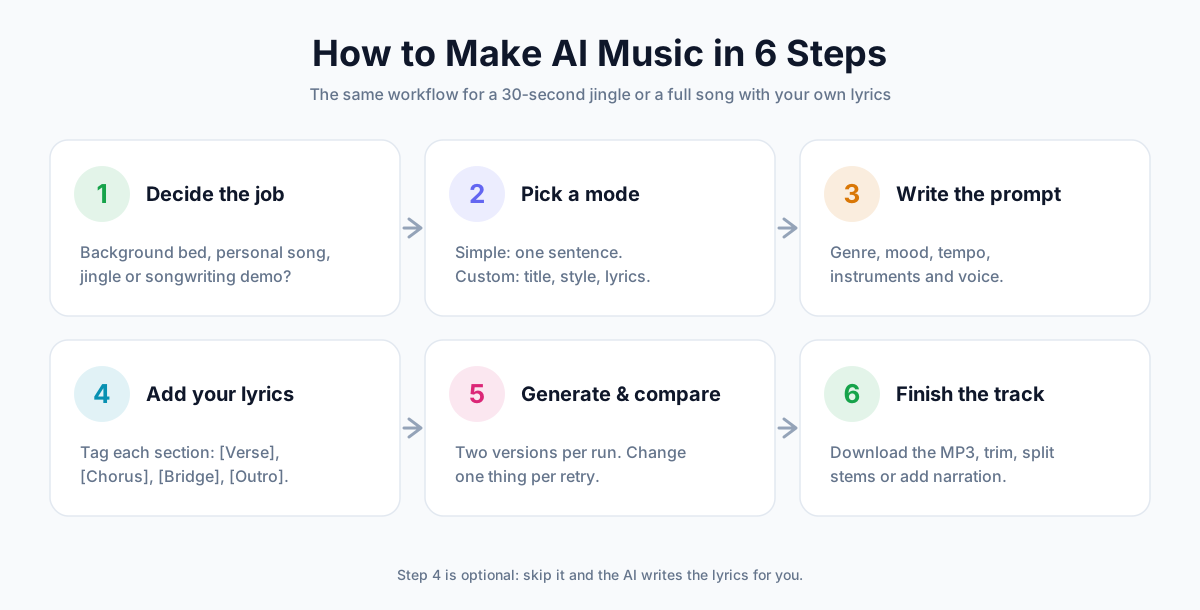
Step 1: Decide What the Song Is For
Ask how to make AI music that actually works, and the answer starts here, before the prompt. The job decides almost everything else: vocals or not, how long, which mode and what to put in the prompt.
So answer one question first: where will this song be heard?
Match the Settings to the Job
| Job | Vocals | Length | Mode | Prompt tip |
|---|---|---|---|---|
| Video or vlog background | Instrumental | Match the edit | Custom | Say "background music" and name the pace |
| Podcast intro | Instrumental | 30 seconds, then trim | Custom | Ask for a short, punchy opening |
| Birthday or wedding song | Vocals | Auto | Custom, with your lyrics | Use names, places and shared memories |
| Jingle or ad | Optional | 30 seconds | Custom | Ask for a "catchy, singable hook" |
| Songwriting demo | Vocals | Auto | Custom, with your lyrics | Keep the style rough; you're testing the words |
| Study or focus music | Instrumental | Auto | Simple | "Lo-fi", "mellow", "no drops" |
Example: A One-Minute Travel Vlog Bed
Here's an instrumental made for exactly one job: sitting quietly under travel footage.
Style prompt (Custom mode, instrumental):
upbeat cinematic background music for a travel vlog, warm acoustic guitar, light percussion, soft strings, hopeful and brightBoth versions came back at 1:02 with no vocals, which is what you want under a voiceover.
Step 2: Choose Simple or Custom Mode
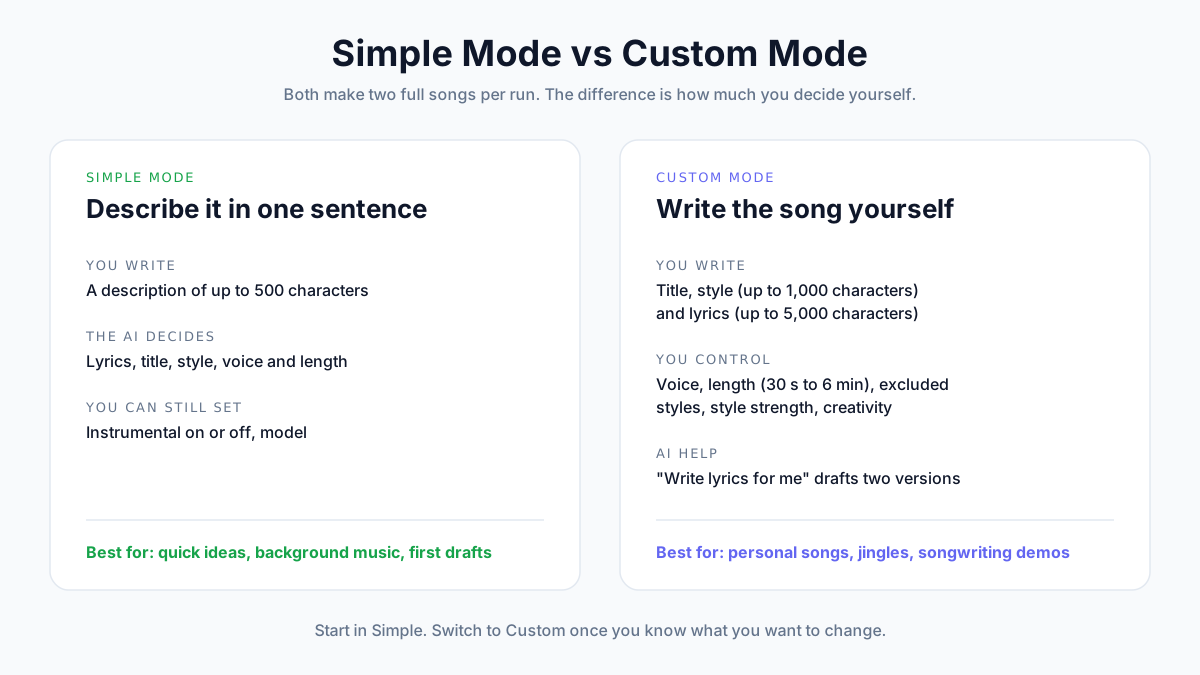
Both modes make two full songs per run. The difference is how much you decide yourself.
Simple Mode: One Sentence In, Two Songs Out
In Simple mode you write a description of up to 500 characters. The AI writes the lyrics, picks the style and names the song.
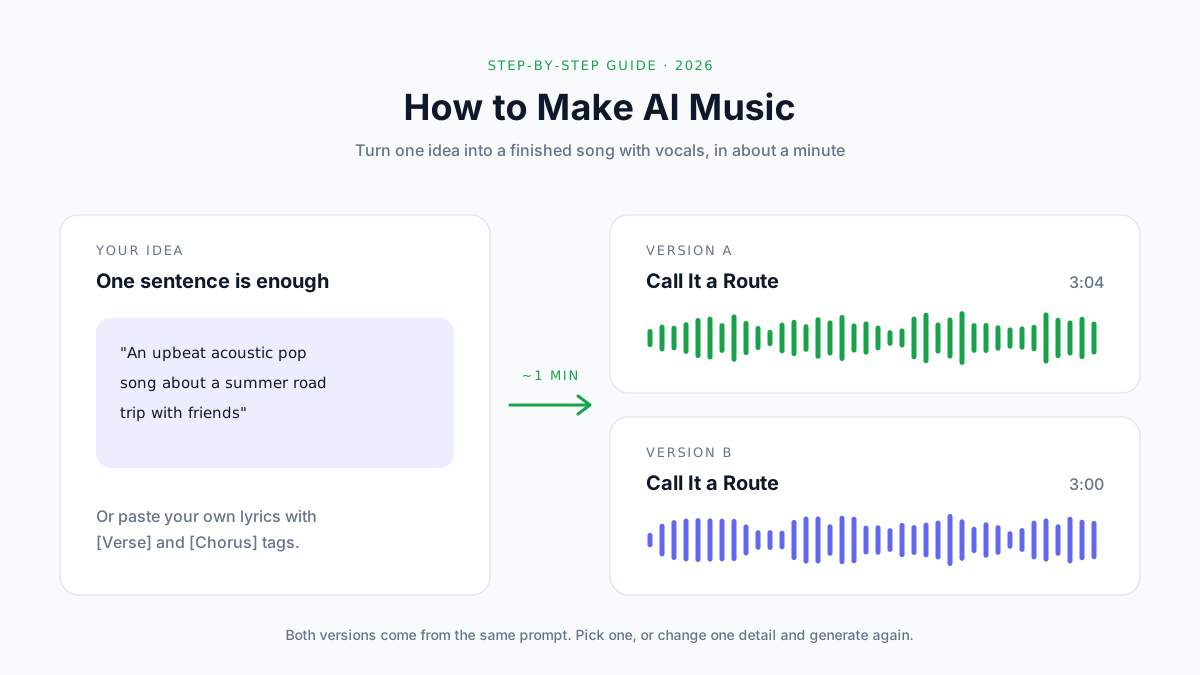
It's the fastest way to hear an idea. Here's a 65-character prompt:
An upbeat acoustic pop song about a summer road trip with friendsThe model titled it "Call It a Route" and wrote all the lyrics itself. All from one line.
What the Model Does with a Short Prompt
Short prompts work because the model fills in the details.
This instrumental started as one line:
a calm lo-fi hip hop beat for late-night studying, mellow piano, soft drums, vinyl crackleThe style notes that came back with the song read like a producer's brief: "Verse section stays sparse with piano, dust, and drums; a small lift adds filtered keys and tape-wobble before the loop returns."
You didn't ask for a "small lift" or "tape wobble". The model decided. That's great for background music and less great when you have a specific song in your head.
Custom Mode: You Write the Song
Custom mode gives you separate boxes:
- Title, up to 80 characters
- Style, up to 1,000 characters, typed or picked from Genre, Mood, Voice, Tempo and Instruments tags
- Lyrics, up to 5,000 characters, or switch on Instrumental
It also unlocks the settings below.
Custom Mode Settings
| Setting | What it does | When to change it |
|---|---|---|
| Vocal | Auto, male or female voice | When the song needs a particular singer |
| Duration | Auto, or any length from 30 seconds to 6 minutes | Videos, ads and anything with a fixed slot |
| Exclude styles | Keeps out sounds you don't want | When something unwanted keeps showing up |
| Style strength | How closely the song follows your style text | Raise it if the model keeps drifting off-genre |
| Creativity | How far the model may stray from the obvious | Raise it for surprises, lower it for safe results |
Above both modes you pick a model: Studio for the best quality, Fast for quicker results, or Experimental for bolder ideas. All three cost the same.
Which Mode Should You Use?
Start in Simple mode. It tells you quickly whether the idea works at all.
Switch to Custom the moment you know what you'd change: your own words, a different singer, a set length or a sound you want gone.
Step 3: Write a Prompt That Works
A prompt is a brief for a session band. "Make it good" doesn't help a band, and it doesn't help a model either.
The Five-Part Prompt Formula
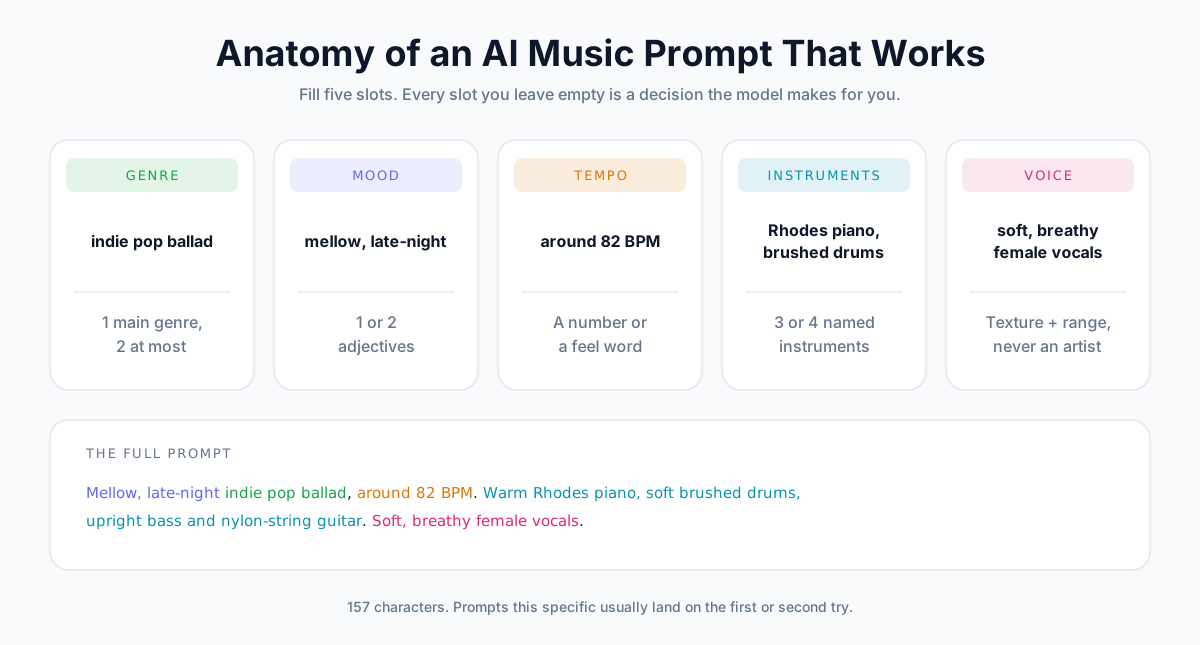
Cover five slots: genre, mood, tempo, instruments and voice. Leave one out and the model guesses it for you.
Genre: One Main Style
Pick one genre, two at most. "Indie pop ballad" works. "Jazz metal reggae trap" gives the model four directions and it can only follow one.
If you want a blend, name the main genre first: "R&B with a touch of gospel."
Mood: One or Two Adjectives
"Mellow", "euphoric", "nostalgic", "dark". One or two are enough.
Mood words shape the chords, the singing and the mix all at once, so they do a lot of work for their size.
Tempo: A Number or a Feel
A BPM number is the most precise. A feel word ("slow", "driving", "upbeat") works when you don't know the number.
| Style | Typical tempo |
|---|---|
| Ballad, slow jam, ambient | 60 to 80 BPM |
| Hip hop, boom bap, R&B | 80 to 100 BPM |
| Pop, rock, funk | 100 to 130 BPM |
| House and EDM | 120 to 130 BPM |
| Punk, drum and bass | 160 BPM and up |
Instruments: Three or Four Named Sounds
"Warm Rhodes piano, soft brushed drums, upright bass" paints a picture. "Instruments" doesn't.
More than four or five instruments and the mix gets crowded, which tends to push the vocals back.
Voice: Texture, Not a Name
Describe how the singer sounds: "soft, breathy female vocals", "raspy male vocals", "powerful soul voice", "airy falsetto".
Leave out real artist names. Prompts that name them are rejected (more on that below).
Weak vs Strong Prompts
| Weak prompt | Strong prompt | What changed |
|---|---|---|
| "a happy song" | "Upbeat acoustic pop around 110 BPM, handclaps, bright guitar, warm male vocals, about a summer road trip" | All five slots, plus a topic |
| "sad piano" | "Slow, melancholic piano ballad around 70 BPM, soft strings, intimate female vocals, about missing an old friend" | Mood, tempo, voice and topic |
| "rap beat" | "Boom bap hip hop around 90 BPM, dusty sampled piano loop, hard-hitting drums, vinyl crackle" | A sub-genre and named sounds |
| "epic music" | "Epic cinematic trailer music, booming drums, rising strings, brass hits, slow build to a huge final hit" | Instruments and a shape |
Describe the Arrangement, Not Just the Sound
The strongest prompts say how the song moves.
The style notes for "Call It a Route" do this: "Open with guitar and a small percussion pulse, build into buoyant full-band choruses, then pull back for a more intimate bridge before a final lifted chorus."
You can write the same kind of sentence yourself in Custom mode. "Starts with solo piano, drums enter at the chorus, quiet last verse" is enough.
Name the Sound, Never the Artist
Prompts that name real singers or bands are rejected, and the credits go back to your balance.
Describe what you like about the artist instead:
- The era: "early 2000s pop-punk", "80s synth-pop"
- The voice: "husky alto", "bright tenor with vibrato"
- The production: "big gated drums", "lo-fi bedroom recording", "dry, close-mic vocals"
You'll often get closer to the sound you want this way, because you've named the parts that matter to you.
Use Exclude Styles for What Keeps Showing Up
If every version has autotune you didn't ask for, don't rewrite the whole prompt. Put "autotune" in Exclude styles in the Custom mode settings.
Keep exclusions short: two or three words each.
Example Prompts by Genre
Each of these is a real style prompt, followed by version A of the song it made.
Alternative Rock
Energetic alternative rock at around 150 BPM. Driving live drums with crashing cymbals, crunchy overdriven electric guitars, punchy bass and a soaring guitar solo before the last chorus.Progressive House
Euphoric progressive house EDM at 126 BPM. Bright supersaw chords, pulsing sidechained bass, four-on-the-floor kick, shimmering arpeggios and big risers.R&B Slow Jam
Smooth contemporary R&B slow jam around 80 BPM. Warm Rhodes electric piano, deep round sub bass, crisp finger snaps and soft rolling hi-hats, subtle clean guitar licks.Notice the pattern: genre and tempo first, then three to five named sounds. None of them is longer than about 200 characters.
Step 4: Add Your Own Lyrics
This is how to make an AI song that's actually yours. Simple mode writes lyrics for you. Custom mode sings whatever you paste in.
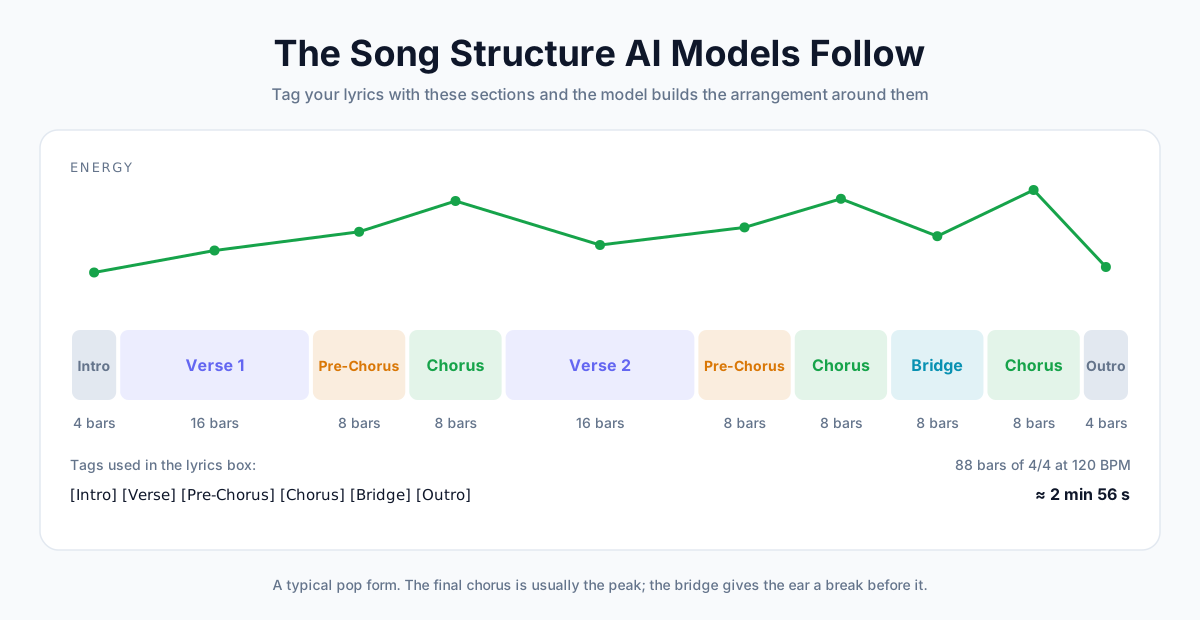
Structure Tags the Model Understands
Put a tag in square brackets on its own line before each section. The model uses them to decide where the energy rises and falls.
| Tag | What it does | Typical length |
|---|---|---|
[Intro] | Opens the song, often without vocals | One or two lines, or none |
[Verse] | Tells the story; the melody stays calmer | 4 to 8 lines |
[Pre-Chorus] | Builds tension into the chorus | 2 to 4 lines |
[Chorus] | The hook; the biggest, most repeated part | 4 to 6 lines |
[Bridge] | A change of angle before the last chorus | 2 to 4 lines |
[Outro] | Winds the song down | One or two lines, or none |
Numbered variants such as [Verse 2] or [Final Chorus] are common too, and help you keep track of long lyrics.
A Real Lyric Sheet and the Song It Became
Here's the first half of the lyrics for "Paper Cup Rain", exactly as they were entered:
[Verse 1]
Late night, the windows shine
Rain keeps time on the glass
You trace circles in the steam
Like you don't want this to pass

[Pre-Chorus]
And I swear the whole room leans
When you say my name like that
The storm can knock outside
But it can't pull us back

[Chorus]
Stay here with me
Stay here with me
Let the rain talk loud tonight
Stay here with me
Stay here with me
Till the glass turns silver-white
The style prompt was "Mellow late-night indie pop ballad around 82 BPM. Warm Rhodes piano, soft brushed drums, round upright bass, and gentle nylon-string guitar."
The full sheet adds a second verse, a bridge and a final chorus. The song runs 3:33.
How to Write Lyrics AI Can Sing
The model will try to sing anything. These habits make it sound natural.
Keep Lines Short
Six to ten syllables per line is a comfortable range. "Late night, the windows shine" has six.
Long lines get rushed. The singer has to cram words in to stay on the beat.
Match Syllable Counts in Paired Lines
Lines that share a melody should have roughly the same number of syllables. If line one has seven and line three has fourteen, the model has to squeeze or stretch.
Repeat the Hook
A chorus that repeats one short phrase is easy to sing and easy to remember. "Stay here with me" appears four times in the chorus above.
Rhyme at the End of Lines
End rhymes ("glass" and "pass") give the melody natural landing points. They don't need to be perfect.
Spell Out Numbers and Odd Words
Write "twenty twenty-six" instead of "2026", and spell out anything the singer might misread. Unusual names are worth a phonetic spelling if the first try gets them wrong.
Let AI Draft the Lyrics, Then Edit
Stuck on a blank page? In Custom mode, Write lyrics for me turns a one-line idea (up to 150 characters) into two full drafts.
Drafting lyrics doesn't use credits on paid plans, up to 50 times a day.
Treat the draft as a starting point. Swap in real names, places and details. That's what turns a generic song into a personal one.
Lyrics in Other Languages
Write the lyrics in the language you want sung. The model handles English and most major languages, including Spanish, Portuguese, French, German, Japanese, Korean and Chinese.
Keep the style prompt in English. Style tags like "indie pop" or "brushed drums" work best that way, whatever language the lyrics are in.
Step 5: Generate, Compare and Iterate
Press Generate. Two songs usually arrive in about a minute.
What to Listen For
Play both versions all the way through once. Then check five things:
- The first ten seconds. Does the opening match the mood you asked for?
- The vocals. Are they clear, or buried under the instruments?
- The chorus. Does it lift compared with the verse?
- The lyrics. Did every line get sung, in the right order?
- The ending. Does it finish properly, or stop mid-phrase?
If something sounds off, jump to the troubleshooting section for the most likely fix.
Change One Thing at a Time
When you change the genre, the tempo and the voice all at once, you can't tell which change helped.
Keep a quick log as you go:
| Attempt | What you changed | What to listen for |
|---|---|---|
| 1 | Nothing: first run | Which version is closer? |
| 2 | Added "around 90 BPM" | Does the groove feel right now? |
| 3 | Excluded "autotune" | Are the vocals more natural? |
| 4 | Shortened the chorus lines | Is the hook easier to sing along to? |
Every song you make is saved to your history, so you can go back to an earlier attempt if a later one turns out worse.
What Each Attempt Costs
On AnySpeech, one generation costs 1,000 credits and returns two songs. A failed generation refunds its credits automatically.
The Basic plan's 50,000 monthly credits cover 50 generations, or 100 songs if you spend them all on music. See pricing for the other plans.
Step 6: Download and Finish the Track
A generated song is already mixed and ready to use. A few minutes of finishing makes it fit the job.
Download the MP3 and the Lyrics
Download the version you like as an MP3 and copy the lyrics if you need them for captions or a lyric video.
Trim, Fade and Level It
Any audio or video editor can do the basics: Audacity, GarageBand, CapCut or the editor you already use.
- Trim the song to the length of your video or slot
- Fade out the last few seconds if you cut it early
- Lower the music under speech so every word stays clear
Releasing on a streaming service? Don't push the volume. Spotify turns tracks down to -14 dB LUFS by default and recommends keeping true peaks below -1 dB, according to its loudness normalization guide. A louder master just gets turned down.
Split It into Stems
Need a karaoke version, or the vocals on their own? Run the song through a vocal remover to get an instrumental and an acapella.
It's also how you keep an AI melody but replace the singer with your own recorded voice. Our guide on how to remove vocals from a song covers the details.
Add Narration or Build a Podcast Around It
A song is often half a project. Write the voiceover and render it with AI text to speech, then lay it over the instrumental in any editor.
For shows, make a short instrumental sting, then build the episode itself with the AI podcast generator.
How to Fix Common AI Music Problems
Most bad results come from a handful of causes, and each has a quick fix.
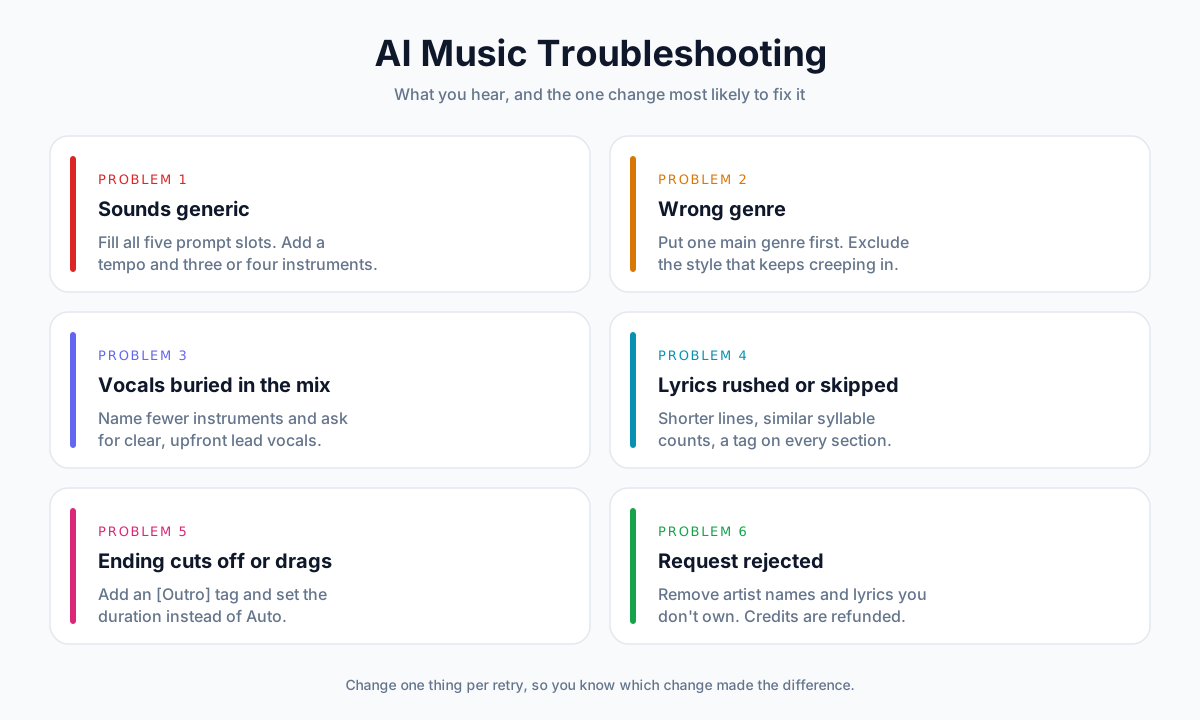
Problem 1: The Song Sounds Generic
Cause: the prompt left most decisions to the model, so it chose the most typical option for each.
Fix: fill all five slots of the prompt formula. A tempo and three or four named instruments make the biggest difference.
Problem 2: The Genre Is Wrong
Cause: too many genres in one prompt, or a genre word that means different things to different people.
Fix: put one main genre first. If another style keeps creeping in, add it to Exclude styles. Raising Style strength also keeps the model closer to your text.
Problem 3: The Vocals Are Buried
Cause: a crowded arrangement. Six instruments competing for the middle of the mix push the singer back.
Fix: name fewer instruments and ask for "clear, upfront lead vocals" or "intimate, close-mic vocals".
Problem 4: Lyrics Are Rushed, Repeated or Skipped
Cause: lines that are too long, uneven syllable counts or sections without tags.
Fix: shorten the lines, even out paired lines and put a tag before every section. If one section keeps getting dropped, cut it shorter.
Problem 5: The Ending Cuts Off or Drags
Cause: the model had no signal for where the song should end.
Fix: add an [Outro] tag with one or two closing lines, or set a fixed duration instead of Auto.
Problem 6: The Request Is Rejected
Cause: the prompt or lyrics name a real artist, include lyrics you don't own, or break the content policy.
Fix: describe the sound instead of naming the artist, and use your own words. The credits for a rejected generation are refunded.
Can You Use AI Music Commercially?
Making the song is the easy part. Releasing it is where the rules start.
Platforms are tightening those rules because the volume is huge. In July 2026, Deezer reported receiving nearly 90,000 fully AI-generated tracks a day, more than 50% of its daily deliveries on peak days, while AI music made up only 1–3% of streams (Deezer).
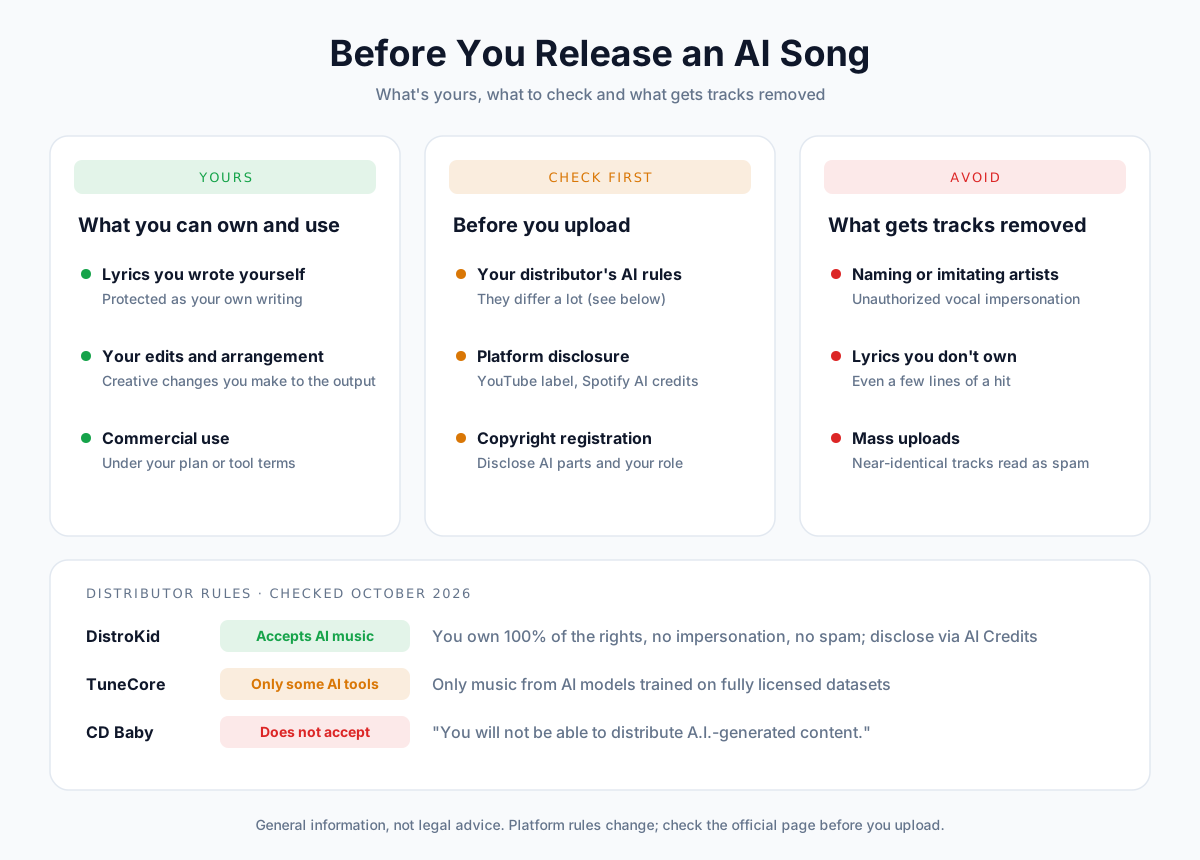
Here's where things stand as of October 2026. It's general information, not legal advice.
Commercial Use Is Not the Same as Copyright
Two different questions often get mixed up.
- Commercial use is what the tool's terms let you do with the song: put it in a monetized video, an ad or a product. On AnySpeech, every song made on a paid plan comes with commercial use.
- Copyright is whether you can stop other people from copying the song. That's decided by law, not by the tool.
You can have the first without the second. That's normal for AI music today.
Who Owns an AI-Generated Song?
In the US, the Copyright Office's January 2025 report is the clearest guide (Copyright and Artificial Intelligence, Part 2).
Its key conclusions:
- "Copyright does not extend to purely AI-generated material, or material where there is insufficient human control over the expressive elements."
- "Based on the functioning of current generally available technology, prompts do not alone provide sufficient control."
- Human authors keep copyright in their own work that is "perceptible in AI-generated outputs", and in their "creative selection, coordination, or arrangement" of the material or "creative modifications" of it.
In practice, that means:
| What went into the song | Likely copyright status in the US |
|---|---|
| A one-line prompt, AI wrote everything | Not protected: prompts alone aren't enough |
| Your own lyrics, AI music and vocals | Your lyrics are protected; the AI-made parts are not |
| AI output you edited, rearranged or recorded over | Your changes can be protected, case by case |
If you register a song that contains AI material, the Office expects you to disclose the AI-generated parts and explain what you contributed.
Writing your own lyrics is therefore more than a creative choice. It's the part of an AI song you can most clearly call yours.
Uploading AI Music to Spotify
Spotify doesn't ban music made with AI. In its own words, its rules are "not about punishing artists who use AI responsibly" (Spotify, September 2025).
What it does police:
- Impersonation: "Vocal impersonation is only allowed in music on Spotify when the impersonated artist has authorized the usage."
- Spam: a music spam filter targets mass uploads and near-duplicates. Spotify said it had removed over 75 million spammy tracks in the previous 12 months.
- Disclosure: optional AI credits, added through your distributor, let you tell listeners how AI was used.
- AI personas: since August 2026, artists whose identity may be AI-generated get an AI Persona badge and, by default, are left out of editorial and algorithmic recommendations. The badge "is about the artist's public identity, not about how the music was made" (Spotify, August 2026).
Distributor Rules for AI Music
You can't upload straight to Spotify or Apple Music. A distributor does it for you, and their AI policies differ a lot.
| Distributor | AI music? | The rule, in short |
|---|---|---|
| DistroKid | Accepted, with rules | You must own 100% of the rights, no impersonation, no mass-generated spam (DistroKid) |
| TuneCore | Only from some AI tools | Only music from AI models "trained on fully licensed datasets" (TuneCore) |
| CD Baby | Not accepted | "You will not be able to distribute A.I.-generated content." (CD Baby) |
TuneCore's rule depends on how an AI model was trained, which most users can't check. We can't promise that songs from our generator meet it, so ask TuneCore before you upload.
Posting AI Music on YouTube
YouTube asks creators to disclose realistic AI-generated content, and "AI generated music" is one of its examples. The rule specifically covers content that "creates music that's the main focus of the video" (YouTube Help).
So if the song is the point of the video, like a lyric video or a music upload, turn the disclosure on. For a quiet instrumental under your own narration, the wording is less clear.
When in doubt, disclose. YouTube says that "disclosing AI content alone won't limit a video's audience or impact its eligibility to earn money." Creators who repeatedly fail to disclose can face penalties, up to removal from the YouTube Partner Program.
Two more things to know:
- Monetization: YouTube doesn't pay for mass-produced, templated content with nothing original added, AI-made or not. Our guide on starting a faceless YouTube channel with AI voice covers that policy in detail.
- Content ID: YouTube hasn't published a rule on AI music and Content ID. Content ID is built for owners with exclusive rights, and purely AI-generated material can't be copyrighted in the US, so don't count on claiming an AI song.
What to Avoid
These get AI songs removed, demoted or rejected:
- Naming or imitating a real artist. Describe the sound instead.
- Lyrics you don't own, even a few lines of a famous song.
- Uploading dozens of near-identical tracks. Spam filters catch these.
- Skipping disclosure when the platform or distributor asks for it.
Frequently Asked Questions
How do I make AI music for free?
Some AI music tools have free tiers, usually with daily limits and terms that don't allow commercial use. Read the license before you publish anything made on one. On AnySpeech, music generation is part of paid plans, and the cheapest one covers 100 songs a month with commercial use included.
How do I make an AI song with my own lyrics?
Switch to Custom mode, paste your lyrics into the Lyrics box with a tag such as [Verse] or [Chorus] before each section, describe the style, and generate. Keep lines short and repeat your hook in the chorus.
Can I make an AI song with my own voice?
Not directly: the generator uses its own singers. You can make the song, remove the AI vocals with a vocal remover, and record your own voice over the instrumental.
Can I make an AI cover of an existing song?
Not with copyrighted lyrics. Our generator blocks lyrics you don't own, and releasing a cover needs a mechanical license for the original song anyway. You can write new lyrics in a similar style, as long as you don't name or imitate a real artist.
How long does it take to make a song with AI?
About a minute per generation, and each generation gives you two songs. Writing a good prompt or lyrics takes longer than the generation itself.
How long can an AI-generated song be?
On Auto, songs usually run two to four minutes. In Custom mode you can set any length from 30 seconds to 6 minutes.
Can AI make music without vocals?
Yes. Switch on Instrumental in either mode. Instrumentals are the best fit for video backgrounds, podcast intros and study music.
Can AI sing in languages other than English?
Yes. Write the lyrics, or describe the idea, in the language you want sung. Keep the style prompt in English for the best results.
Is AI-generated music copyrighted?
In the US, not if AI made all of it. The Copyright Office says purely AI-generated material isn't protected and prompts alone aren't enough. Lyrics you write yourself, and creative edits you make, can be. This guide covers the US position; rules in other countries differ.
Can I upload AI music to Spotify?
Yes, through a distributor that accepts AI music, such as DistroKid. Spotify doesn't ban AI-made music, but it removes unauthorized vocal impersonation and spam, and lets you disclose AI use through optional AI credits.
Do I need to know music theory to make AI music?
No. You describe the song in plain words and the model handles melody, chords and arrangement. Knowing a few terms, like BPM or the names of song sections, helps you get closer to what you want.
What is the best AI to make music?
Judge any AI music generator on four things: real vocals, support for your own lyrics, a clear commercial license and the cost per song. Then test it with the same prompt you'd actually use.
The Bottom Line
Making AI music takes a minute. Making the song you had in mind takes a good brief.
Here's the short version:
- Decide the job first. It settles vocals, length and mode.
- Start in Simple mode to test the idea, then move to Custom.
- Fill all five prompt slots: genre, mood, tempo, instruments and voice.
- Tag your lyrics and keep the lines short and singable.
- Change one thing per attempt and compare the two versions.
- Check the rules of the platform you'll publish on before you release.
Now you know how to make AI music that sounds like the song in your head. Open the AI music generator, type one sentence, and hear two versions of it in about a minute.
Making an intro for a show? Our guide on how to make an AI podcast covers the rest of the episode.
Author

Categories
More Posts
How to Make AI Voice Sound Less Robotic: 12 Fixes (2026)
Why AI voices sound robotic, and 12 fixes that work: write for the ear, use punctuation for pauses, spell out numbers, fix pronunciation, tune speed and more.
How to Start a Faceless YouTube Channel with AI Voice (2026)
Start a faceless YouTube channel with AI voice: niches, scripts, voices and costs, plus YouTube's 2026 rules on AI content, disclosure and monetization.
How to Make an AI Podcast: From One Idea to a Multi-Speaker Show (2026)
Learn how to make an AI podcast in minutes. Turn a single topic or script into a natural two-host conversation with AI voices — step by step, no mic or editing needed.