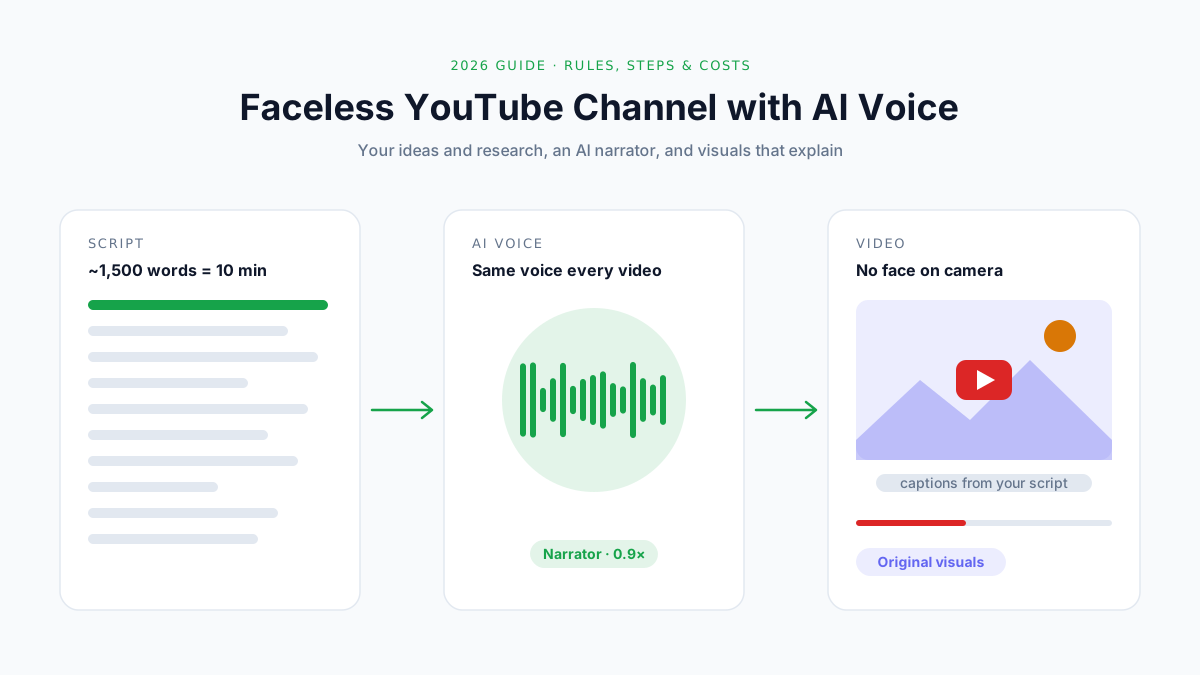
How to Start a Faceless YouTube Channel with AI Voice (2026)
Start a faceless YouTube channel with AI voice: niches, scripts, voices and costs, plus YouTube's 2026 rules on AI content, disclosure and monetization.
Plenty of successful YouTube channels never show a face. History explainers, tech tutorials, sleep stories, product comparisons: all narrated, none on camera.
AI voice has made this format far easier to start. You write the script, pick a voice, and have a finished voiceover in minutes, without a microphone, a quiet room or a single retake.
But 2026 is not 2023. YouTube now demonetizes "mass-produced" AI content, has specific rules on when you must disclose AI, and has announced that the watch-hour bar for new channels doubles on February 1, 2027.
This guide shows you how to build a faceless channel with AI voice that stays on the right side of all three.
What you'll learn:
- The YouTube rules that decide whether an AI-voiced channel can earn money
- When you must disclose AI voice, and when you don't
- How to start a faceless channel in 8 steps, from niche to upload
- How long your scripts should be, and what the voiceover costs
- Which AI voice suits which kind of channel
- The mistakes that get faceless channels demonetized
Quick answer: To start a faceless YouTube channel with AI voice, pick a niche where you can add your own research or perspective, write scripts of about 150 words per minute of video, generate the narration with an AI voice generator such as a YouTube voiceover generator, and pair it with original visuals. AI voice is allowed and can be monetized. What YouTube demonetizes is mass-produced, templated content with nothing original in it.
What Is a Faceless YouTube Channel?
A faceless YouTube channel is a channel where the creator never appears on camera. The videos are built from narration over visuals: screen recordings, stock or original footage, animation, maps, charts or illustrations.
Common formats include:
- Explainers and documentaries: history, science, geography, business stories
- Tutorials: software walkthroughs recorded from the screen
- Lists and comparisons: product reviews with your own testing
- Stories: sleep stories, kids' stories, narrated fiction
- Relaxation: meditation and ambient content
Why AI Voice Fits Faceless Channels
| Benefit | What it means in practice |
|---|---|
| Speed | A 10-minute voiceover takes minutes, not an afternoon of recording and editing |
| Consistency | The same voice, tone and pace in every video |
| No setup | No microphone, no treated room, no retakes |
| Privacy | Your face and your real voice stay off the internet, if you want |
| Languages | The same script can be voiced or dubbed in other languages |
Is It Still Worth It in 2026?
Yes, but the easy version is gone. Channels that pump out templated AI videos are being demonetized and, in some cases, removed. In January 2026, YouTube's CEO named reducing low-quality "AI slop" as a priority for the year.
What still works is the old formula with a faster voiceover: a real topic, real research, a clear point of view, and visuals that fit. AI voice is a production tool, not a content strategy.
The 2026 Rules You Need to Know First
Most faceless-channel guides skip this part. It's the part that decides whether your channel ever earns money.
YouTube Partner Program Thresholds
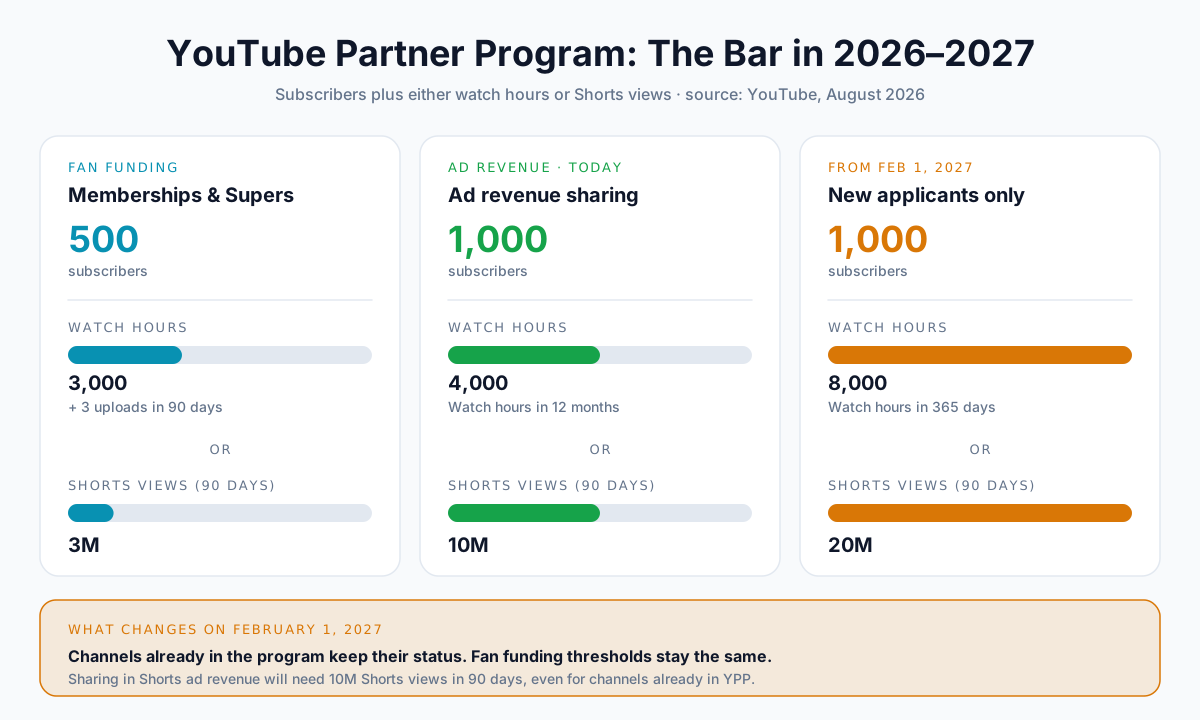
To earn from YouTube, you need to join the YouTube Partner Program (YPP). There are two levels, and the main one is about to get harder to reach.
| Level | Subscribers | Plus one of these | Unlocks |
|---|---|---|---|
| Fan funding | 500 | 3,000 watch hours (12 months) or 3M Shorts views (90 days), plus 3 uploads in 90 days | Memberships, Super Thanks, shopping |
| Ad revenue (today) | 1,000 | 4,000 watch hours (12 months) or 10M Shorts views (90 days) | Ad revenue sharing |
| Ad revenue (from Feb 1, 2027) | 1,000 | 8,000 watch hours (365 days) or 20M Shorts views (90 days) | Ad revenue sharing, for new applicants |
Three things to know about the 2027 change, announced by YouTube in August 2026:
- Channels already in YPP aren't affected. The new bar applies to new applicants.
- Shorts ad revenue gets its own bar. From February 1, 2027, you need 10 million Shorts views in 90 days to share in Shorts ad revenue, even if you're already in YPP.
- Fan funding doesn't change. The 500-subscriber level stays the same.
Once you're in, YouTube pays creators 55% of the ad revenue from long-form videos and 45% of their allocated share of Shorts revenue.
💡 Pro tip: If you're starting now, long-form videos are the faster path to the current 4,000-hour bar. A 10-minute video watched to the halfway point earns five minutes of watch time; a Short earns seconds.
The "Inauthentic Content" Policy
On July 15, 2025, YouTube renamed its "repetitious content" policy to "inauthentic content" and clarified that it covers content that is "repetitive or mass-produced". This is the policy that decides whether a faceless AI channel can be monetized.
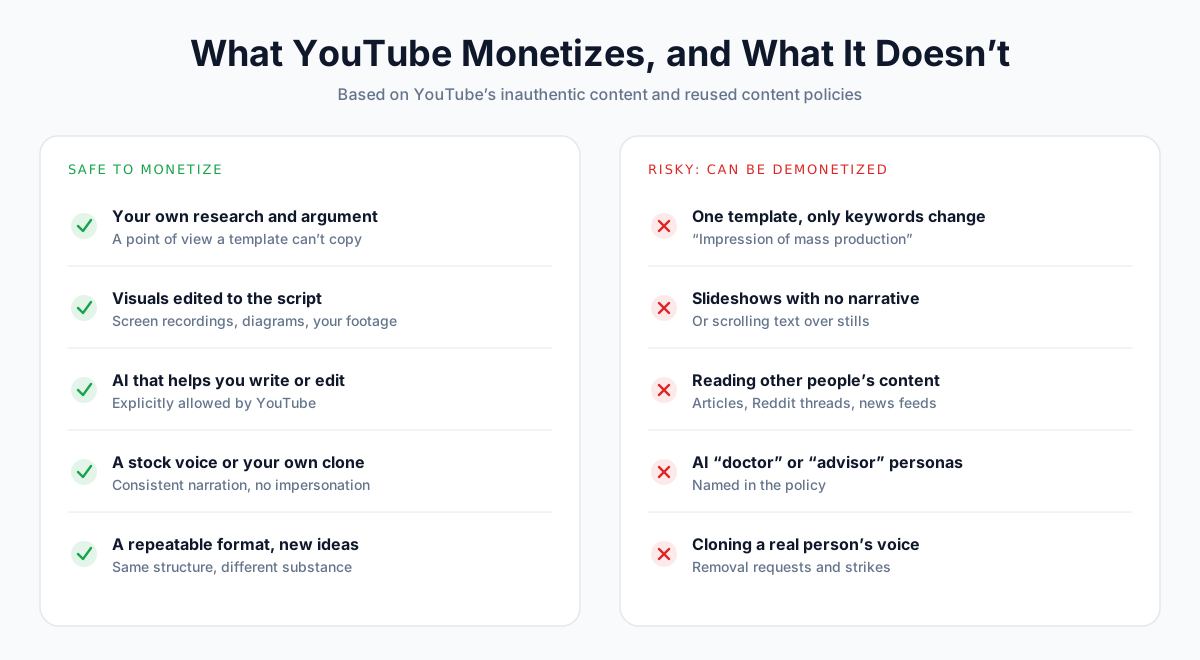
YouTube's own examples of content that can't be monetized include:
- "AI-generated content made with generic or unoriginal templates giving the impression of mass production without adding the creator's original, authentic insights or perspective"
- "Image slideshows, templated storylines, or scrolling text with minimal or no narrative, commentary, or educational value"
- AI personas giving advice, such as "an AI 'doctor' providing medical diagnoses" or "AI-generated podcast hosts offering financial guidance"
And under the related reused content rule: content that "exclusively features readings of other materials you did not originally create, like text from websites or news feeds".
What's explicitly allowed: "using AI to edit your video scripts or generate a unique background visual for your content", as long as the result delivers "a unique, well-researched, or creative narrative".
In plain English: the voice can be AI. The ideas have to be yours.
When You Must Disclose AI Voice
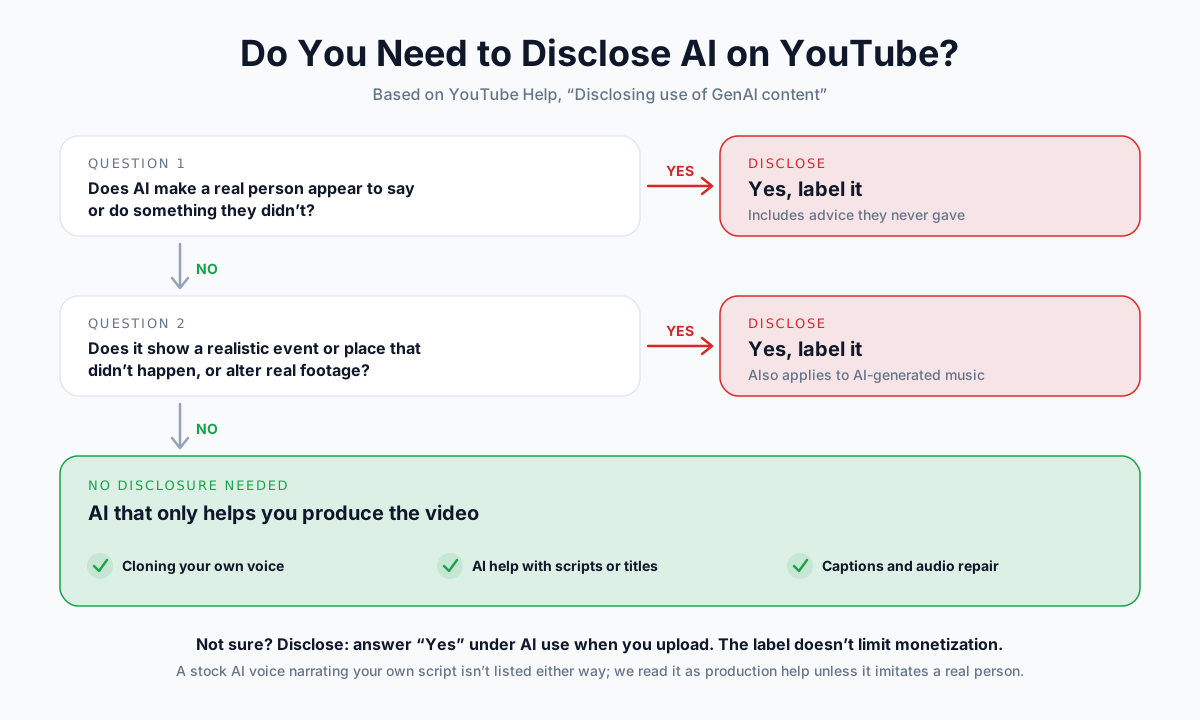
YouTube requires you to disclose AI when it makes realistic content that could mislead viewers. It does not require disclosure for every use of AI.
| Situation | Disclose? | What YouTube says |
|---|---|---|
| AI makes a real person appear to say something they didn't | Yes | Listed as requiring disclosure |
| AI makes it look like someone gave advice they didn't give | Yes | Listed as requiring disclosure |
| AI-generated music | Yes | Listed as requiring disclosure |
| Realistic footage of events that didn't happen | Yes | Listed as requiring disclosure |
| Cloning your own voice for voiceovers or dubs | No | Listed as not requiring disclosure |
| Using AI to help write the script, title or outline | No | "Production assistance" |
| AI captions or audio repair | No | Listed as not requiring disclosure |
| A stock AI voice narrating your own script | Not listed | Generally treated as production help, as long as it doesn't imitate a real person |
When disclosure is needed, you answer Yes under AI use in the video details during upload. YouTube then shows a label in the description, or in the player for sensitive topics. YouTube says the label doesn't limit your audience or your eligibility to earn money.
📝 Note: The last row is our reading of the policy, not YouTube's wording. If your video could make viewers believe something false about a real person, place or event, disclose. When in doubt, disclose.
Never Use a Real Person's Voice
Cloning a celebrity, politician or another creator's voice is one of the fastest ways to lose a channel. Anyone can ask YouTube to remove AI content that simulates their face or voice, and YouTube's likeness-detection tools are expanding to cover voices.
Use a stock AI voice, or clone your own voice. YouTube explicitly lists cloning your own voice for voiceovers as not requiring disclosure.
Check Your Commercial Rights
A monetized channel is commercial use. Before you publish, check your AI voice tool's terms:
- Does your plan include commercial use? (Many free tiers don't.)
- Does free use require attribution in the title or description?
- Can you keep using audio you made after you cancel?
- Are you allowed to clone a voice that isn't yours?
On AnySpeech, paid plans include a commercial license for monetized YouTube videos, ads and client work. The free tier is for personal projects and trying things out.
How to Start a Faceless YouTube Channel with AI Voice
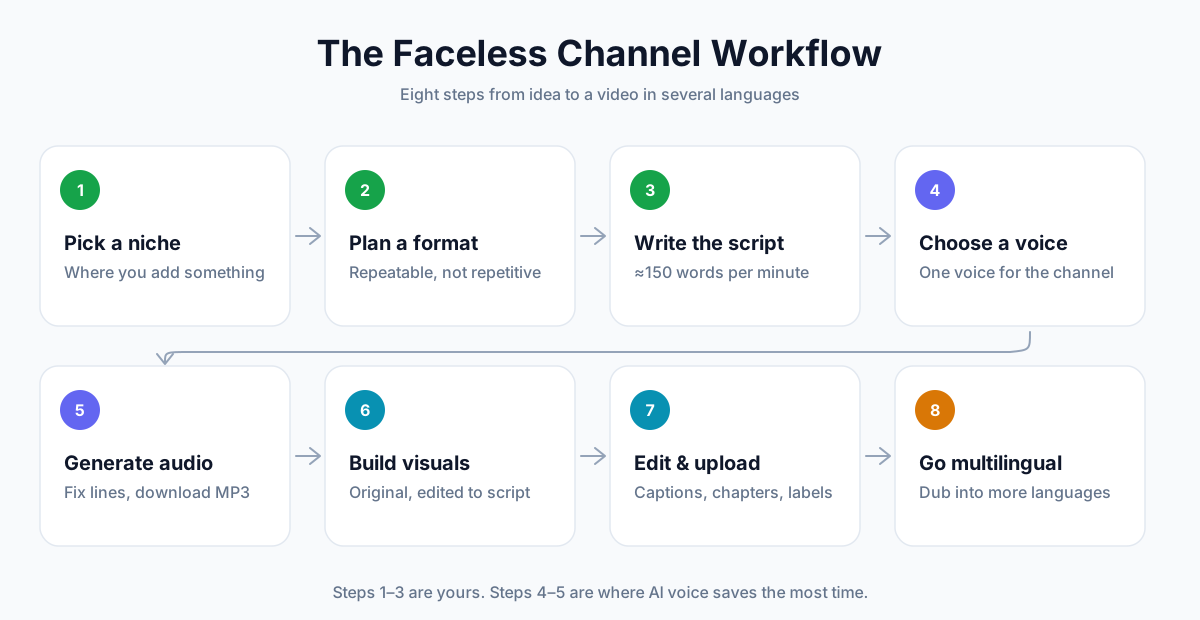
Step 1: Pick a Niche Where You Add Something
Pick a topic where you can bring something a template can't: expertise, research, testing, opinion or a unique angle.
Ask three questions:
- Can I make 50 videos on this without running out of ideas?
- What do I know or do that others in this niche don't?
- Could someone mass-produce this from a template? If yes, pick a different angle.
📝 Note: Finance, health and legal topics can work, but be careful with format. YouTube's policy specifically names AI personas giving financial or medical advice as ineligible. Explain and cite sources in your own voice as the channel; don't invent an AI "advisor" character.
Step 2: Plan a Format You Can Repeat (Without Being Repetitive)
A repeatable format makes production faster. A repetitive one gets demonetized. The difference is what changes from video to video.
| Keep the same | Change every time |
|---|---|
| Intro length and style | The topic and the research |
| Voice and pace | The argument or conclusion |
| Section structure | The visuals |
| Thumbnail style | The examples and stories |
A simple structure that works for most explainers:
- Hook (0–20 seconds): the question or surprising fact
- Context: what the viewer needs to know first
- Build-up: the main points, each with evidence
- Payoff: the answer, conclusion or recommendation
- Close: one line pointing to the next video
Step 3: Write the Script
Scripts are where faceless channels win or lose. Write for the ear: short sentences, one idea each, numbers written out.
Use about 150 words per minute of video. That's close to average conversational speed, and ACX, Audible's audiobook platform, says narrators average about 9,300 words per hour, or roughly 155 per minute.
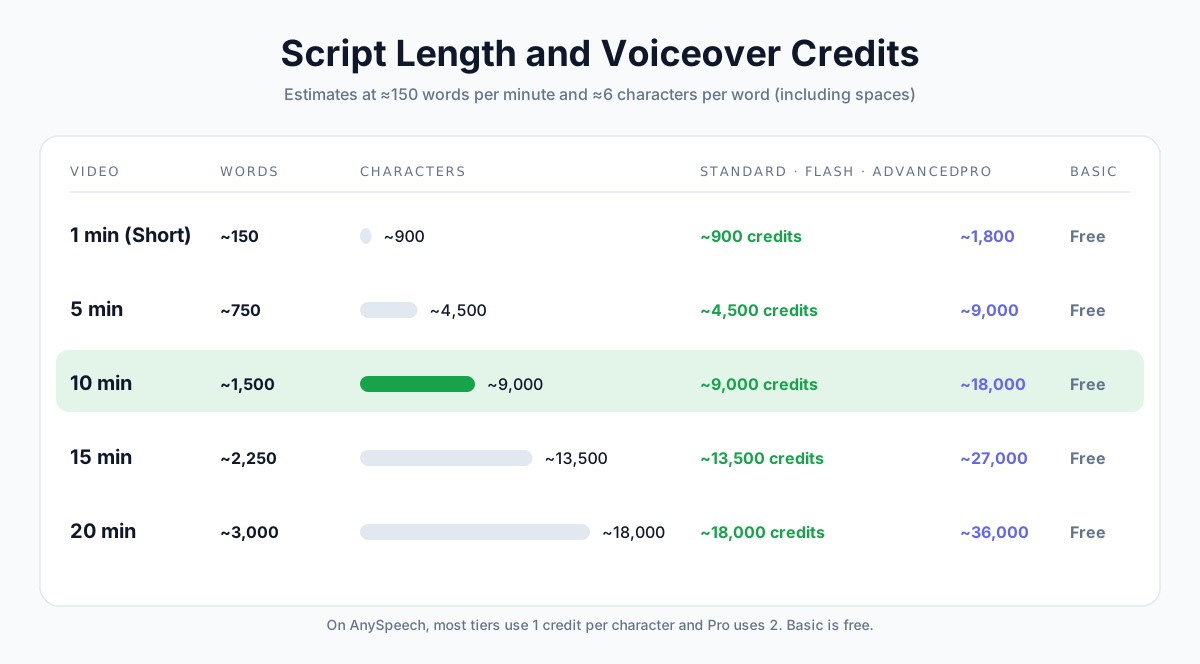
| Video length | Words (≈150/min) | Characters (≈6 per word) |
|---|---|---|
| 1 minute (Short) | ~150 | ~900 |
| 5 minutes | ~750 | ~4,500 |
| 10 minutes | ~1,500 | ~9,000 |
| 15 minutes | ~2,250 | ~13,500 |
| 20 minutes | ~3,000 | ~18,000 |
Character counts are estimates based on typical English text, including spaces.
It's fine to use AI to help outline or edit a script; YouTube lists that as allowed. But the research, the angle and the final wording should be yours.
Step 4: Choose Your AI Voice
Choose the voice for the channel, not the video. Viewers subscribe to a sound as much as a topic, so you'll use this voice for a long time.
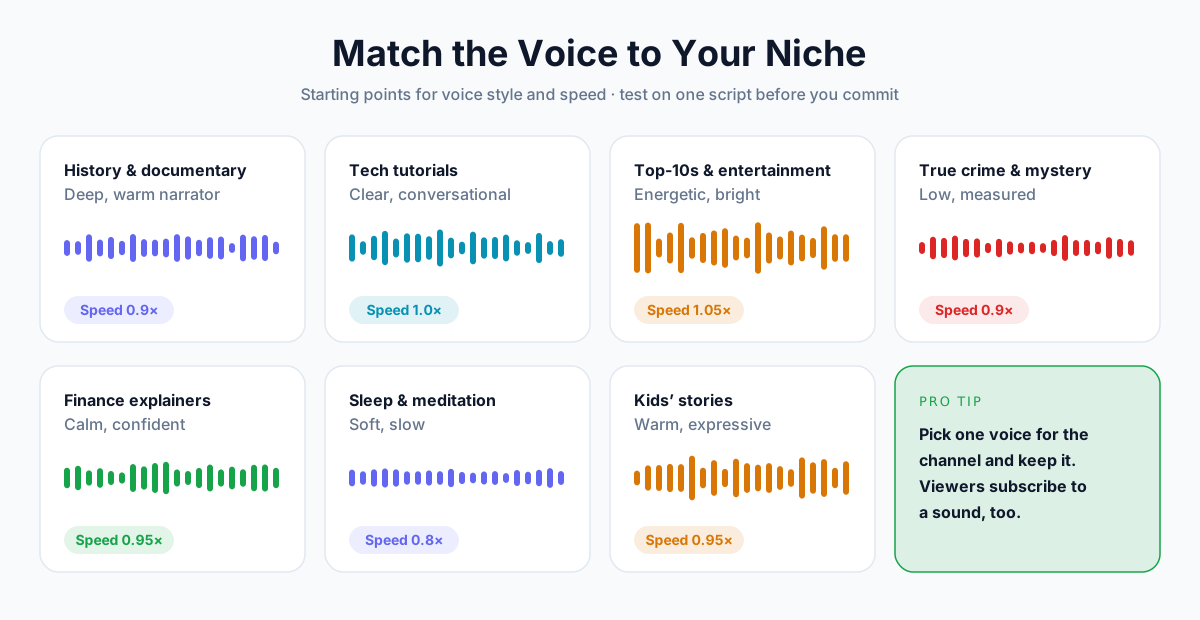
| Niche | Voice style | Speed to start with |
|---|---|---|
| History, documentary | Deep, warm narrator | 0.9× |
| Tech tutorials | Clear, conversational | 1.0× |
| Top-10s, entertainment | Energetic, bright | 1.05× |
| True crime, mystery | Low, measured | 0.9× |
| Finance and business explainers | Calm, confident | 0.95× |
| Sleep, meditation | Soft, slow | 0.8× |
| Kids' stories | Warm, expressive | 0.95× |
Browse by style in the voice library, or start with female or male voices. The YouTube voiceover generator lists voices that suit narration.
For the most personal option, clone your own voice. Your channel sounds like you, without you recording every video, and YouTube doesn't require a disclosure label for it.
Step 5: Generate the Voiceover
- Open AnySpeech text to speech and paste your script.
- Pick your voice and quality tier. Advanced is a good default; Pro gives the most natural delivery.
- Set the speed (see the table above), and leave other settings at their defaults for the first try.
- Generate, listen to the whole thing once, and fix any line that sounds off.
- Download the MP3.
If a line sounds flat or rushed, the fix is usually in the text, not the voice. Our guide on how to make AI voice sound less robotic covers 12 quick fixes, from punctuation to pronunciation.
💡 Pro tip: Generate long scripts section by section, with identical settings. If one line needs fixing, you only regenerate that section, not the whole video.
Step 6: Build Original Visuals
Visuals are where most faceless channels drift into "mass-produced" territory. Aim for visuals that actually explain what the narration says.
| Visual type | Originality | Notes |
|---|---|---|
| Your own screen recordings | High | Ideal for tutorials |
| Your own footage or B-roll | High | Even phone footage adds a lot |
| Custom charts, maps, diagrams | High | Great for explainers |
| Animation | High | More work, very distinctive |
| Licensed stock footage | Medium | Fine when edited to the script |
| AI-generated images | Medium | Use for specific scenes, not as filler |
| Static slideshows with no narrative | Low | Named as ineligible in YouTube's policy |
Only use footage, music and images you have the rights to. Stock libraries and royalty-free music are fine, as long as you follow their licenses.
Step 7: Edit, Caption and Upload
- Edit to the voice. Cut visuals to the rhythm of the narration, not the other way round.
- Add captions. Many viewers watch without sound. Upload your script as a caption file, or generate one from the finished video with video to text.
- Write a clear title and thumbnail. Promise one thing, and deliver it in the first 30 seconds.
- Set disclosure correctly. Only when your video needs it (see the 2026 rules).
- Add chapters. Timestamps in the description help viewers and search.
Step 8: Grow into Other Languages
Once a video works in one language, you can reuse it in others. YouTube's multi-language audio feature lets one video carry several audio tracks, and viewers hear the one that matches their language.
With AI voice, you have two options:
- Voice a translated script in a native voice for each language.
- Dub the finished video with AI dubbing, which keeps the same voice across languages.
Our guide on how to dub a YouTube video walks through the full process, including uploading the extra audio track in YouTube Studio.
What Does an AI-Voiced Channel Cost?
The voiceover is usually the cheapest part of a faceless channel. On AnySpeech, most voice tiers use one credit per character of script, and Pro uses two.
| Tier | Credits for a 10-minute script (~9,000 characters) |
|---|---|
| Basic | 0 (free) |
| Standard, Flash, Advanced | ~9,000 |
| Pro | ~18,000 |
Here's roughly how many 10-minute voiceovers each monthly plan covers on the Advanced tier:
| Plan | Price / month | Credits | 10-minute voiceovers |
|---|---|---|---|
| Free | $0 | 5,000 (one-time) | Enough to test, about 5 minutes of narration |
| Basic | $9.99 | 50,000 | ~5 |
| Standard | $19.90 | 100,000 | ~11 |
| Professional | $49.90 | 350,000 | ~38 |
Paid plans include commercial use and can generate up to 50,000 characters at once. Yearly plans are 20% cheaper. See pricing for current details.
8 Mistakes That Get Faceless Channels Demonetized
- Publishing from a template. Same structure, same stock clips, only the keywords change. This is exactly what the inauthentic content policy targets.
- Reading someone else's content. Narrating articles, Reddit threads or news feeds word for word counts as reused content.
- Slideshows with no narrative. A voice reading captions over still images isn't enough.
- AI personas giving advice. An AI "financial advisor" or "doctor" character is named in YouTube's policy.
- Imitating real people. Celebrity or creator voice clones invite removal requests and strikes.
- Skipping disclosure when it's needed. Realistic content about real people or events must be labeled.
- Using voices without commercial rights. A free-tier voice may not be licensed for a monetized channel.
- Chasing volume over quality. Five good videos a month beat thirty thin ones, for viewers and for YouTube's review.
Faceless Channel Ideas That Work with AI Voice
| Idea | Example video | What makes it original |
|---|---|---|
| History explainers | "Why the Byzantine Empire lasted 1,000 years" | Your research, maps and argument |
| Software tutorials | "Automate invoices in Google Sheets" | Your own screen recordings |
| Product comparisons | "I tested 5 budget microphones" | Your own testing and results |
| Science explainers | "How noise-cancelling headphones work" | Your diagrams and analogies |
| Book analysis | "The 3 ideas from Atomic Habits that held up" | Your commentary, not a summary read aloud |
| Personal finance education | "How compound interest really works" | Explained as you, with sources, no AI "advisor" |
| Language learning | "50 Spanish phrases for travel" | Native voices, your lesson structure |
| Sleep stories | "A rainy night in a mountain cabin" | Original stories, consistent calm voice |
| Travel guides | "3 days in Lisbon on a budget" | Your own footage and tips |
| Business case studies | "How a small bakery went viral" | Your research and interviews |
Frequently Asked Questions
Can you monetize a faceless YouTube channel with AI voice?
Yes. YouTube doesn't ban AI voiceovers. It demonetizes content that is mass-produced, templated or reused without adding original value. A channel with original research, a clear point of view and real visuals can join the YouTube Partner Program and earn ad revenue with an AI voice.
Does YouTube demonetize AI voiceovers?
Not for using AI voice by itself. YouTube's inauthentic content policy targets "AI-generated content made with generic or unoriginal templates giving the impression of mass production". YouTube explicitly allows using AI to help with scripts and visuals, as long as the video delivers a unique narrative.
Do I have to disclose AI voice on YouTube?
Only in specific cases. You must disclose realistic AI content that makes a real person appear to say or do something they didn't, or shows events that didn't happen. YouTube lists cloning your own voice for voiceovers or dubs as not requiring disclosure.
What is the best AI voice for a YouTube channel?
The one that fits your niche and that you'll keep using. Deep, warm narrators suit history and documentaries; clear conversational voices suit tutorials; energetic voices suit lists and entertainment. On AnySpeech, the Advanced and Pro tiers give the most natural narration.
How many words is a 10-minute YouTube script?
About 1,500 words. Narration averages roughly 150 words per minute, so a 10-minute video needs about 1,500 words, or around 9,000 characters including spaces. Slower narration for documentaries or meditation needs fewer words.
How much does an AI voiceover cost for YouTube?
On AnySpeech, a 10-minute script uses about 9,000 credits on the Advanced tier and 18,000 on Pro. The Basic tier is free. The $19.90 Standard plan's 100,000 monthly credits cover about eleven 10-minute voiceovers on Advanced.
Can I use my own cloned voice?
Yes, and it's one of the best options. Your channel sounds like you, and YouTube lists "cloning one's own voice to create voice overs or dubs" as not requiring disclosure. You can clone your voice from a short recording.
Can I use a celebrity's voice for my channel?
No. Imitating a real person's voice without permission can lead to privacy removal requests, copyright or impersonation strikes, and loss of monetization. It may also break the law in some places. Use a stock AI voice or your own cloned voice.
What are the YouTube monetization requirements in 2026?
For ad revenue, 1,000 subscribers plus 4,000 watch hours in 12 months or 10 million Shorts views in 90 days. From February 1, 2027, new applicants need 8,000 watch hours or 20 million Shorts views. The fan-funding tier needs 500 subscribers and 3,000 watch hours or 3 million Shorts views.
Can a faceless channel make YouTube Shorts?
Yes. A 60-second Short needs about 150 words of narration. But from February 1, 2027, sharing in Shorts ad revenue requires 10 million Shorts views in 90 days, so long-form videos are usually the more reliable path to monetization for new channels.
Start Your Faceless Channel
A faceless channel in 2026 is still a real opportunity, as long as you treat AI voice as a production tool rather than a shortcut. Bring the ideas, the research and the visuals. Let AI handle the recording.
Ready to hear your first script? Paste it into the YouTube voiceover generator, pick a voice that fits your niche, and have your first voiceover in minutes.
Author

Categories
More Posts
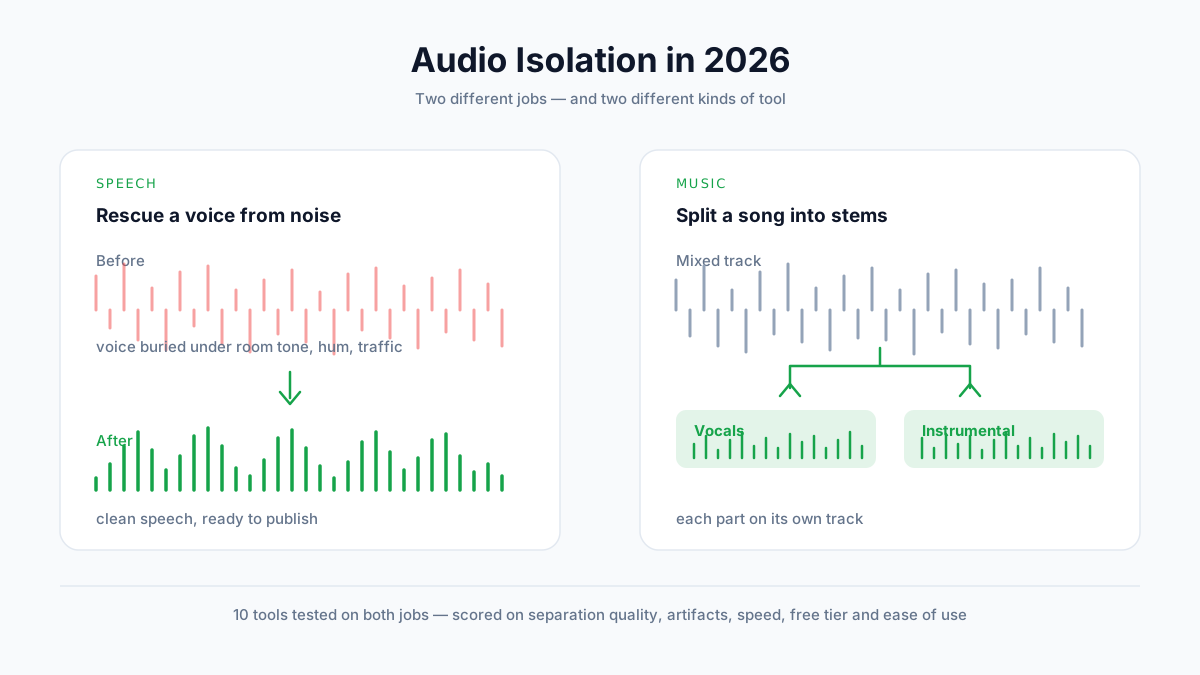
Best Audio Isolation Tools in 2026 (10 Tools Tested)
We tested 10 audio isolation tools on both speech and music. Compare separation quality, artifacts, pricing, and free tiers — and find out which type of tool your job actually needs.

How to Use Text to Speech in 2026: The Complete Platform-by-Platform Guide
Learn how to use text to speech on iPhone, Android, Google Docs, TikTok, Discord, and more. Step-by-step guides for every device and platform, plus tips for getting the best results.
How to Make an AI Podcast: From One Idea to a Multi-Speaker Show (2026)
Learn how to make an AI podcast in minutes. Turn a single topic or script into a natural two-host conversation with AI voices — step by step, no mic or editing needed.