How to Get a Transcript of a YouTube Video (6 Ways, 2026)
Get a transcript of any YouTube video: built-in Show transcript, phone, free generators with TXT/SRT export, YouTube Studio, videos with no captions, and code.
A 40-minute lecture. A podcast episode with one quote you need. A tutorial you'd rather skim than watch.
A transcript turns all of them into text you can search, copy and reuse in minutes.
Getting one is usually easy: YouTube has a built-in transcript button. But it's hidden, it's hard to copy, it doesn't work well on phones, and roughly one video in four doesn't have a transcript at all.
This guide covers six ways to get a YouTube transcript, including what to do when the button is missing.
What you'll learn:
- The fastest free way to open a transcript on desktop
- How to get a transcript on iPhone or Android, where copying is blocked
- How to download a transcript as TXT, SRT or VTT
- What to do when a video has no transcript (with our own data on how often that happens)
- How developers pull transcripts in bulk with yt-dlp
- How accurate YouTube transcripts are, and how to clean them up
Quick answer: On a computer, open the YouTube video, click ...more under the title, scroll down and click Show transcript. The transcript opens next to the video. To download it as a file or get one on your phone, paste the video link into a YouTube transcript generator. If the video has no captions, you'll need AI transcription of the audio instead.
Which Method Should You Use?
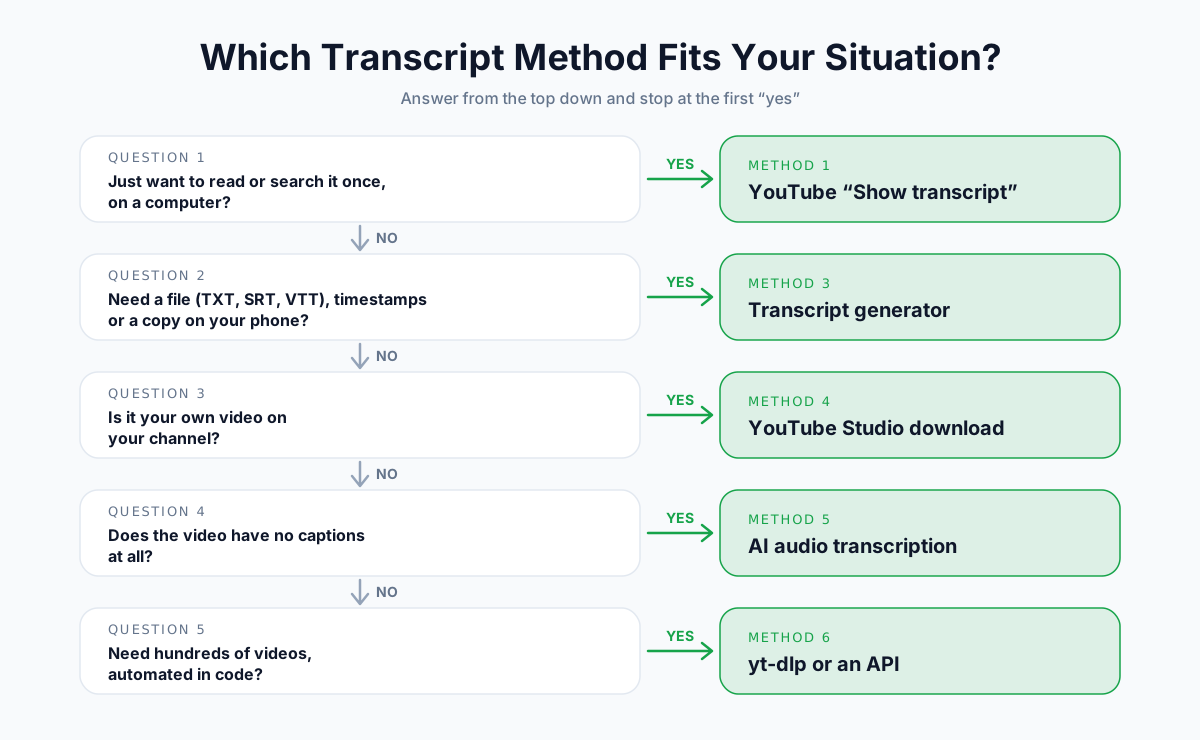
The right method depends on four things: your device, whether you need a file, whose video it is, and whether captions exist.
The 6 Methods at a Glance
| Method | Cost | Device | Download a file | Works without captions | Best for |
|---|---|---|---|---|---|
| 1. Show transcript (desktop) | Free | Computer | No (copy only) | No | Reading or searching once |
| 2. YouTube mobile app | Free | Phone | No (view only) | No | Quick look on the go |
| 3. Transcript generator | Free tier | Any browser | Yes (TXT, SRT, VTT) | Some tools, paid | Files, timestamps, phones |
| 4. YouTube Studio | Free | Computer | Yes (SRT, VTT, SBV) | No | Your own videos |
| 5. AI audio transcription | Paid | Any browser | Yes | Yes | Videos with no captions |
| 6. yt-dlp / API | Free | Command line | Yes | No | Developers, bulk jobs |
Before You Start: Transcripts, Captions and Where They Come From
Every free YouTube transcript method reads the same thing: the video's caption track. Understanding that saves a lot of frustration.
Transcript vs Captions vs Subtitles
| Term | What it is | Has timestamps |
|---|---|---|
| Captions | Text synced to the video, including speech (and sometimes sounds) | Yes |
| Subtitles | Captions in another language, for viewers who don't speak the original | Yes |
| Transcript | The full text of what's said, as a readable document | Optional |
On YouTube, the transcript panel is simply the caption track displayed as a list. No caption track means no transcript.
Two Kinds of Captions
- Creator-uploaded captions. Written or edited by the channel. Usually accurate and properly punctuated.
- Auto-generated captions. Produced by YouTube's speech recognition. Free and automatic, but with more errors, lighter punctuation and no speaker labels.
How Often Videos Have No Captions
We launched our YouTube transcript generator in August 2026 and looked at what happened in the first two weeks.
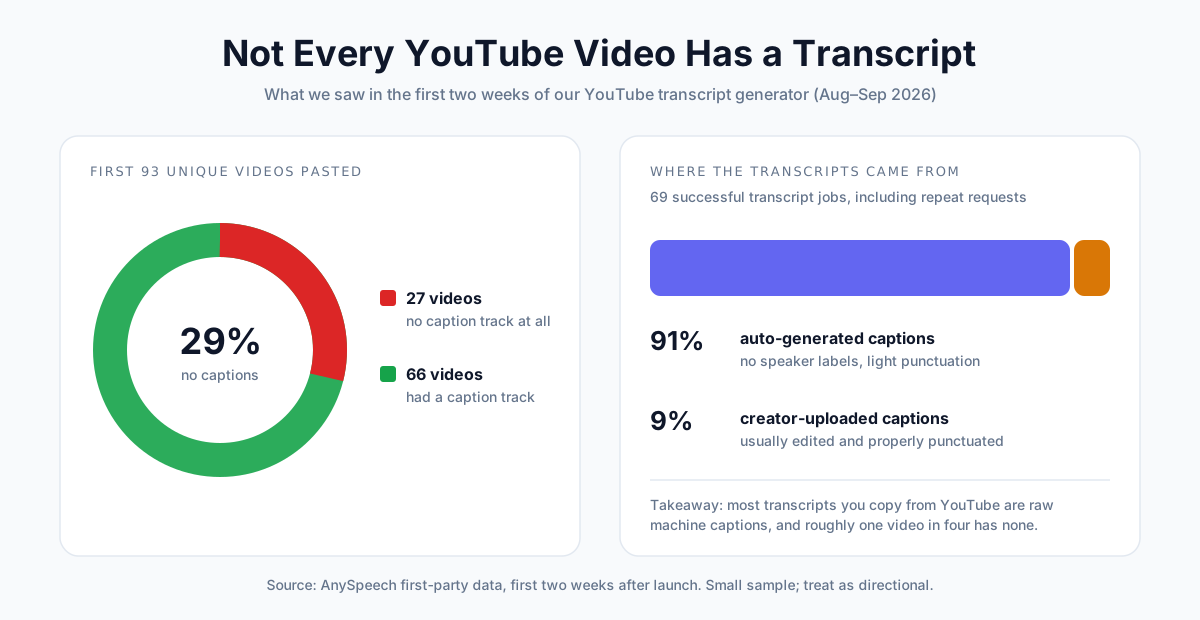
Of the first 93 unique videos people pasted, 27 (29%) had no caption track at all. And of 69 successful transcript jobs, 63 (91%) came from auto-generated captions, not creator-uploaded ones.
It's a small sample, but the pattern is clear: most YouTube transcripts are raw machine captions, and a meaningful share of videos have none.
Method 1: Use "Show Transcript" on YouTube (Desktop)
Best for: reading, searching or copying a transcript once, on a computer.
Step-by-Step
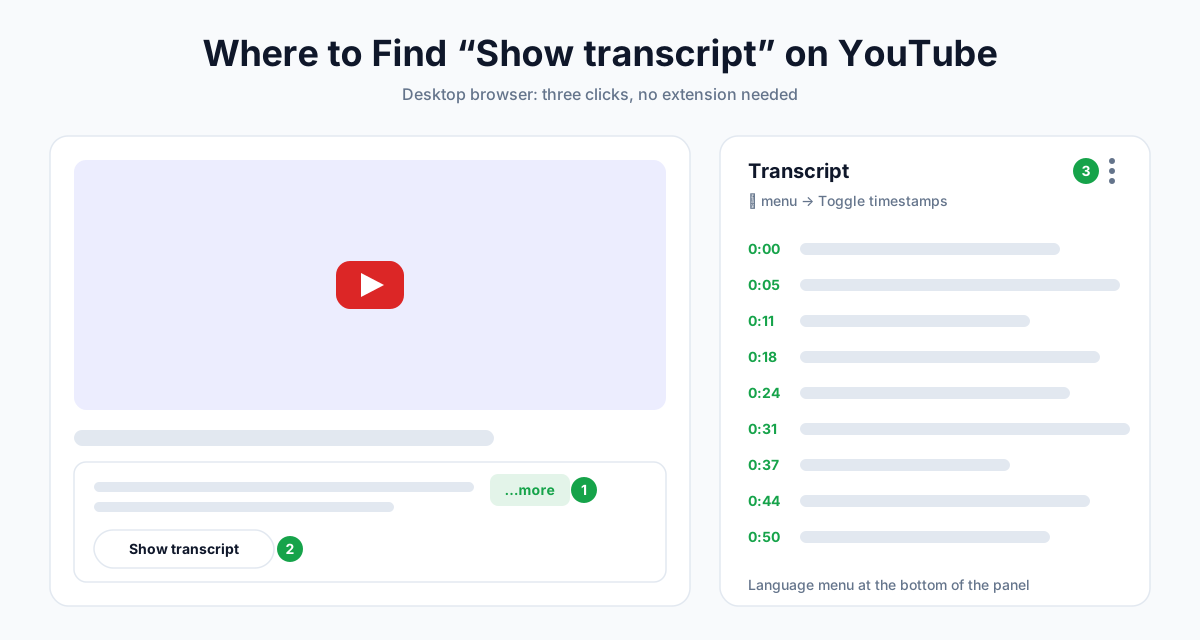
- Open the video on YouTube in a desktop browser.
- Below the video, click ...more to expand the description.
- Scroll to the bottom of the description and click Show transcript.
- The transcript panel opens beside the video (or below it on narrow windows).
- Click any line to jump to that moment in the video.
Useful Panel Controls
| Control | Where | What it does |
|---|---|---|
| Toggle timestamps | ⋮ menu at the top of the panel | Hides or shows the time codes |
| Language selector | Bottom of the panel | Switches between available caption tracks |
| Search | Ctrl+F (Cmd+F on Mac) | Finds words in the loaded transcript |
How to Copy the Transcript
YouTube has no copy or download button, so you copy by hand:
- Turn timestamps off first if you only want the text.
- Click just before the first word and drag to the last line.
- Press Ctrl+C (Cmd+C on Mac) and paste into your document.
Tips for a Cleaner Copy
- Ctrl+A won't work. It selects the whole page, not just the panel.
- Long videos load lazily. Scroll to the end of the panel before selecting, so every line is included.
- Expect one line per caption. You'll need to join lines into paragraphs afterwards (see the cleanup section below).
💡 Pro tip: If you don't see Show transcript, the video has no caption track in any language. Jump to Method 5.
Method 2: Get a Transcript on iPhone or Android
Best for: checking what was said while you're away from a computer.
In the YouTube App
- Open the video in the YouTube app.
- Tap the description (on iPhone, tap the video title) to expand it.
- Scroll down and tap Show transcript.
- Tap any line to jump to that point.
The Problem: You Can't Copy It
The app displays the transcript, but it doesn't let you select the text. That makes it fine for reading and useless for quoting or note-taking.
Workarounds That Actually Work
| Workaround | How | Downside |
|---|---|---|
| Use a web-based transcript generator | Tap Share › Copy link in the app, then paste it into a generator in Safari or Chrome | Needs a free account on most tools |
| Open YouTube's desktop site | In your mobile browser, request the desktop version of youtube.com and use Method 1 | Fiddly on a small screen |
| Send it to your computer | Share the link to yourself and copy the transcript later | Not immediate |
The first option is the most reliable, because you get a clean text file instead of fighting with text selection.
Method 3: Use a YouTube Transcript Generator
Best for: downloading a transcript as a file, keeping timestamps, and getting transcripts on any device.
A transcript generator reads the video's caption track for you and gives you clean, exportable text.
How to Do It with AnySpeech
- Copy the video URL from your browser's address bar or the Share button.
- Open the YouTube transcript generator and paste the link.
- Click Generate Transcript.
- Read it in Text view, or switch to Timestamps view to click through the video.
- Click Copy or Download to save it.
Export Formats
| Format | Best for |
|---|---|
| TXT with timestamps | Notes and quotes you want to find again in the video |
| TXT without timestamps | Clean reading, blog drafts, AI prompts |
| SRT subtitles | Video editors and re-uploading captions |
| VTT subtitles | Web video players and course platforms |
Limits and Pricing
| Plan | Transcripts from captions | Max video length |
|---|---|---|
| Free account | 3 per day | 3 hours |
| Basic | 100 per month | 3 hours |
| Standard | 200 per month | 3 hours |
| Professional | 400 per month | 3 hours |
| Premium | 800 per month | 3 hours |
| Max | 1,500 per month | 3 hours |
Reading captions doesn't use credits. The result page also lets you translate the transcript, and each plan includes a monthly translation allowance.
📝 Note: Prefer a view focused on plain text? The same tool is also available as YouTube to text.
Other Transcript Tools Compared
| Tool | Type | Download file | Videos with no captions |
|---|---|---|---|
| AnySpeech | Web | TXT, SRT, VTT | AI audio transcription (paid) |
| Tactiq | Web + Chrome extension | Yes | No |
| NoteGPT | Web + extension | Yes | Paid upgrade |
| YouTubeToTranscript | Web | No (copy only) | No |
| Chrome transcript extensions | Browser extension | Varies | No |
Most free tools read the same caption track, so when a video has no captions, they all fail the same way.
Method 4: Download Captions from YouTube Studio (Your Own Videos)
Best for: creators who want the transcript of their own uploads.
If the video is on your channel, YouTube gives you an official download.
Step-by-Step
- Go to YouTube Studio.
- Click Subtitles in the left menu.
- Select the video.
- Next to the language track you want, open the ⋮ (Options) menu.
- Click Download and pick a format.
Studio Download Formats
| Format | Use it for |
|---|---|
| .srt | Most video editors and social platforms |
| .vtt | Web players and online course platforms |
| .sbv | Re-uploading to YouTube (older YouTube format) |
YouTube Studio only works for videos on channels you manage. There's no official way to download caption files from someone else's video.
💡 Pro tip: If your auto-captions have mistakes, fix them in Studio first. A corrected transcript improves accessibility, and Google can index captions you upload.
Method 5: What to Do When a Video Has No Transcript
Best for: videos where Show transcript is missing and every free tool says "no captions."
Why Is There No Transcript?
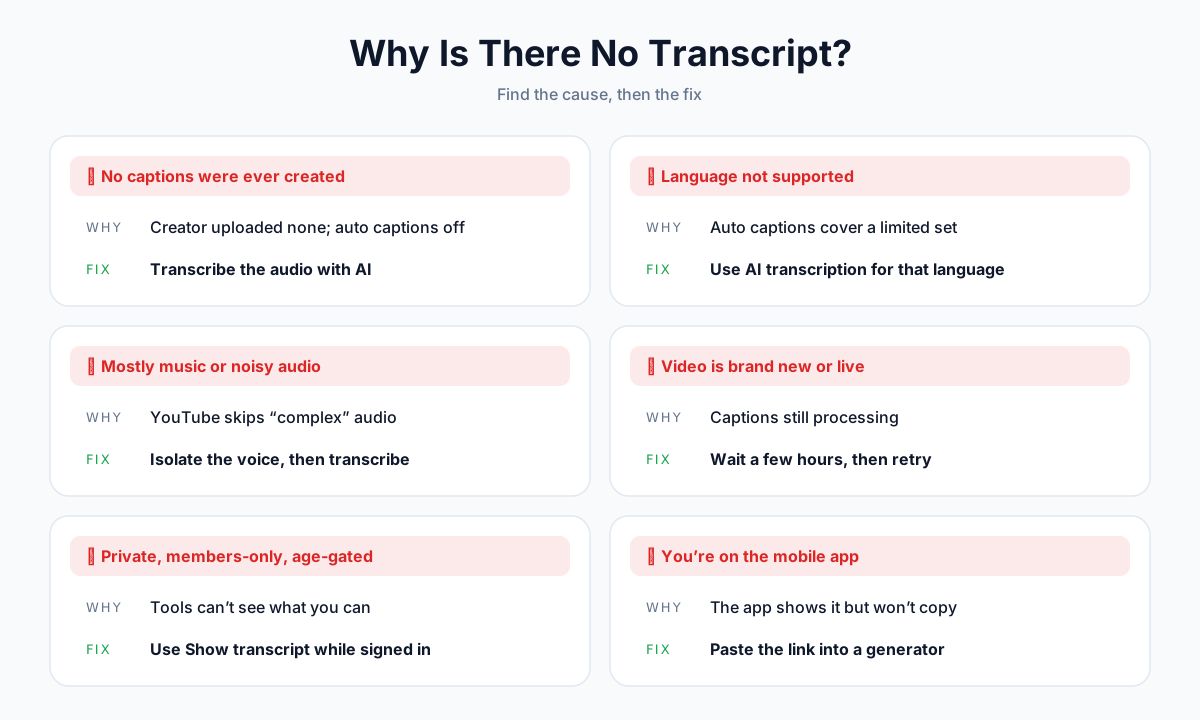
| Cause | How to tell | Fix |
|---|---|---|
| Creator uploaded no captions and auto-captions are off | No transcript option in any language | Transcribe the audio with AI |
| Language not supported by auto-captions | Common for smaller languages | Use AI transcription that supports the language |
| Mostly music, noise or overlapping voices | YouTube skipped "complex" audio | Isolate the voice first, then transcribe |
| Video is brand new or a live stream | Uploaded within the last few hours | Wait, then check again |
| Private, members-only or age-restricted | Tools say "unavailable" | Use Show transcript while signed in with access |
| You're in the mobile app | Transcript visible but not copyable | Use a web-based generator (Method 3) |
Option A: Transcribe the Audio with AI
If a video truly has no captions, the only way to get a transcript is to transcribe the speech itself.
With the AnySpeech YouTube transcript generator, this happens in the same place:
- Paste the link and click Generate Transcript.
- If the video has no captions, you'll see the option to Transcribe the audio with AI.
- A confirmation shows the video length, the credits it will use and your balance afterwards.
- Confirm, and the transcript arrives with the same export options.
AI Audio Transcription Details
| Detail | Value |
|---|---|
| Availability | Paid plans and credit packs |
| Price | 500 credits per minute of audio |
| Max video length | 120 minutes |
| Before charging | Cost shown, confirmation required |
| If it fails | Credits refunded in full |
Option B: Upload the File Yourself
If it's your own video, or you have the file with permission, upload it directly to video to text. You get punctuation, speaker labels and timestamps from the audio rather than from captions.
When the Audio Is Noisy
Heavy background music or noise lowers transcription accuracy. Run the audio through a voice isolator first, then transcribe the clean voice track.
Method 6: Get Transcripts with Code (yt-dlp and Python)
Best for: developers, researchers and anyone processing many videos.
Download Captions with yt-dlp
yt-dlp is a free, open-source command-line tool. This command downloads English captions (creator-uploaded or auto-generated) as SRT, without downloading the video:
yt-dlp --write-subs --write-auto-subs --sub-langs "en.*" --sub-format vtt --convert-subs srt --skip-download "https://www.youtube.com/watch?v=VIDEO_ID"What Each Flag Does
| Flag | Meaning |
|---|---|
--write-subs | Save creator-uploaded subtitles |
--write-auto-subs | Save auto-generated subtitles |
--sub-langs "en.*" | Languages to fetch (regex; use all for every language) |
--sub-format vtt | Preferred format to download |
--convert-subs srt | Convert the result to SRT |
--skip-download | Don't download the video itself |
Run yt-dlp --list-subs "URL" first to see which languages exist.
Fetch a Transcript in Python
The open-source youtube-transcript-api library returns caption text with timings:
from youtube_transcript_api import YouTubeTranscriptApi

transcript = YouTubeTranscriptApi().fetch("VIDEO_ID")
print(" ".join(snippet.text for snippet in transcript))
Caveats Before You Automate
- Captions only. Both tools read existing caption tracks; neither can transcribe a video without captions.
- Cloud servers get blocked. YouTube blocks many IP addresses that belong to cloud providers, so scripts that work on your laptop often fail on a server.
- Terms of service. YouTube's terms restrict automated access. Check them, and keep bulk jobs to content you're allowed to process.
Can ChatGPT, Gemini or NotebookLM Give You a Transcript?
AI assistants are great at summarizing videos, but they're not reliable transcript tools.
| Tool | What it actually does | Gets a word-for-word transcript? |
|---|---|---|
| NotebookLM | Imports a public video's captions as a source you can ask questions about | No; it needs existing captions and gives answers, not an export |
| YouTube "Ask" button | Answers questions about the video you're watching (limited rollout) | No |
| Gemini in Chrome | Summarizes the page or video you're viewing | No |
| ChatGPT / Claude with a link | Often can't open the video, and may guess at content | No |
For an accurate, complete transcript, get the text first (Methods 1–6), then paste it into an AI tool to summarize, translate or rewrite it.
How Accurate Are YouTube Transcripts?
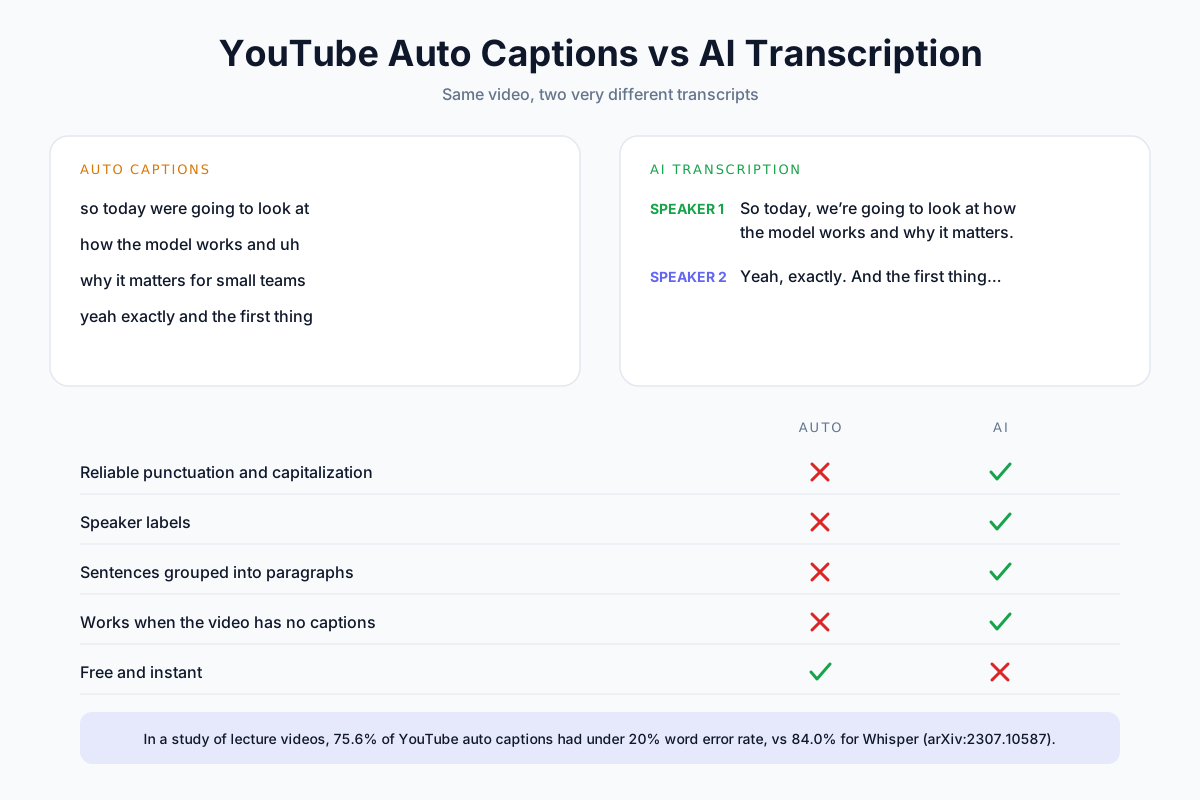
Auto-generated captions are good enough to follow a video, but they're not publication-ready.
What the Research Says
A 2023 study of lecture videos compared YouTube auto-captions with OpenAI's Whisper model. 75.6% of YouTube auto-captions had a word error rate below 20%, compared with 84.0% for Whisper (arXiv:2307.10587).
In practice, accuracy depends heavily on the audio.
What Affects Accuracy
| Factor | Effect |
|---|---|
| Clear, close microphone | Much higher accuracy |
| Background music or noise | More missed and wrong words |
| Several people talking at once | Words merged or dropped |
| Strong accents or fast speech | More substitutions |
| Names, jargon, brand terms | Frequently misspelled |
| Creator-edited captions | Usually the most accurate option |
What Auto-Captions Leave Out
- Speaker labels. You can't tell who said what in interviews or podcasts.
- Reliable punctuation. Sentences run together.
- Paragraphs. The text arrives as short caption fragments.
For interviews, research or anything you'll publish, AI transcription from the audio gives you punctuation and speaker labels out of the box. Our guide on how to transcribe audio to text covers how to get the most accurate result.
How to Clean Up and Format a YouTube Transcript
Raw transcripts need a little work before they're easy to read or reuse.
Remove Timestamps
- In YouTube's panel, use ⋮ › Toggle timestamps before copying.
- In a transcript generator, download TXT without timestamps.
- In a text editor that supports regular expressions, find
^\d{1,2}:\d{2}(:\d{2})?\s*and replace it with nothing.
Turn Caption Lines into Paragraphs
- Paste the text into a document.
- Replace line breaks with spaces.
- Add paragraph breaks where the topic changes, roughly every 4–6 sentences.
- Fix obvious errors, especially names and technical terms.
💡 Pro tip: Paste the raw text into an AI assistant with a prompt like "Add punctuation and paragraph breaks. Don't change any words." Always spot-check the result against the video.
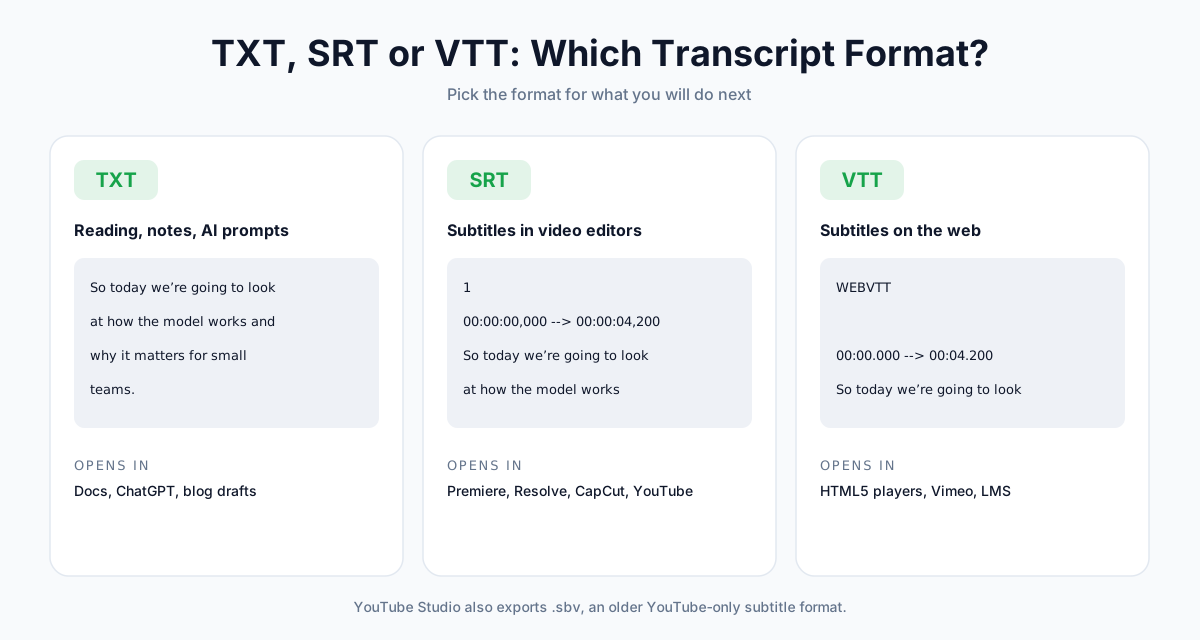
Choose the Right Format
| You want to… | Use |
|---|---|
| Read, quote or summarize | TXT |
| Add subtitles in Premiere, Resolve or CapCut | SRT |
| Show captions in a web player or course platform | VTT |
| Re-upload captions to YouTube | SRT or SBV |
What You Can Do with a YouTube Transcript
| Goal | How a transcript helps | Next step |
|---|---|---|
| Study notes | Read a lecture in a fraction of the time and search for key terms | Highlight and summarize |
| Quotes and research | Copy exact wording with timestamps for citations | Link to the timestamp |
| Repurpose your own videos | Turn a video into a blog post, newsletter or social thread | Edit the TXT export |
| Subtitles | Add or fix captions for accessibility | Export SRT or VTT |
| Reach other languages | Translate the transcript, or dub the whole video | AI dubbing |
| New audio content | Turn a video's ideas into a podcast episode | AI podcast generator |
| Re-voice a script | Edit the transcript and generate a fresh narration | Text to speech |
Is It Legal to Use a YouTube Transcript?
Reading a transcript for personal use is fine. Republishing someone else's words is a different matter.
A video's spoken content belongs to its creator, and a transcript is a copy of it.
| What you do | Generally | Why |
|---|---|---|
| Read or take notes for yourself | Fine | Personal use |
| Quote a few lines with credit and a link | Usually fine | Commonly treated as fair use for commentary and research |
| Transcribe your own videos and repurpose them | Fine | It's your content |
| Publish someone's full transcript on your site | Risky | Copies the whole work without permission |
| Rewrite someone's video into your own article | Risky | Can still be a derivative of their work |
📝 Note: This is general guidance, not legal advice. Fair use rules vary by country. Ask the creator for permission before republishing their content.
Frequently Asked Questions
How do I get a transcript of a YouTube video for free?
On a computer, open the video, click ...more in the description, then Show transcript. It's free and needs no account. To download it as a file, paste the link into a free transcript generator: AnySpeech gives free accounts 3 transcripts a day for videos up to 3 hours, with TXT, SRT and VTT exports.
Why is there no "Show transcript" option on a YouTube video?
The video has no caption track. Either the creator didn't upload captions and auto-captions are off, the language isn't supported, the audio is mostly music or noise, or the video is still processing. In the first two weeks of our generator, 29% of pasted videos had no captions. The only fix is transcribing the audio with AI.
Can I get a YouTube transcript on my iPhone or Android phone?
Yes. In the YouTube app, expand the description and tap Show transcript. The app won't let you select or copy the text, though. To copy it, share the video link and paste it into a web-based YouTube transcript generator in Safari or Chrome.
How do I download a YouTube transcript as a TXT or SRT file?
YouTube doesn't offer a download for other people's videos. Paste the link into a transcript generator and choose TXT (with or without timestamps), SRT or VTT. For your own videos, use YouTube Studio: Subtitles, select the video, open the options menu next to the language and click Download.
How do I copy a YouTube transcript without timestamps?
In the transcript panel, open the ⋮ menu and choose Toggle timestamps, then drag-select the text and copy it. Or download "TXT without timestamps" from a transcript generator, which also avoids the one-line-per-caption formatting problem.
How do I get a transcript of a YouTube video that has no captions?
Free tools can't, because they all read the caption track. Use AI transcription of the audio instead. With AnySpeech, paid plans can transcribe videos without captions at 500 credits per minute, up to 120 minutes, with the cost confirmed before anything runs and a full refund if it fails.
How accurate are YouTube's auto-generated transcripts?
Good enough to follow along, but error-prone. In a 2023 study of lecture videos, 75.6% of YouTube auto-captions had a word error rate under 20%, compared with 84.0% for Whisper. Auto-captions also lack speaker labels and reliable punctuation, and struggle with music, accents and technical terms.
Can ChatGPT give me the transcript of a YouTube video?
Not reliably. Chatbots often can't open YouTube links and may invent content. NotebookLM can import a public video's captions, but only if captions exist, and it answers questions rather than exporting a transcript. Get the transcript first, then paste it into an AI tool.
Can I get a transcript of a private or members-only video?
Only if you have access. Sign in with an account that can watch the video and use Show transcript on desktop. External tools can't see private, members-only or age-restricted videos, so they'll report the video as unavailable.
Is it legal to use a YouTube video's transcript?
Using a transcript for personal notes or study is fine, and short quotes with credit are commonly treated as fair use. Republishing someone else's full transcript, or rewriting their video into your own content, can infringe their copyright. Ask the creator first. This isn't legal advice.
The Bottom Line
Getting a YouTube transcript takes seconds when captions exist, and a little more when they don't.
Here's the short version:
- On a computer? Click ...more, then Show transcript.
- Need a file or using a phone? Paste the link into a transcript generator.
- Your own video? Download captions from YouTube Studio.
- No transcript at all? Transcribe the audio with AI.
- Hundreds of videos? Use yt-dlp, within YouTube's terms.
Ready to try it? Paste any link into the free YouTube transcript generator and get a timestamped transcript you can copy or download.
Working with your own recordings instead? Read our guide on how to transcribe audio to text, or upload a file to speech to text.
Author

Categories
More Posts
How to Transcribe Audio to Text: The Complete Step-by-Step Guide (2026)
Learn how to transcribe audio or video to text fast. A step-by-step walkthrough, a 7-point accuracy checklist, supported formats, and use-case playbooks for meetings, interviews, and subtitles.
How to Dub a YouTube Video into Another Language (2026)
Dub a YouTube video into other languages: auto-dubbing vs your own AI dub, how to add a multi-language audio track in Studio, costs and a QA checklist.
How to Make an AI Podcast: From One Idea to a Multi-Speaker Show (2026)
Learn how to make an AI podcast in minutes. Turn a single topic or script into a natural two-host conversation with AI voices — step by step, no mic or editing needed.