Text to Speech MP3 Converter
Type or paste your text, pick a voice, and download your speech as an MP3 file — free, no account required.
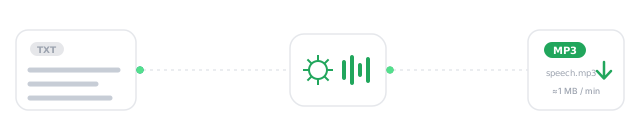
How to Convert Text to MP3 in 3 Steps
From pasted text to a saved MP3 file in under a minute.
- 01
Paste your text
Drop your script, article, or notes into the converter above. Up to 1,000 characters per request works without an account — about 150 words, or a minute of finished audio.
- 02
Pick a voice and convert
Choose from 240+ AI voices in 100+ languages, then hit Convert to MP3. The audio streams back in seconds.
- 03
Download your MP3
Click the download button in the player and the MP3 file saves straight to your device — ready for any editor, phone, or platform.
The text to speech MP3 output is a standard 44.1 kHz file, so there's no conversion step afterwards: what you download drops directly into Premiere, CapCut, Audacity, or a podcast host without re-encoding.
Why Download Text to Speech as an MP3?
A text to speech MP3 converter turns written text into a downloadable MP3 audio file — speech you own as a portable file instead of a playback session inside someone's app.
Browser-only TTS disappears when the tab closes. A downloaded MP3 is yours: it plays on every device made in the last 25 years, imports into every editor, uploads to every platform, and keeps working offline. That's the real difference between "listening to text" and converting text to MP3 — the file outlives the session.
Listen on flights, commutes, and anywhere without a connection
Phones, cars, browsers, editors — MP3 is the one format nothing rejects
Drag it into any timeline, trim it, mix it under a video or podcast
It also changes what the audio is worth. A session inside someone else's player can't be versioned, backed up, or handed to a client; a text to speech MP3 download can. Creators keep a folder of narration takes next to their project files, teams commit prompts and audio to the same repo, and educators reuse last semester's modules without regenerating a word. The file is the deliverable — which is why download-first is the default here, not a premium add-on.
MP3 vs WAV: Which Format Do You Actually Need?
The honest answer for spoken audio — with real numbers.
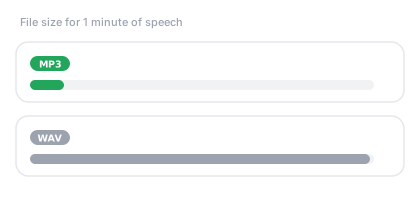
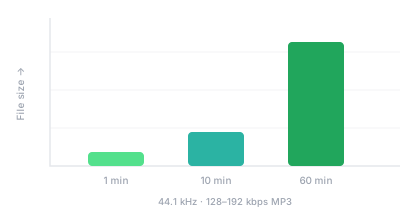
For voice content, MP3 at a proper bitrate is the practical choice, and it's what this converter delivers: 44.1 kHz sample rate at 128–192 kbps, which works out to roughly 1 MB per minute of speech. WAV stores the same minute uncompressed at around 10 MB — headroom that matters for heavy studio processing, but that human ears can't distinguish on spoken narration at these bitrates.
The size gap compounds fast. A 40-minute audiobook chapter is about 40 MB as MP3 and 400 MB as WAV — the MP3 uploads to a podcast host in seconds, emails without tricks, and streams instantly. Unless a client contract specifically demands uncompressed masters, converting text to MP3 gives you the file you'll actually use.
| Spec | MP3 (what you download) | WAV (uncompressed) |
|---|---|---|
| Size per minute of speech | ≈1 MB | ≈10 MB |
| Perceived quality for voice | Transparent at 128–192 kbps | Identical to the ear |
| Plays on | Everything | Most editors, fewer devices |
| Editing headroom | Fine for cuts, mixing, ducking | Better for heavy re-processing |
| Best for | Video, podcasts, e-learning, IVR, offline listening | Studio mastering pipelines |
One honest caveat: bitrate only matters if the source speech is good. A 320 kbps file of a robotic voice still sounds robotic. That's why this text to speech MP3 converter spends its effort on the voice models first — the 240+ neural voices upstream of the encoder are what make the downloaded file sound professional, and the 128–192 kbps encoding simply preserves what they produce.
Where Your MP3 Goes Next
A downloaded file fits every workflow — these are the six we see most.
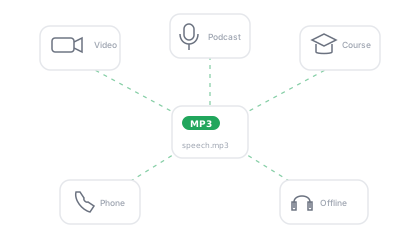
The point of converting text to MP3 is what happens after the download. Because the output is a standard file rather than a locked-in playback session, it slots into whatever tool your project already lives in — no export wizards, no format converters, no re-recording. These are the six destinations we see most, each with the matching AnySpeech page if you want a workflow built for it.
- Video editors
Drop the MP3 onto a Premiere, CapCut, or DaVinci timeline as your voice track — no format conversion needed. YouTube voiceover generator →
- Podcast hosting
Upload intros, ad reads, or full segments straight to your host; MP3 is the podcast delivery standard. AI voices for podcasters →
- Courses & LMS
Attach narration files to slides and modules — MP3 plays inside every major LMS without plugins. Text to speech for educators →
- Phone systems & IVR
Most PBX and IVR platforms accept MP3 prompts directly, or convert them on upload. Try the full text to speech tool →
- Offline listening
Send articles, study notes, or manuscripts to your phone and listen like a private audiobook. Free text to speech →
- Shorts & social clips
Pair the MP3 with captions in any mobile editor for TikTok, Reels, and Shorts voiceovers. Text to speech for TikTok →
Convert Long Text to MP3
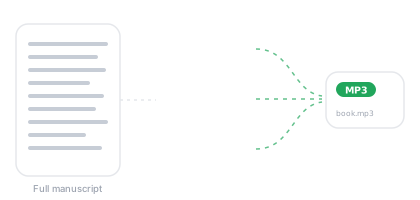
Short notes fit the anonymous tier, but the converter is built for length too. A free account raises each conversion to 5,000 characters, and paid plans handle book-length projects on monthly credits — the engine splits long text into chunks behind the scenes and returns one continuous MP3, not a folder of fragments.
For multi-chapter work, convert chapter by chapter: you get clean per-chapter MP3 files named and ready for a podcast feed or audiobook folder, and when one chapter changes you regenerate one file instead of the whole book. Voice choice matters more on long reads — the voice library page lets you audition narrators before committing.
A practical benchmark: a 5,000-character conversion is roughly 12–13 minutes of finished speech — a solid podcast segment or two textbook sections — and downloads as a single MP3 of about 12 MB. Stack a few of those and an evening commute's worth of listening costs you minutes of work.
What the Free Text to MP3 Converter Includes
No trial clock and no watermark audio — the free tier is a working converter, not a demo.
If you're comparing text to MP3 converters, the checklist that actually matters is short: does the free tier produce a downloadable file (not just playback), is there a daily allowance you can live with, and can the paid tier license the file for commercial work? The converter above answers yes to all three — the table below is the fine print, in plain terms.
- 1,000 characters per conversion (≈150 words)
- 10 conversions per day
- MP3 download included, 44.1 kHz
- Neural voices in 50+ languages
- 5,000 characters per conversion, 20/day free
- Premium engines up to studio grade
- Monthly credits for book-length projects
- Commercial license for client work, ads & monetized content
Commercial use of downloaded files — monetized videos, client projects, ads — is included with paid plans; the free tier covers personal and evaluation use.